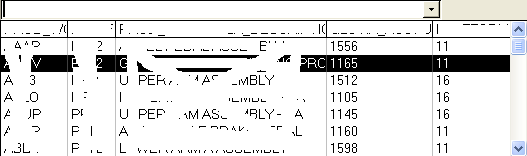
is it possible to create a table inside a html dropdown ? sort of like this(doesnt work)

<select style="" name="test" id="test"  param=test>
	<option name="scrapCode" id="scrapCode" property="scrapCode" param="scrapCode" value="">
	<table>
<caption>Animal groups</caption>
<colgroup>
	<col span="3"/>
	<col class="alternative" />
</colgroup>
	<tr>
		<th>Apes</th>
		<th colspan="2">Cats</th>
		<th style="background: #ddf;">Dogs</th>
		<th>Lemurs</th>
	</tr>
	<tr>
		<td>Gorilla</td>
		<td>Tiger</td>
		<td>Cheetah</td>
		<td style="background: #ddf;">Grey Wolf</td>
		<td>Indri</td>
	</tr>
	<tr>
		<td>Orangutan</td>
		<td>Lion</td>
		<td>Puma</td>
		<td style="background: #ddf;">Cape hunting dog</td>
		<td>Sifaka</td>
	</tr>
	<tr>
		<td>Man</td>
		<td>Jaguar</td>
		<td>Serval</td>
		<td style="background: #ddf;">Very silly big long-long named dog woof</td>
		<td>Red ruffed lemur</td>
	</tr>
	<tr>
		<td>Chimpanzee</td>
		<td>Leopard</td>
		<td>Caracal</td>
		<td style="background: #ddf;">Red Fox</td>
		<td>Ring tailed lemur</td>
	</tr>
	<tr>
		<td>Bonobo</td>
		<td>Snow leopard</td>
		<td>Wild cat</td>
		<td style="background: #ddf;">Fennec</td>
		<td>Dwarf lemur</td>
	</tr>
</table>
	</option>	
</select>

Thanks.
Dani AI

Generated

Short answer: you can’t put a real HTML table inside a native <select>/<option>. The option element is intended for text only and most browsers will ignore or flatten nested HTML. For a multi-column or table-like picklist you need a custom control that mimics a select and renders a separate floating panel that can contain a table or grid.

A minimal pattern: a toggle (button), a hidden form input to carry the selected value, and an absolutely positioned panel that contains your table. Example (trimmed):

<button type="button" class="sel-toggle" aria-haspopup="listbox" aria-expanded="false">Choose…</button>
<input type="hidden" name="animal" id="animalValue" value="">

<div id="sel-panel" class="sel-panel" role="listbox" aria-hidden="true" style="display:none;">
  <table>
    <thead><tr><th>Apes</th><th>Cats</th><th>Dogs</th></tr></thead>
    <tbody>
      <tr data-value="gorilla"><td>Gorilla</td><td>Tiger</td><td>Grey Wolf</td></tr>
      <tr data-value="orangutan"><td>Orangutan</td><td>Lion</td><td>Fox</td></tr>
    </tbody>
  </table>
</div>

Toggle the panel with JS, update the hidden input from the clicked row, and update the button label so the value submits with the form. Implement keyboard handling (Arrow keys, Enter to pick, Escape to close), manage focus, and expose proper ARIA attributes so screen readers can use it. If accessibility is critical, follow ARIA combobox/listbox patterns or use a well-tested library rather than rolling everything from scratch.

Notes for : if you only need grouped columns (not a full table), consider CSS Grid inside the panel or a two-step native select (choose group, then item). Test touch scrolling (max-height + overflow) and make sure the panel is placed/positioned so it doesn’t get clipped on small screens.

is this possible?

Be a part of the DaniWeb community

We're a friendly, industry-focused community of developers, IT pros, digital marketers, and technology enthusiasts meeting, networking, learning, and sharing knowledge.