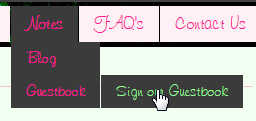
This is the code for my third level drop down menu.

<ul id="menu">
                <li><a href="ourlovestory.php">Our Love Story</a></li>
                <li><a>Notes</a>
                    <ul>
                        <li><a href="blog.php">Blog</a></li>
                        <li><a href="guestbook.php">Guestbook</a></li>
                            <ul>
                                <li><a href="guestbooksign.php">Sign our Guestbook</a></li>
                            </ul>
                    </ul>
                </li>            
            </ul>

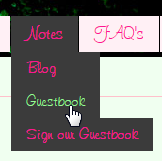
What i want is the third level, Sign our Guestbook, be hidden then be displayed once hovered to Guestbook link.
But my problem is that it is already displayed on the second level.
a47a8f8d739ea29682ef434221109b0d

This is my CSS for this one.

ul 
{
    font-family: 'tr_freehand591regular';
    font-size: 18px;
    margin: 0px;
    padding: 0px;
    list-style: none;   
    z-index:100;
}

ul li
{
    display: block;
    position: relative;
    float: left;
}

li ul
{
    display: none;
}

#menu a 
{
    color: #ff1493;
}

#menu a:hover
{
    color: #98fb98;
}

ul li a
{
    display: block;
    text-decoration: none;
    padding: 5px 15px 5px 15px;
    background: #fff0f5;
    margin-left: 1px;
    white-space: nowrap;
}

ul li a:hover 
{
    background: #3b3b3b;
}

li:hover ul 
{
    display: block;
    position: absolute; 
    visibility: visible;
}

li:hover li 
{
    float: none;
    font-size: 16px;
}

li:hover a 
{ 
    background: #3b3b3b; 
}
Dani AI

Generated

Short diagnosis and a robust fix: the visible third-level menu usually comes from two things — the third-level <ul> not being nested inside the correct <li>, and a descendant hover rule that reveals every nested list when an ancestor is hovered. already found hiding/showing, but a cleaner, more maintainable solution is to (1) ensure the third-level <ul> is a child of the Guestbook <li>, and (2) use the child combinator so only the immediate submenu opens on hover/focus.

Try a compact CSS pattern like this:

/* basic reset */
#menu, #menu ul { list-style: none; margin: 0; padding: 0; }

/* top-level items */
#menu > li { float: left; position: relative; }

/* hide all nested menus by default and place absolutely */
#menu ul { display: none; position: absolute; top: 100%; left: 0; z-index: 1000; }

/* show only the direct child submenu on hover or keyboard focus */
#menu li:hover > ul,
#menu li:focus-within > ul {
  display: block;
}

/* stack submenu items vertically */
#menu ul li { float: none; white-space: nowrap; }

/* position 3rd (and deeper) levels to the right of their parent */
#menu ul ul { top: 0; left: 100%; }

Why this works: > limits the reveal to the immediate child submenu so second-level hover doesn’t automatically expose deeper levels. position: relative on the parent <li> plus absolute positioning on the submenu keeps placement predictable; using left:100% for deeper levels places them adjacent rather than below (more reliable than a fixed margin). Add :focus-within so keyboard users can open menus, and use a small JS toggle for touch devices if needed. ’s margin trick is a quick fix, but the approach above scales better across fonts, sizes and responsive layouts.

Hi! I've already hide it :) Yey!

This is what i added.

li ul, li ul ul li //li ul ul li
{
    display: none;
}

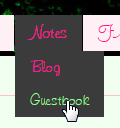
The second problem is how can i display it when hovered?

b5593780a796980c8270f5aa76eaaae6

This is done already! Got it!

Displaying when hovered.

Now, i want that displayed link be adjacent to the parent link and not at the bottom.

how could i do taht?

got it already, u just have to

li:hover ul li:hover ul li
{
    display: block;
    position: relative; 
    margin: -33px 0px 0px 90px;
}

11653835b208c7be32c2734dae66bf20

Be a part of the DaniWeb community

We're a friendly, industry-focused community of developers, IT pros, digital marketers, and technology enthusiasts meeting, networking, learning, and sharing knowledge.