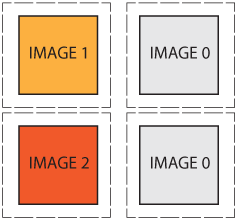
Does anyone know of an easy way to have an image switch to another image when the cursor hovers over a completely separate image?
is a diagram that hopefully illustrates more clearly what I'm trying to say.

Dani AI

Generated

A compact, practical note tying the thread together and showing two clean ways to replace one image when hovering a different one. ’s sprite technique is great when the same element needs a rollover. ’s inline onmouseover works, but modern practice favors unobtrusive event listeners. ’s fiddle demonstrates the idea; the patterns below adapt that concept into options that fit most templates.

A small, flexible JavaScript pattern that works even when the trigger and target live in different parts of the DOM. Use a data-attribute on the trigger and let a short script swap the target image src. Preload the hover src to avoid flicker.

HTML

<div data-swap-target="#main" data-swap-src="main-hover.jpg">
  <img src="thumb.jpg" alt="thumb">
</div>
<img id="main" src="main.jpg" alt="main">

JavaScript

(function(){
  var triggers = document.querySelectorAll('[data-swap-target]');
  triggers.forEach(function(t){
    var target = document.querySelector(t.getAttribute('data-swap-target'));
    if(!target) return;
    var original = target.src;
    var hover = t.getAttribute('data-swap-src');
    // preload
    if(hover){ (new Image()).src = hover; }
    t.addEventListener('mouseenter', function(){ if(hover) target.src = hover; });
    t.addEventListener('mouseleave', function(){ target.src = original; });
    t.addEventListener('touchstart', function(){ if(hover) target.src = hover; });
    t.addEventListener('touchend', function(){ target.src = original; });
  });
})();

A CSS-only approach is possible when the trigger and target can be placed so a selector like :hover + or :hover ~ reaches the target: layer two images in the target and toggle opacity on hover. This avoids JS but requires specific markup order and is not touch-friendly.

Troubleshooting notes: check markup order and selectors, confirm image paths, preload hover images to prevent flicker, and add meaningful alt text for accessibility. If the page is inside a rigid template (as mentioned), attach handlers to existing IDs rather than rewriting markup.

Recommended Answers

All 7 Replies

Try this on the page not on the css. I will give you the complete code I used.

<Img border=“0" id="img1" src="your location for the primary image" height="30" width="100" alt="Name of your image" onMouseOver="FP_swapImg(1,0,/id/'img1',/url/'"your location for the image you want to replace the current image"')" onMouseOut="FP_swapImg(0,0,/id/'img1',/url/'"your location for the image you want to display when the mouse move off the image"')>

Note that where I putted '""' you will leave the ' and replace the " with the location and also that is the code I used on my menu so if you are working with a big image you can adjust the size using the height and width.

Hope this will help you. Sorry for not formating the codes I'm using mobile

You can get this done with a few lines of javascript.

If you provide your relevant HTML, it would be easier to help.

Thanks everyone for the suggestions. Unfortunately I was unable to figure out how the suggestions would fit into my template. I think I found a work around though. Thanks again!

Check these out.

www.dynamicdrive.com/forums/showthread.php?63552-Image-Change-using-mouseover

And a very nice example here: reference.sitepoint.com/html/event-attributes/onmouseover

helplogger.blogspot.nl/2012/05/create-rollover-image-effect-change.html?m=1

Hope you will get what you want here.

You can do this easity by taking background image as follows

<!DOCTYPE html PUBLIC "-//W3C//DTD XHTML 1.0 Transitional//EN" "http://www.w3.org/TR/xhtml1/DTD/xhtml1-transitional.dtd">
<html xmlns="http://www.w3.org/1999/xhtml">
<head>
<meta http-equiv="Content-Type" content="text/html; charset=utf-8" />
<title>Untitled Document</title>
<style type="text/css">
.hover_me
{
background:url(1.png) 0 0; 
width:237px; height:110px;
}
.hover_me:hover
{
background:url(1.png) 0 110px; 
width:237px; height:110px;
}
</style>
</head>

<body>
<div class="hover_me">
</div>
</body>
</html>

I have attached image for that.

attachin image

Be a part of the DaniWeb community

We're a friendly, industry-focused community of developers, IT pros, digital marketers, and technology enthusiasts meeting, networking, learning, and sharing knowledge.