Hi
is it possible to display database values in a .html form using php.

This is my .html form and I want to display values from mysql in the form fields.

<!DOCTYPE html>
<html>
<head>
    <title>Bursary application</title>
</head>
<body>
<form action="config.php" method="post">
<div>
    <p></p>
    <label for="surname">Surname:</label><input id="surname" type="text" name="surname" value="<?php echo $surname;?>">
    </div>
<div>
    <label for="names">Names:</label><input id="names" type="text" name="names" value="<?php echo $name;?>">
    </div>
<div>
    <label for="birthdate">Date Of Birth:</label><input id="birthdate" type="date" name="birthdate" value="<?php echo $birthdate;?>"><br><br>
</div>
<div>
    <label for="email">Email</label><input id="email" type="email" name="email" value="<?php echo $email;?>"><br><br>
</div>
<div>
    <label for="gender">Gender:</label></div>
<div>
    <label for="gender">Male</label><input id="gender" type="radio" name="gender" value="Male">
    </div>
<div>
    <label for="gender">Female</label><input id="" type="radio" name="gender" value="Female">
    </div>
<div>    <label for="postad">Postal Address:</label><input id="postad" type="text" name="postad" value="">
</div>
<div>    <label for="residential">Residential Address:</label><input id="residential" type="text" name="residential" value="">
</div>
<div>    <label for="homephone">Phone(Home):</label><input id="homephone" type="tel" name="homephone" value="">
</div>
<div>    <label for="workphone">Phone(Work):</label><input id="workphone" type="tel" name="workphone" value="">
</div>
<div>    <label for="mobile">Phone(Cell):</label><input id="mobile" type="tel" name="mobile" value="">
</div>
    <div>
    <label for="image">Email:</label><input id="image" type="file" name="image" value="">
        </div>
<input type="submit" value="apply" name="apply">
</div>
</form>
</body>
</html>

Dani AI

Generated

Brief summary and practical fixes (building on replies from and ):

The important steps are: fetch the row from the database before you output the form, make sure the variables are defined, and always escape and format values before inserting them into attributes. The common causes for “echo works but value="" is blank” are: the variable is empty (no DB value), the output contains unescaped quotes that break the attribute, the HTML5 date input needs YYYY‑MM‑DD, or you’re trying to prefill a file input (which browsers disallow).

Examples (put these server-side, before the form HTML):

<?php
// after your DB query you have $user array
$surname = $user['surname'] ?? '';
?>
<input name="surname" value="<?php echo htmlspecialchars($surname, ENT_QUOTES, 'UTF-8'); ?>">

Format a date for an <input type="date">:

<?php
$dob = !empty($user['birthdate']) ? date('Y-m-d', strtotime($user['birthdate'])) : '';
?>
<input type="date" name="birthdate" value="<?php echo htmlspecialchars($dob, ENT_QUOTES, 'UTF-8'); ?>">

Handle radio buttons:

<input type="radio" name="gender" value="Male" <?php if (($user['gender'] ?? '') === 'Male') echo 'checked'; ?>>

Notes and quick tips

  • File inputs cannot be prefilled; show a thumbnail or link to the existing file and let the user upload a replacement. Add enctype="multipart/form-data" if you accept file uploads.
  • Always use prepared statements (PDO or mysqli) to fetch data.
  • Debug by viewing page source to see the raw attribute value, and add a var_dump($user) before the HTML to confirm the DB data.
  • If you still see nothing, confirm the PHP in that file is being parsed (you said simple echo works, so likely parsing is fine) and watch for stray characters or mismatched quotes in your HTML output.

Recommended Answers

All 17 Replies

Member Avatar for Member #120589

You can display php in normal html files by addinng to your htaccess file:

AddType application/x-httpd-php .html .htm

If I place the .htaccess file in a directory will it manipulate all the files there.

Member Avatar for Member #120589

Yes. Have you tried it?

yes it still doesn't work. form.JPG

Member Avatar for Member #120589

Do you have php running?

Yes I do.

Member Avatar for Member #120589

SHow your .htaccess file and your directory structure

AddType application/x-httpd-php .html .htm
Member Avatar for Member #120589

Strange. Looks OK to me. Sorry, anybody else?

It is imposible to run PHP in a .html file. But as we are students of we can try different ways. You should use iframe to include the php within the html page.

commented: bad advice -3
Member Avatar for Member #120589

. It is not, I assure you. You do not need to resort to using an iframe for anything like this.

The link you provide is a general one, that leads me to think that the site may be yours or you are affiliated with it. If you do not wish to be called out for spamming, please link to relevant pages. That was not relevant.

Member Avatar for Member #120589

Here's my output, just to prover that it can be done, regardless of what safeer seems to think:

Directory Structure

dir.pmg_.PNG

.htaccess content

htaccess.PNG

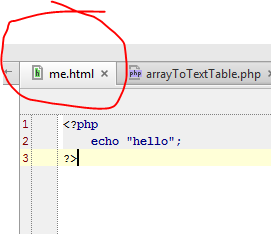
me.html content (pure php)

content.png

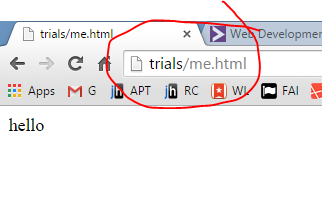
browser output

output.png

silly question:
Are you actually using a Apache server?

Hi Diafol,
When I do it the way you did it, 'echo Hello' it works perfectly but putting it in the value attribute of the form it doesn't.
Anyway I'm trying to use the same HTML form to create a profile as well as to update it. Would you advise on that?

Member Avatar for Member #120589

You can certainly re-use a form. No issue with that. You just need to change the action value.

If you've got the form in its own include file, you can do this:

form include file (formfile.php)
<?php
    $fields = ['surname','names','birthdate','email', 'gender', 'postad']; //etc

    foreach($fields as $field)
        $$field = (!isset($row[$field])) ? '' : $row[$field];

    $action = (isset($update)) ? 'updateUser.php' : 'createUser.php';
?>
<form action="<?=$action?>" method="post">
<!-- rest of form -->
</form>

If you want a create form. Just do...

include 'formfile.php';

If you want an update form:

// $row from your DB query
$update = true;
include 'formfile.php';

There are many variations on a theme, but I've found that keeping a consistent look and feel to a create and update form is a good thing.

Great thanks you're a blessing. You've been really helpful.

PHP variables etc do not show up in a file named something.html, unless you go through all the things they mention above. Which is not actually the right way to work.

The correct way is to name your file as a .php file, and of course to connect to your database and retrieve the info needed using a query, then assign the returned data to variables. Or if you are reusing a form, start with the form named as a .php file.

Then all this playing with .htaccess becomes totally unnecessary.

Be a part of the DaniWeb community

We're a friendly, industry-focused community of developers, IT pros, digital marketers, and technology enthusiasts meeting, networking, learning, and sharing knowledge.