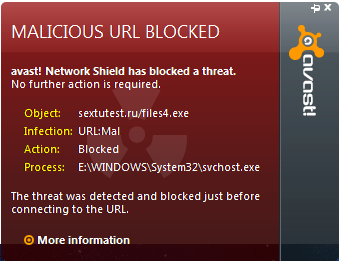
Guys...can you help me?
Ive been recently having a trouble about that avast have been detected.
I can't find and remove it from my computer.
What shall i do?
This is the PICTURE of the Detection:
REGARDS!!!
Guys...can you help me?
Ive been recently having a trouble about that avast have been detected.
I can't find and remove it from my computer.
What shall i do?
This is the PICTURE of the Detection:
REGARDS!!!
Short summary and a practical checklist for anyone who finds an AV alert like this one: reported an Avast detection and posted a rootkit scan; asked for the additional logs the forum sticky requests, and the OP ultimately reformatted. Formatting works but is a last resort. The steps below explain how to confirm an infection and remove it safely without needlessly breaking the system.
Rootkit scanners often show kernel-level hooks and file-system filter drivers as "suspicious" even when those hooks come from the installed antivirus. Likewise, a flagged system driver does not automatically mean the file is malicious. Manual deletion of drivers or system files can render Windows unbootable. Treat those findings as clues to investigate, not automatic commands to delete files.
Recommended troubleshooting workflow:
sfc /scannow from an elevated command prompt to detect/restore corrupted system files.Final notes: If reformatting is chosen, first back up personal data and scan those backups from a clean machine. After reinstall, apply all OS updates, reinstall AV, change online passwords, and only restore files confirmed clean. Thanks to for prompting the standard log-gathering approach.
Jump to Post— jholland1964 650What you need to do is follow all the steps given in our Read Me Sticky. Post back here with all the logs and we can better offer assistance.
Jump to Post— jholland1964 650You need to run the rest of the scans recommended and post back with those logs.
What you need to do is follow all the steps given in our Read Me Sticky. Post back here with all the logs and we can better offer assistance.
I'LL Post the result A.S.A.P.
Thanks!
How to post the results here?
"NEWBIE" T_T
This is the GMER One Result.
GMER 1.0.15.15281 - http://www.gmer.net
Rootkit quick scan 2010-07-08 11:34:44
Windows 5.1.2600 Service Pack 3
Running: l8se61u4.exe; Driver: E:\DOCUME~1\ALLUSE~2\LOCALS~1\Temp\fxtdypow.sys
---- System - GMER 1.0.15 ----
SSDT \SystemRoot\System32\Drivers\aswSnx.SYS (avast! Virtualization Driver/ALWIL Software) ZwEnumerateKey [0xED57CA3E]
SSDT \SystemRoot\System32\Drivers\aswSnx.SYS (avast! Virtualization Driver/ALWIL Software) ZwEnumerateValueKey [0xED57C8A9]
Code \SystemRoot\System32\Drivers\aswSP.SYS (avast! self protection module/ALWIL Software) ZwCreateProcessEx [0xED5B9B9C]
Code \SystemRoot\System32\Drivers\aswSP.SYS (avast! self protection module/ALWIL Software) ObInsertObject
Code \SystemRoot\System32\Drivers\aswSP.SYS (avast! self protection module/ALWIL Software) ObMakeTemporaryObject
---- Devices - GMER 1.0.15 ----
Device \FileSystem\Ntfs \Ntfs aswSP.SYS (avast! self protection module/ALWIL Software)
AttachedDevice \FileSystem\Ntfs \Ntfs aswMon2.SYS (avast! File System Filter Driver for Windows XP/ALWIL Software)
Device \FileSystem\Fastfat \Fat aswSP.SYS (avast! self protection module/ALWIL Software)
AttachedDevice \FileSystem\Fastfat \Fat fltMgr.sys (Microsoft Filesystem Filter Manager/Microsoft Corporation)
AttachedDevice \FileSystem\Fastfat \Fat aswMon2.SYS (avast! File System Filter Driver for Windows XP/ALWIL Software)
AttachedDevice \Driver\Tcpip \Device\Ip aswTdi.SYS (avast! TDI Filter Driver/ALWIL Software)
AttachedDevice \Driver\Tcpip \Device\Tcp aswTdi.SYS (avast! TDI Filter Driver/ALWIL Software)
AttachedDevice \Driver\Tcpip \Device\Udp aswTdi.SYS (avast! TDI Filter Driver/ALWIL Software)
AttachedDevice \Driver\Tcpip \Device\RawIp aswTdi.SYS (avast! TDI Filter Driver/ALWIL Software)
Device -> \Driver\atapi \Device\Harddisk0\DR0 8550AEC5
---- Files - GMER 1.0.15 ----
File E:\WINDOWS\system32\drivers\atapi.sys suspicious modification
---- EOF - GMER 1.0.15 ----
You need to run the rest of the scans recommended and post back with those logs.
Gotto format my PC....
Thanks to jholland1964 for the response.....
*THREAD CLOSED*
We're a friendly, industry-focused community of developers, IT pros, digital marketers, and technology enthusiasts meeting, networking, learning, and sharing knowledge.