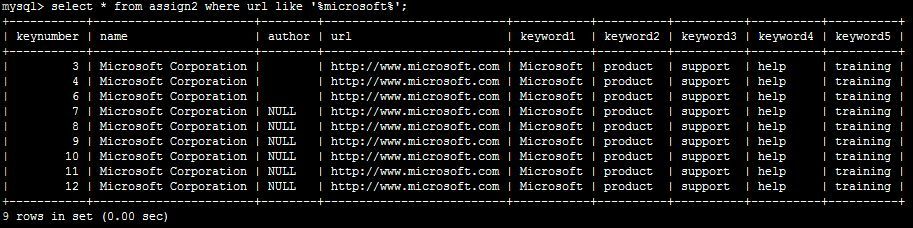
attached is a screenshot of what my table already has for the URL micorosft.com.
The column headings are the same as column names. Now, if I do the following statement:

select * from assign2 where UPPER(keyword1) LIKE '%MICROSOFT%';

OR

select * from assign2 where keyword1 LIKE '%microsoft%';

I am being returned an empty set.
Any suggestions?
Dani AI

Generated

Good call by — this behaviour almost always points to a charset/collation issue rather than a bug in LIKE. MySQL string comparisons (including LIKE) follow the column collation: a case‑sensitive or binary collation will not match the same letters in a different case, and a mismatch between the stored byte sequence and the declared character set can make functions like UPPER() behave unpredictably. The fact that an encoding conversion returned rows confirms the problem is at that layer.

Quick checks to run on a copy of the table:

SHOW CREATE TABLE assign2;
SHOW VARIABLES LIKE 'character_set%';
SELECT HEX(keyword1) FROM assign2 LIMIT 5;

If the DDL shows a binary/case‑sensitive collation or the HEX output reveals bytes that don’t match the declared charset, you have your cause.

Workarounds and fixes:

  • Temporary (no DDL change): force a case‑insensitive collation in the query with COLLATE to validate results quickly, e.g. use a collation that is case‑insensitive for your charset.
  • Permanent: normalize the column/table to a consistent, case‑insensitive charset/collation (modern choice: utf8mb4 + a _unicode_ci collation). For example, convert the table to utf8mb4 and a unicode case‑insensitive collation. Always test on a backup copy—wrong conversion can corrupt text if bytes are already mislabelled.

Also note performance: leading wildcards (%foo%) prevent index use, and wrapping the column in functions (like UPPER) prevents index use as well. For fast substring search consider full‑text indexes or an external search engine when appropriate.

Recommended Answers

All 5 Replies

What type of collation is this?

run this

SHOW FULL COLUMNS FROM assign2;

also try this statement also

select * FROM assign2 WHERE UPPER(CONVERT(keyword1 USING latin1)) LIKE '%MICROSOFT%';

Yes, the select statment worked! Could you please tell me why Convert and using latin1 were required?

What is the result of the show full columns statement i sent you, if its latin1_bin thats why

The select statement provided with me with the same data set that I had attached as an image. Thanks alot for helping!

Be a part of the DaniWeb community

We're a friendly, industry-focused community of developers, IT pros, digital marketers, and technology enthusiasts meeting, networking, learning, and sharing knowledge.