I'm not sure if this is the right forum to ask this in, sorry if it isn't. It's been a while since I've been to this site.

We have a MS SQL database that contains a table with some columns that are no longer used (or shouldn't be). The data isn't updated anymore and has been moved to different columns to extend functionality with the applications that access the data.

Anyway, I would like to remove the columns, but I need to make sure that the ASP.NET website, an Access database and a C# WinForms application don't have any code that references these columns, lest there be an error with downtime to correct it.

I know it's a generic, and complicated question, but what are some suggestions on removing these columns safely while trying to prevent unforseen errors with the applications that access the table. Because there are 3 different applications, and some of them are rather complex, I'm worried that simply searching source code for references won't be enough to catch everything.

Any thoughts or ideas?

Dani AI

Generated

A practical, low-risk workflow helps more than a single “rip the columns out” move. Two risks stand out in this thread: hidden references in compiled or Access objects, and code that relies on ordinal column positions (as warned). Building on ’s safe-undo idea, a compatibility layer plus an audit phase gives the needed safety while work proceeds.

Start with a thorough inventory: search database modules and all source artifacts, then hunt compiled binaries and Access objects. Example searches:

-- find SQL modules that mention the column
SELECT OBJECT_SCHEMA_NAME(object_id)+'.'+OBJECT_NAME(object_id) AS obj
FROM sys.sql_modules
WHERE definition LIKE '%OldColumnName%';

-- simple PowerShell file search
Get-ChildItem -Recurse -Include *.cs,*.aspx,*.vb,*.sql | Select-String -Pattern 'OldColumnName' -List

For compiled WinForms assemblies, extract embedded SQL/text with a decompiler (ILSpy/dnSpy) or a binary string scan. For Access, iterate QueryDefs, forms and control sources (VBA or the UI) to spot references.

If any unknown/ordinal usage is suspected, preserve runtime behavior by introducing a compatibility view that presents the original column names in the original order, and route writes back to the new schema with INSTEAD OF triggers. Example pattern:

EXEC sp_rename 'dbo.MyTable','MyTable_old';
CREATE VIEW dbo.MyTable AS
  SELECT NewColA AS OldColA, NewColB AS OldColB, ... FROM dbo.MyTable_old;

CREATE TRIGGER dbo.MyTable_IO_UPDATE ON dbo.MyTable
INSTEAD OF UPDATE
AS
  UPDATE dbo.MyTable_old
  SET NewColA = i.OldColA, ...
  FROM dbo.MyTable_old t JOIN inserted i ON t.Id = i.Id;

Deploy this in a maintenance window after full backups. Run a monitoring period (application logs, Extended Events or query-text captures) to catch any code still touching legacy names or relying on ordinals. Once all apps have been updated and tested against the new column names, remove the view/triggers and drop the old columns. Keep a rollback plan (backup or table copy) available in case an unanticipated dependency appears.

Recommended Answers

All 4 Replies

I have a few thoughts on this.

  1. The columns have names. Search the project for references. If none, almost good to go. But don't delete.
  2. Don't delete, rename. That way you have a fast undo if you didn't catch it in line 1.

  3. Now for the big question. Is the company prepared with the Disaster Plan? The server goes up in smoke or drowns in a flood. I've found that either they have no plan and just hope nothing goes terrible wrong or get irate that anyone would every ask.

There is also the possibility that some programmer wrote code that accesses the columns in a recordset by number rather than by name. I've seen it done more than once by someone new to DB programming.

commented: Thanks. Something I never coded like that. I guess there's always someone that will find a way. +14

Good points rproffitt! The typical disaster plan here is unwritten and typically goes like this:

"Oh crap! There's a problem! Quick! Restore a backup!" Amazingly it works more often than I would care to admit.

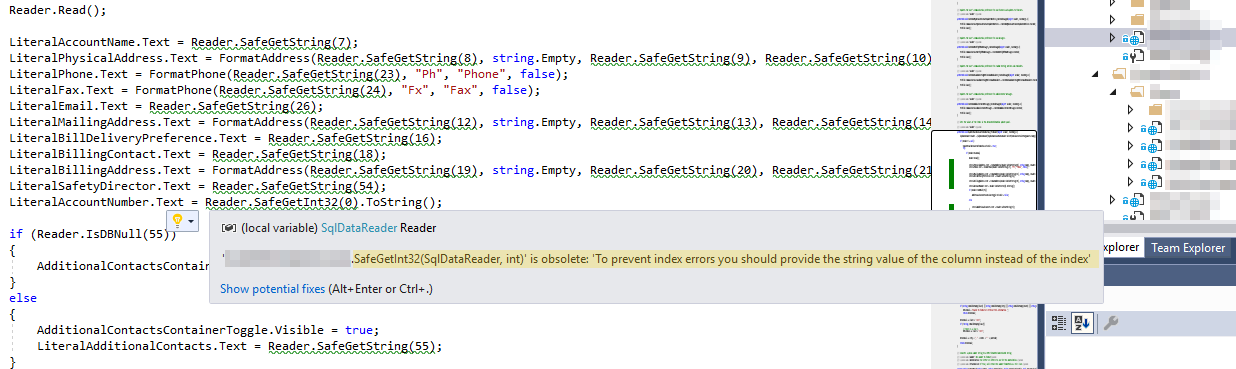
Reverend Jim -- You mean something like this:

columnIndexHell.png

I'm literally in column index hell with this! There's even an obsolete message associated with the method used! It's making me crazy.

commented: If this is so, can't delete columns yet. +14

The stuff I was referring to was code from way back (circa 2000). The offending code was written using ADO. This was before all the interface objects like Readers came into use. I have to admit that I would rather use low-level objects like ADO and such than all of the more abstracted objects. I prefer getting my hands dirty.

Be a part of the DaniWeb community

We're a friendly, industry-focused community of developers, IT pros, digital marketers, and technology enthusiasts meeting, networking, learning, and sharing knowledge.