Hi. Can someone help.
I'm working with a list (not a listBox)
I have a list of staff called staffList and add a new staff member as staffList.add(staff), where staff is an object containing the staff members name and salary.

I have a staff class and a staffList class for methods and form1.

I want to be able to display a staff member from the list by entering the name (via an inputBox).
I can do it by index/ position in the list, but I want to do it by name.
How can I do this? By searching the list until I find a match? Do I use a boolean in a while statement, or a For...statement???

I tried this:

dim length as integer
dim index as integer
dim found as boolean
dim staffWanted as string

length = staffList.items.count
staffWanted = inputBox("enter staff name")

found = false
index=0
While (found = false) And (index < length)
If staffList.items(index) = staffWanted Then
found = true
staffList.RemoveAt(wanted)
Else:
index = index + 1
End If
End While

But it won't work as it won't accept staffList.items or (index). I think that must be because you use those with listBoxes but not lists.
Dani AI

Generated

wanted to look up a staff member by name instead of by index; showed a manual scan/loop. A clearer, safer approach is to keep a strongly typed collection and search its Name property rather than comparing the object to a string. Implement a small finder on the employeeList so the list itself knows how to locate and remove an Employee; that keeps UI code simple and avoids index errors.

Example implementation (uses List(Of Employee).Find so it works on older .NET versions; LINQ is an option on .NET 3.5+):

Public Class Employee
    Public Property Name As String
    Public Property Salary As Decimal
    Public Sub New(n As String, s As Decimal)
        Name = n
        Salary = s
    End Sub
End Class

Public Class EmployeeList
    Private ReadOnly items As New List(Of Employee)()

    Public Sub Add(emp As Employee)
        items.Add(emp)
    End Sub

    Public Function FindByName(searchName As String) As Employee
        If searchName Is Nothing Then Return Nothing
        Dim key = searchName.Trim()
        Return items.Find(Function(e) e.Name IsNot Nothing AndAlso e.Name.Trim().Equals(key, StringComparison.OrdinalIgnoreCase))
    End Function

    Public Function RemoveByName(searchName As String) As Boolean
        Dim found = FindByName(searchName)
        If found Is Nothing Then Return False
        Return items.Remove(found)
    End Function
End Class

Notes: prefer case-insensitive, trimmed comparisons for names; consider culture rules when required. For UI: bind a ListBox using DisplayMember="Name" or for a ListView create ListViewItem(s) from the found Employee. For API details on typed lists see the List(Of T) documentation: https://learn.microsoft.com/en-us/dotnet/api/system.collections.generic.list-1?view=netframework-4.8

Recommended Answers

All 7 Replies

Member Avatar for Member #46692

That's probably because staff is an object and thus comprises of two things, so you cannot say If staffList.items(index) = staffWanted .

Instead you have to create a method to match just the name.

I don't know if the below link helps
http://www.vbdotnetheaven.com/UploadFile/camurphy/VB.NetLists11142006230335PM/VB.NetLists.aspx

Let me know if you need code...

[edit] looks like the fool who wrote that article didn't test it properly, List<person>people = new List<person>(); clearly isn't vb.net!

Could do with some code if can help.
I looked at the link but I can't see how to adapt it to my situation to find one match in the list.

Member Avatar for Member #46692

Something like this:-

Public Class Form1

    Private al As New ArrayList()

    Private Sub Button1_Click(ByVal sender As System.Object, ByVal e As System.EventArgs) Handles Button1.Click

        Dim val As Staff

        Dim k As Integer

        Dim i As Integer = 0
        For Each val In al
            If val.theName.Equals(TextBox1.Text) Then
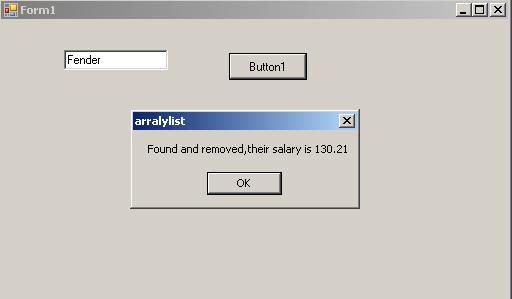
                MsgBox("Found and removed,their salary is " & val.theSalary)
                k = i
                i = i + 1

            End If

            i = i + 1
        Next
        
        al.RemoveAt(k)

        For Each val In al
            MsgBox(val.theName)
        Next

    End Sub


    Public Class Staff
        Private name As String
        Private salary As Double
        Public Sub New(ByVal n As String, ByVal s As Double)
            name = n
            salary = s
        End Sub

        Public ReadOnly Property theName() As String
            Get
                Return name
            End Get
        End Property

        Public ReadOnly Property theSalary() As Decimal
            Get
                Return salary
            End Get
        End Property
    End Class


    Private Sub Form1_Load(ByVal sender As System.Object, ByVal e As System.EventArgs) Handles MyBase.Load

        al.Add(New Staff("Gibson", 12.39))
        al.Add(New Staff("Fender", 130.21))
        al.Add(New Staff("Guild", 2382.21))
    End Sub
End Class
Member Avatar for Member #46692

And the form

That doesn't work.
My private statement is:

Private theList as new employeeList()

not arrayList.
And it doesn't like the bit dim val as Staff
as I have dim anEmployee as New Employee()

Could I email you my code rather than put it all up here? And maybe it'd be easier for you to spot my problem.

Something like this:-

Public Class Form1

    Private al As New ArrayList()

    Private Sub Button1_Click(ByVal sender As System.Object, ByVal e As System.EventArgs) Handles Button1.Click

        Dim val As Staff

        Dim k As Integer

        Dim i As Integer = 0
        For Each val In al
            If val.theName.Equals(TextBox1.Text) Then
                MsgBox("Found and removed,their salary is " & val.theSalary)
                k = i
                i = i + 1

            End If

            i = i + 1
        Next
        
        al.RemoveAt(k)

        For Each val In al
            MsgBox(val.theName)
        Next

    End Sub


    Public Class Staff
        Private name As String
        Private salary As Double
        Public Sub New(ByVal n As String, ByVal s As Double)
            name = n
            salary = s
        End Sub

        Public ReadOnly Property theName() As String
            Get
                Return name
            End Get
        End Property

        Public ReadOnly Property theSalary() As Decimal
            Get
                Return salary
            End Get
        End Property
    End Class


    Private Sub Form1_Load(ByVal sender As System.Object, ByVal e As System.EventArgs) Handles MyBase.Load

        al.Add(New Staff("Gibson", 12.39))
        al.Add(New Staff("Fender", 130.21))
        al.Add(New Staff("Guild", 2382.21))
    End Sub
End Class
Member Avatar for Member #46692

It works on vb.net 2005, if you are using something else then I'm afraid I can't help you.

The arrayList would be just as flexible as a list. I'm quite busy so I won't be able to look at your code. Sorry. That's all I can offer.

that's ok. Appreciate your help anyhow.

Be a part of the DaniWeb community

We're a friendly, industry-focused community of developers, IT pros, digital marketers, and technology enthusiasts meeting, networking, learning, and sharing knowledge.