Member Avatar for Member #578978

Hi,

I am trying to develop a GUI application that has a text area for a 10 digit number. I would prefer to right click on the field and select a max length and "number type" instead of coding an 'if function on keypress' and so on. Is this possible?

I looked but didn't find anything, perhaps I'm not looking in the right places...

Thanks,
-Ashton.

Dani AI

Generated

Short summary and where NetBeans fits: wanted a simple right‑click property in the NetBeans GUI builder to both limit input to digits and stop input at 10 characters. ’s Properties tip and ’s JFormattedTextField suggestion are on point, and NetBeans does expose a FormattedField, but there is no single generic “maxLength + numeric only” checkbox for a plain JTextField. Two reliable approaches are shown below: a DocumentFilter that blocks non‑digits as typed (and on paste), or a MaskFormatter on a JFormattedTextField if a fixed mask and placeholders are acceptable. (docs.oracle.com)

Use a DocumentFilter (recommended for strict, realtime blocking and paste-safe behavior). Add the filter after NetBeans’ initComponents() so generated code isn’t overwritten. Example DocumentFilter and attachment:

import javax.swing.text.*;

public class DigitFilter extends DocumentFilter {
    private final int maxLength;
    public DigitFilter(int maxLength) { this.maxLength = maxLength; }

    private String digitsOnly(String s) { return s == null ? "" : s.replaceAll("\\D+", ""); }

    @Override
    public void insertString(FilterBypass fb, int offset, String string, AttributeSet attr)
            throws BadLocationException {
        if (string == null) return;
        String filtered = digitsOnly(string);
        int cur = fb.getDocument().getLength();
        int allowed = Math.max(0, maxLength - cur);
        if (allowed > 0) super.insertString(fb, offset, filtered.substring(0, Math.min(filtered.length(), allowed)), attr);
    }

    @Override
    public void replace(FilterBypass fb, int offset, int length, String text, AttributeSet attrs)
            throws BadLocationException {
        String filtered = digitsOnly(text);
        int cur = fb.getDocument().getLength();
        int allowed = Math.max(0, maxLength - (cur - length));
        if (allowed > 0) super.replace(fb, offset, length, filtered.substring(0, Math.min(filtered.length(), allowed)), attrs);
    }
}

Attach in the form constructor (after initComponents()):

((javax.swing.text.AbstractDocument)myTextField.getDocument()).setDocumentFilter(new DigitFilter(10));

DocumentFilter is the API designed for this; it handles insert/replace/remove (so pastes and programmatic changes are filtered). (docs.oracle.com)

MaskFormatter alternative (quick, no custom filter): a MaskFormatter with a 10‑digit mask will reject non‑digits and stop input at the mask length. It behaves differently (placeholders, caret handling) but is straightforward to use in a FormattedField or by creating a DefaultFormatterFactory in code:

try {
    javax.swing.text.MaskFormatter mf = new javax.swing.text.MaskFormatter("##########");
    mf.setPlaceholderCharacter(' ');
    myFormattedTextField.setFormatterFactory(new javax.swing.text.DefaultFormatterFactory(mf));
} catch (java.text.ParseException ex) {
    // handle
}

MaskFormatter and JFormattedTextField are covered by the Swing formatted‑field docs; choose MaskFormatter when a fixed, visible mask is desired, and DocumentFilter when the goal is silent, strict digit‑only input (best UX for phone/ID entry). (docs.oracle.com)

Final notes and troubleshooting: avoid KeyListener for validation — it misses paste and IME input; prefer DocumentFilter (or DocumentListener for reactive behavior) for robust handling. Place custom wiring after initComponents() in the NetBeans form constructor so generated code is not lost. For a quick plugin-style option, third‑party restricted‑field libraries exist, but the DocumentFilter approach is small, portable, and well supported. (stackoverflow.com)

Recommended Answers

All 14 Replies

Tutorial for drag&drop "developers"

Member Avatar for Member #578978

lol, no need to insult.. it's just a question - you probably don't know some minor things here and there either... you could've given me a 2 line answer if you knew this instead of making me read a huge document... I know how to make swing applications, I just don't know this one little thing.

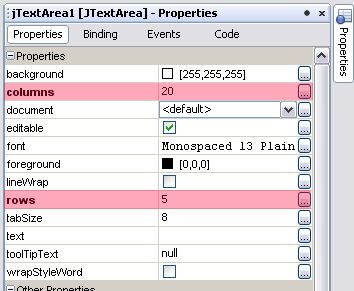
All your dreams come true when you click on the component and check the Properties tab (normally on the right).
If by any chance you do not see this panel then from main menu select Window >> Properties or Ctrl+Shift+7

Member Avatar for Member #578978

Hi,

I am trying to develop a GUI application that has a text area for a 10 digit number. I would prefer to right click on the field and select a max length and "number type" instead of coding an 'if function on keypress' and so on. Is this possible?

I looked but didn't find anything, perhaps I'm not looking in the right places...

Thanks,
-Ashton.

I have checked properties of the text field many times, but did not find anything, that's why I made this thread.

PS: Why do I always have to argue with some big shot before I can get an answer on this website? It would work so much better if we were all willing to listen before talking I think.

Thanks again,
-Ashton.

commented: Stop being paranoid. -2

Have a look at JFormattedTextField in the API, if I understand your requirement properly, this may be the answer.

Member Avatar for Member #578978

Hi James,

I was looking for a Netbeans answer in specific, If there is no function like the one I'm looking for then I will move on and look at alternative methods. Thanks for your input.

-Ashton.

Am I missing something here? :-/

However you will not able to set content type like NUMBER, ANY, EMAIL. For that you will need add on library

Hi James,

I was looking for a Netbeans answer in specific, If there is no function like the one I'm looking for then I will move on and look at alternative methods. Thanks for your input.

-Ashton.

I'm an Eclipse user myself, so I can't address NetBeans, but I thought if NetBeans supports JFormattedTextField in its GUI builder (which it really should) then it should have the standard format options available for you to pick from including numeric type & length.

Good suggestion James, there is of course one in NetBeans.

Member Avatar for Member #578978

Am I missing something here?

However you will not able to set content type like NUMBER, ANY, EMAIL. For that you will need add on library

Sorry I meant text field not text area.

JTextField also doesn't let you set content type (unlike TextField in Java Microedition).

Use JFormattedTextField as James suggested. You will find it in NetBeans in Palette>> Swing Controls >> FormattedField. And to set content type in Properties look for formatterFactory and use drop down menu

Member Avatar for Member #578978

I just played around with the JFormattedTextField and formatterFactory, and had a look at the API. The problem though, is that it formats the text after it has already been typed in where as my aim is to completely disable any other character except numbers. Is this not possible?

At the same time, to disable input once the 10th character has been entered (max length).

Thanks again,
-Ashton.

why not use a JSpinner?
EDIT> misread the question, just use a JFormattedTextField as said by the other two.

Member Avatar for Member #578978

Hi majestic0110,

I think it's cool that you have 1,234 posts but you didn't read my previous reply as to why I can't use the JFormattedTextField.

Thanks,
-Ashton.

Be a part of the DaniWeb community

We're a friendly, industry-focused community of developers, IT pros, digital marketers, and technology enthusiasts meeting, networking, learning, and sharing knowledge.