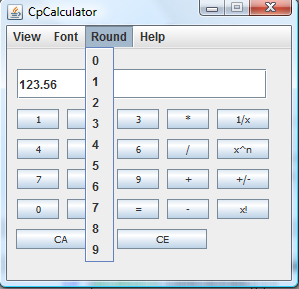
I am making a calculator for a project,using Swing but I am finding one task particulary hard because it is something I have not yet learned. So for this calculator I need a rounding menu I have a list of menu items 0 through to 9 which stipulate the rounding precision to be applied to all calculations. I have taken a screen shot to give you an idea.
I am not sure how to do this, online I have found many people mention the BigDecimal class and one of the instructors told me to search for the round method, however I am looking at both of these options but I am not sure how to implement them.
I thought I would ask if any one had any similar code samples I could look at.

Dani AI

Generated

For a calculator with a user-selected rounding precision, separate computation from presentation. Keep internal arithmetic in exact decimal form (BigDecimal) and apply the chosen precision only when converting results for the display — unless the calculator must mimic a device that rounds after every operation (in which case round after each step). was right to point at JFormattedTextField/NumberFormat, and an important nuance: avoid new BigDecimal(double) (it preserves the double’s binary artifacts). Prefer BigDecimal.valueOf(...) or construct from the input String.

A compact, practical wiring pattern (build a display formatter from the selected scale, update it when the menu changes, and use a NumberFormatter for input):

private static DecimalFormat createFormatter(int scale) {
    StringBuilder p = new StringBuilder("#0");
    if (scale > 0) { p.append('.'); for (int i = 0; i < scale; i++) p.append('0'); }
    DecimalFormat df = new DecimalFormat(p.toString());
    df.setRoundingMode(RoundingMode.HALF_UP);
    return df;
}

for (int i = 0; i <= 9; i++) {
    final int s = i;
    JMenuItem mi = new JMenuItem(Integer.toString(i));
    mi.addActionListener(e -> {
        DecimalFormat df = createFormatter(s);
        displayField.setText(df.format(currentBigDecimal)); // format BigDecimal for display
    });
    roundingMenu.add(mi);
}

NumberFormatter nf = new NumberFormatter(createFormatter(selectedScale));
nf.setValueClass(BigDecimal.class);
nf.setAllowsInvalid(false);
JFormattedTextField input = new JFormattedTextField(nf);
input.setHorizontalAlignment(SwingConstants.RIGHT);

Layout and alignment notes (clarifying ): don’t use absolute setBounds or a null layout — use layout managers. A common pattern is BorderLayout for the frame (display in NORTH) and a GridLayout for the keypad so buttons stay uniform. Set the display font and right-align the text field to match calculator UI conventions.

Troubleshooting tips: if you see odd extra digits (the “3/6/9” cases), it’s almost always double -> decimal conversion. Keep inputs as strings or use BigDecimal.valueOf, do math with BigDecimal, and only format to the selected scale for presentation.

Recommended Answers

All 3 Replies

there are:

1/ basic and strong Assembler's rounding mode

int baseInt = (doubleNumber + (0.05))/100
double roundedNumber = baseInt * 100

2/ rounding problems if NumberValue ends with 3,6,9, sometimes (lots of decimal places) I never check why, never solved, just ignored, compared with outPut/rounding from MsExcel

int decimalPlace = 0;
BigDecimal bd = new BigDecimal(doubleNumber);
bd = bd.setScale(decimalPlace, BigDecimal.ROUND_HALF_UP);
doubleNumber = bd.doubleValue();

3/ excelent and strong way, but required that by usage JFormattedTextField and proper/correct way

amountFormat = NumberFormat.getNumberInstance();
amountFormat.setMinimumFractionDigits(2);
amountFormat.setMaximumFractionDigits(2);
amountFormat.setRoundingMode(RoundingMode.HALF_UP);

4/ excelent and strong way

public class round {

    public static double roundTo2Places(double value) {
        assert value >= Long.MIN_VALUE / 100 && value <= Long.MAX_VALUE / 100;
        long digits = (long) (value < 0 ? value * 100 - 0.5 : value * 100 + 0.5);
        return (double) digits / 100;
    }

    private round() {
    }
}

- your GUI isn't layed corect way, please don't use bound/size etc
- JTextFields knows Font
- JComponets aren't justified
- JTextField.setHorizontalAlignment(javax.swing.SwingConstants.RIGHT);

<my view>
I don't like that, I think it's ugly
</my view>

sure there are exists another way "How to Rounding Correctly"

Thank you for the examples I think I can go ahead now.
I was hoping you could elaborate on your ending comments as I am not sure what they mean:

your GUI isn't layed corect way, please don't use bound/size etc
- JTextFields knows Font
- JComponets aren't justified
- JTextField.setHorizontalAlignment(javax.swing.SwingConstants.RIGHT);

input TextField replace with JFormattedTextField#NumberInstance

about justifications

your input TextField is shorter as JButtons
your input JButton "CE" is shorter as above JButtons

set Font and RightxAlignment for input TextField

ignore my hint about layout, without see your code

Be a part of the DaniWeb community

We're a friendly, industry-focused community of developers, IT pros, digital marketers, and technology enthusiasts meeting, networking, learning, and sharing knowledge.