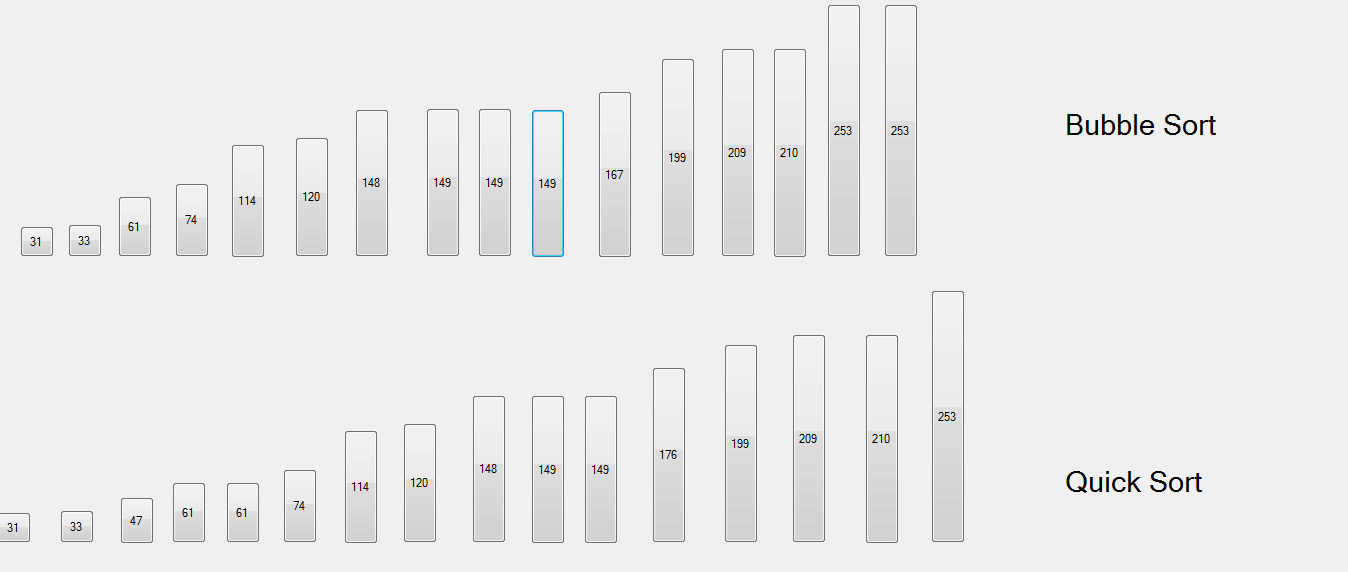
In the name of God my IDE is visual studio 2010 (c#) I want to create 3 threads for 3 sort(bubble sort,quick sort & merge sort) to show which function sort quickly? for showing this I make 3 array of buttons(for every func. 1 arr) & I want to sort them with their height . but I have 2 important problem: 1- how show swapping and changes in buttons on run time? the form will be show after sort done but I want to see showing these change during runtime. 2- I can't work with threads to run sorts concurrence together .
this is my codes now!:
namespace threade {
public partial class Form1 : Form
{
    Button[] btns1;
    Button[] btns2;
    Button[] btns3;

    public Form1()
    {
        InitializeComponent();

        btns1 =new Button[] { button1, button2, button3, button4, button5, button6, button7, button8, button9, button10, button11, button12, button13, button14, button15, button16};
        btns2 = new Button[] { button17, button18, button19, button20, button21, button22, button23, button24, button25, button26, button27, button28, button29, button30,  button31, button32 };
       btns3 = new Button[] { button33, button34, button35, button36, button37, button38, button39, button40, button41, button42, button43, button44, button45, button46, button47, button48 };
        foreach (Button btn in btns1)
        {
            btn.Text = btn.Size.Height.ToString();
        }
        foreach (Button btn in btns2)
        {
            btn.Text = btn.Size.Height.ToString();
        }
        foreach (Button btn in btns3)
        {
            btn.Text = btn.Size.Height.ToString();
        }

        Thread t1 = new Thread(new ThreadStart(sort1));
        Thread t2 = new Thread(new ThreadStart(sort2));
        Thread t3 = new Thread(new ThreadStart(sort3));


    }

    void sort1() {
        bsort(btns1, 16);
    }

    void sort2()
    {
        qsort(0, 15, btns2);
    }


    void sort3()
    {
        mgsort(0, 15, btns3);
    }

    Button aa = new Button(); Button aa2 = new Button();
    void swap(int i,int j,Button[]btns)
    {

        aa = btns[i];
        btns[i] = btns[j];
        btns[j] = aa;

        int t = btns[i].Location.X;
        btns[i].Location = new Point(btns[j].Location.X, btns[i].Location.Y);
        btns[j].Location = new Point(t, btns[j].Location.Y);


    }
    int part(int l, int h,Button[] btns)
    {
        int i, j=l;
        int p = btns[l].Size.Height;
        for (i = l +1; i <= h; i++)
            if (btns[i].Size.Height < p)
            {
                j++;
                swap(i, j, btns);
            }
        int s = j;
        swap(l, j, btns);
        return s;
  }
    void qsort(int l, int h, Button[] btns)
    {

        if (h > l)
        {
            int p = part(l, h, btns);
            qsort(l, p-1,btns);
            qsort(p+1, h,btns);

        }

   }

    void bsort(Button[] btns,int n)
    {
        for(int i=0;i<n-1;i++)
            for(int j=i+1;j<n;j++)
                if (btns[j].Size.Height < btns[i].Size.Height)
                {
                    aa2 = btns[i];
                    btns[i] = btns[j];
                    btns[j] = aa2;

                    int t = btns[i].Location.X;
                    btns[i].Location = new Point(btns[j].Location.X, btns[i].Location.Y);
                    btns[j].Location = new Point(t, btns[j].Location.Y);
                    Thread.Sleep(10);


                }

   }