A part of one of the programs in my assignment requires to declare three arrays of same size which will be used in parallel to store gpa's, registration numbers and names of the students respectively. When I use a single loop to take input in all these three arrays then a strange thing happens. It takes input normally in the gpa and registration number arrays but simply skips the input of the name (a string) and go directly to the next loop. However, if I comment out the other prompts and input lines from this loop and use it to take input solely in the array of names then it works fine.
Please tell me what could be the reason of this problem.
Here is the code that I am using.

#include <iostream>
#include <string>
using namespace std;

int main()
{
	const int size = 3;
	float Gpa[size];
	unsigned int Reg[size];
	string Name[size];
	for (int i=0; i<size; i++)
	{
		cout << "Enter Registration number of the student no. " << i+1 << ": ";
		cin >> Reg[i];
		cout << "Enter GPA of student no. " << i+1 << ": ";
		cin >> Gpa[i];
		cout << "Enter Name of the sudent no. " << i+1 << ": ";
		getline(cin, Name[i]);
	}

	system("pause");
	return 0;
}

and here is sample run of this program:
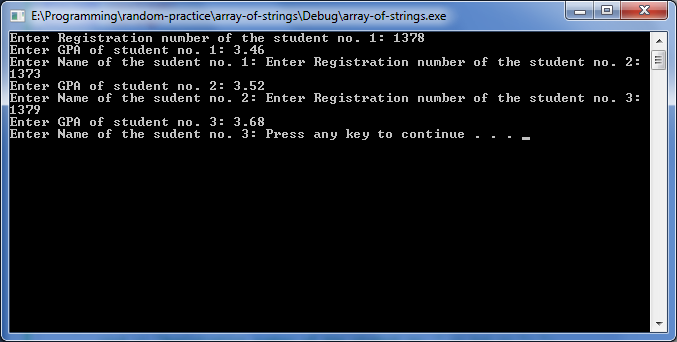
Dani AI

Generated

, nailed the root cause: a newline left behind by formatted extraction gets seen immediately by the next line-based read. In short, >> leaves the \n sitting in the stream; getline sees it and returns an empty string. That is why your name read appears to be skipped.

If you want to keep your current flow, a compact fix is to consume leading whitespace (including that pending newline) right before reading the name:

std::getline(std::cin >> std::ws, Name[i]);

This is easy to drop in and avoids an extra ignore call. Note: this does not rescue you if a prior numeric read failed (bad input puts cin in a fail state). In that case, check cin.fail(), then clear the state and discard the rest of the line before continuing, or reprompt.

For extra robustness, consider a line-based workflow for everything and parse numbers from those lines. It avoids mixing formatted and unformatted input and makes validation simpler:

#include <sstream>  // at top

std::string s;
std::getline(std::cin, s); std::istringstream(s) >> Reg[i];
std::getline(std::cin, s); std::istringstream(s) >> Gpa[i];
std::getline(std::cin >> std::ws, Name[i]);

Now you can check each extraction and reprompt if needed. If you ever refactor, grouping these fields into a struct Student (instead of parallel arrays) also makes the code easier to reason about, but the two techniques above will fix the immediate issue without changing your assignment’s design.

Recommended Answers

All 2 Replies

Formatted input (with the >> operator) and unformatted input (getline is an example) don't play well together. It's a subtle combination of features that work together to give you this bug:

  • Requests only block (wait for you to type) if the stream is empty
  • Operator >> first discards leading whitespace
  • Operator >> stops reading when it sees whitespace and doesn't discard it
  • getline() does not discard leading whitespace
  • getline() stops reading when it sees '\n' and does discard it
  • '\n' counts as whitespace, so operator >> stops on it

So what happens is you type the GPA (say 123.45) and hit enter to send input from the command line to cin. cin now contains the string "123.45\n" because the enter key is recognized as the '\n' character.

Operator >> successfully extracts 123.45 and places it in Gpa, but stops when it sees '\n' and leaves that '\n' in the stream for subsequent input requests.

Now getline() is called and sees '\n'. It doesn't block for input because there's already something in the stream, and that something causes getline() to terminate immediately and successfully with an empty string being stored in Name.

That's the "why" of your problem. Now how do you fix it? The best way is not to mix formatted and unformatted input, but if you're new to C++ that might be too much to ask. A simple solution is removing the newline prior to calling getline (an operation we often call flushing the stream):

cin.ignore(1024, '\n');
getline(cin, Name[i]);

The ignore() member function will extract and discard characters up to a count of the first argument or until the second argument is extracted. So this call says to read and throw away up to 1,024 characters or until a '\n' is found. The 1024 part is really little more than a "big enough" value to ensure that everything is cleared out though. A more correct (and also more complex) version is:

// These will be needed along with your other headers
#include <ios> // For streamsize
#include <limits> // For numeric_limits<>

cin.ignore(numeric_limits<streamsize>::max(), '\n');

I mention that only for future reference. A magic number like 1024 will be fine for now.

For a more thorough investigation on flushing the stream, I'll direct you here.

commented: thankyou very much for such a detailed and easy to understand explaination of a little bit ricky thing ... +1
commented: this is so great! thanks +0

oh ... thankyou very much for such a detailed explaination. It was very easy to understand and worked perfectly.

P.S.
I tried to read your that sticky article a few minutes ago but I think it is currently a little bit difficult for me to understand.

Be a part of the DaniWeb community

We're a friendly, industry-focused community of developers, IT pros, digital marketers, and technology enthusiasts meeting, networking, learning, and sharing knowledge.