Hello Visual Basic Coding Experts,
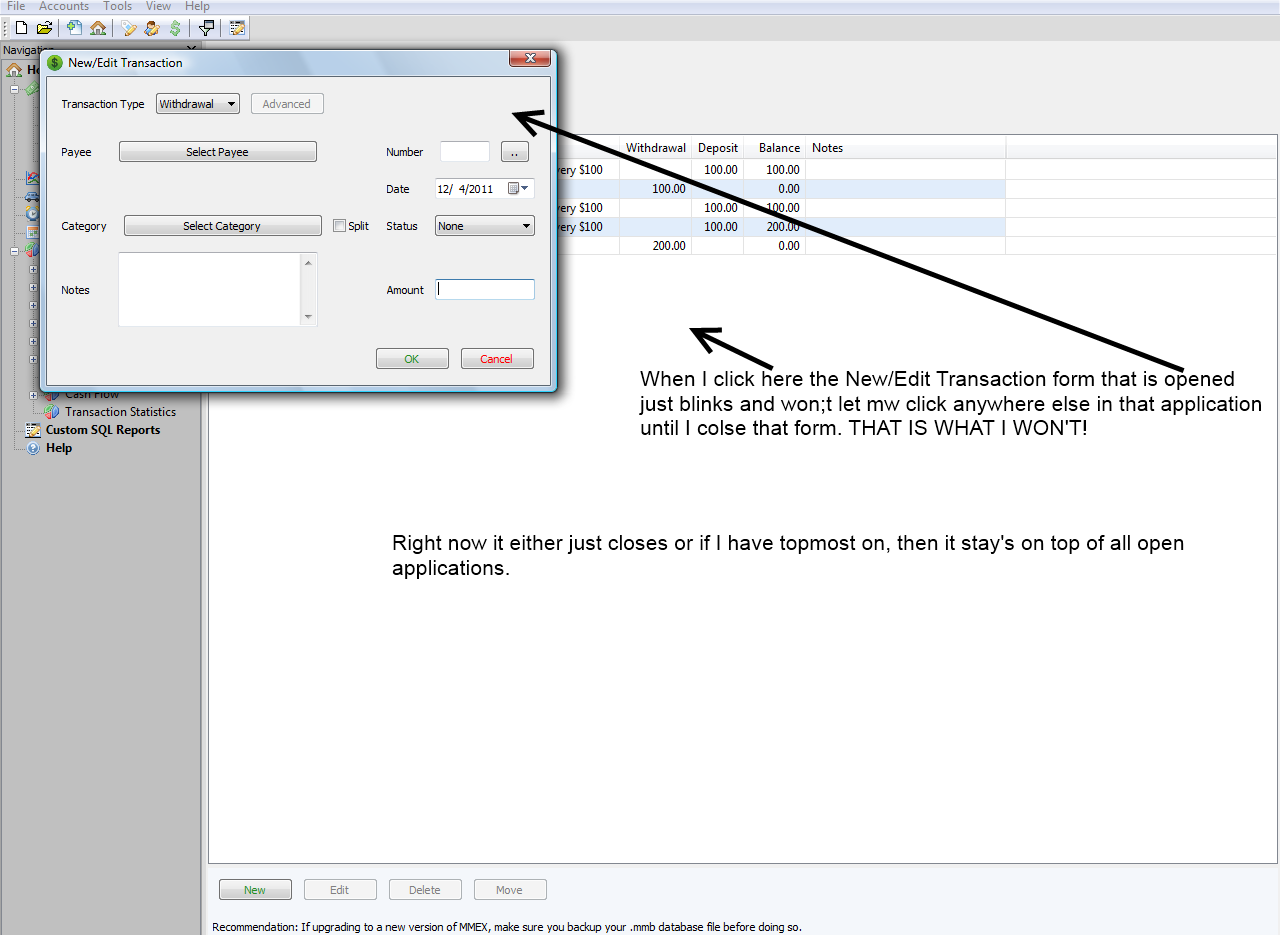
I have other application that I have not made myself, but can do what I am looking to do. I want a code to keep a form on top of all the forms in my application. Not Topmost, which keeps it open onto of all open application. I have tried TopLevel, but have no luck.

Thanks so much in advance,

Kanyonb38
Dani AI

Generated

Short answer: use an owned window (owner/owned relationship) instead of TopMost or a modal dialog unless you actually want blocking behavior. A modal dialog (as noted) forces the user to close it before using other forms; making a window TopMost or using SetWindowPos (as showed) tends to make it top of every application. Owned windows give the “stay above other forms in my app” behavior without going global. (learn.microsoft.com)

If you are on WinForms (VB.NET) the simplest, robust approach is to assign the Owner before showing the form. For example:

Dim f As New Form2()
f.Owner = Me
f.Show()

An owned form stays above its owner, is hidden/minimized with the owner, and doesn’t prevent the owner from being used (unlike a modal dialog). Use ShowDialog only when you need interaction blocked. (learn.microsoft.com)

If you’re using classic VB (VB6) there isn’t a managed Owner property, but you can arrange an owner/owned relationship at the Win32 level by setting the window’s owner field (for top-level windows) via SetWindowLong(GWL_HWNDPARENT). That is a lower-level technique and should be done carefully: save the previous value and restore it on unload, avoid doing cross-process ownership unless you understand the side effects, and use SetWindowLongPtr on 64-bit processes (VB6 itself is 32‑bit). The SetWindowLong documentation explains the rules and cautions. (learn.microsoft.com)

Quick notes: MDI apps and embedding forms are different (use MdiParent or TopLevel = False when appropriate). Owned windows normally should set ShowInTaskbar = False if you don’t want a second taskbar entry. If you post the exact VB runtime (VB6 vs VB.NET) and whether the forms are MDI or plain top-level windows, an exact snippet and a safe restore/unload pattern can be provided.

Recommended Answers

All 2 Replies

I think you want to use the vbmodal parameter with the form.Show statement.
A modal form has focus and does not let you interact with other forms in the application until it has been closed.

form1.show

opens a non-modal form, you can set focus to other forms in the app.

form1.show vbmodal

opens a modal form, must be closed before you can access other forms.

Yes, but you need to use the following Windows API to do that.

BOOL SetWindowPos(
HWND hWnd, // handle to window
HWND hWndInsertAfter, // placement-order handle
int X, // horizontal position
int Y, // vertical position
int cx, // width
int cy, // height
UINT uFlags // window-positioning flags
);
(MSDN)

Public Const HWND_TOPMOST = -1
Public Const SWP_SHOWWINDOW = &H40

Public Declare Function SetWindowPos Lib "user32" Alias "SetWindowPos" (ByVal hwnd As Long, ByVal hWndInsertAfter As Long, ByVal x As Long, ByVal y As Long, ByVal cx As Long, ByVal cy As Long, ByVal wFlags As Long) As Long

Public Function SetMyWindowPos(ByVal WndHdl as long, ByVal ByPosition as Long, ByVal Left as long, ByVal Top as Long, ByVal WinWidth as long, ByVal WinHght as Long) as Long
   Dim lngReturn as Long
   lngReturn = SetWindowPos(WndHdl, ByPosition, WinLeft, WinTop, WinWidth, WinHght)
   ' lngReturn should return a  nonzero value if successful, 0 if it fails

End Function()

Use the HWND_TOPMOST Constant for the second parameter, and the SWP_SHOWWINDOW Constant for the last parameter.
Something like the above should work. Ask, if you have further questions. If you don't it be on top when you leave the application, then you'll have to write extra code to deal with that situation: e.g. when your application loses focus, and again when your application returns focus to put the back on top again.

Be a part of the DaniWeb community

We're a friendly, industry-focused community of developers, IT pros, digital marketers, and technology enthusiasts meeting, networking, learning, and sharing knowledge.