this is my csharp code

using System;
using System.Collections.Generic;
using System.ComponentModel;
using System.Data;
using System.Drawing;
using System.Linq;
using System.Text;
using System.Windows.Forms;
using System.Data.SqlClient;
using System.Configuration;

namespace MutlitableDatasetApp
{
    public partial class MainForm : Form
    {
        //form wide dataset.
        private DataSet autoLotDS = new DataSet("AutoLot");

        //Make use of command builders to simplify data adapter configuration.
        private SqlCommandBuilder sqlCBInventory;
        private SqlCommandBuilder sqlCBCustomers;
        private SqlCommandBuilder sqlCBOrders;

        //our data adapters (for each table).
        private SqlDataAdapter invTableAdapter;
        private SqlDataAdapter custTableAdapter;
        private SqlDataAdapter ordersTableAdapter;

        //form wide connection string.
        private string cnStr = string.Empty;

        public MainForm()
        {
            InitializeComponent();

            //get connection string from *.config file.
            cnStr = ConfigurationManager.ConnectionStrings["AutoLotSqlProvider"].ConnectionString;

            //create adapters.
            invTableAdapter = new SqlDataAdapter("Select * from Inventory", cnStr);
            custTableAdapter = new SqlDataAdapter("Select * from Customers", cnStr);
            ordersTableAdapter = new SqlDataAdapter("Select * from Orders", cnStr);

            //autogenerate commands.
            sqlCBInventory = new SqlCommandBuilder(invTableAdapter);
            sqlCBCustomers = new SqlCommandBuilder(custTableAdapter);
            sqlCBOrders = new SqlCommandBuilder(ordersTableAdapter);

            //fill tables in DS
            invTableAdapter.Fill(autoLotDS, "Inventory");
            custTableAdapter.Fill(autoLotDS, "Customers");
            ordersTableAdapter.Fill(autoLotDS, "Orders");

            //build relations between tables.
            BuildTableRelationship();

            //bind to grids
            dataGridViewInventory.DataSource = autoLotDS.Tables["Inventory"];
            dataGridViewCustomers.DataSource = autoLotDS.Tables["Customers"];
            dataGridViewOrders.DataSource = autoLotDS.Tables["Orders"];
        }

        private void BuildTableRelationship()
        {
            // create customerorder data relation object.
            DataRelation dr = new DataRelation("CustomerOrder", autoLotDS.Tables["Customers"].Columns["CustID"],
                                                autoLotDS.Tables["Orders"].Columns["CustID"]);
            autoLotDS.Relations.Add(dr);

            //create inventoryorder data relation object.
            dr = new DataRelation("InventoryOrder", autoLotDS.Tables["Inventory"].Columns["CarID"],
                                   autoLotDS.Tables["Orders"].Columns["CarID"]);
            autoLotDS.Relations.Add(dr);
        }

        private void btnUpdateDatabase_Click(object sender, EventArgs e)
        {
            try
            {
                invTableAdapter.Update(autoLotDS, "Inventory");
                custTableAdapter.Update(autoLotDS, "Customers");
                ordersTableAdapter.Update(autoLotDS, "Orders");
            }
            catch (Exception ex)
            {
                MessageBox.Show(ex.Message);
            }
        }
    }
}

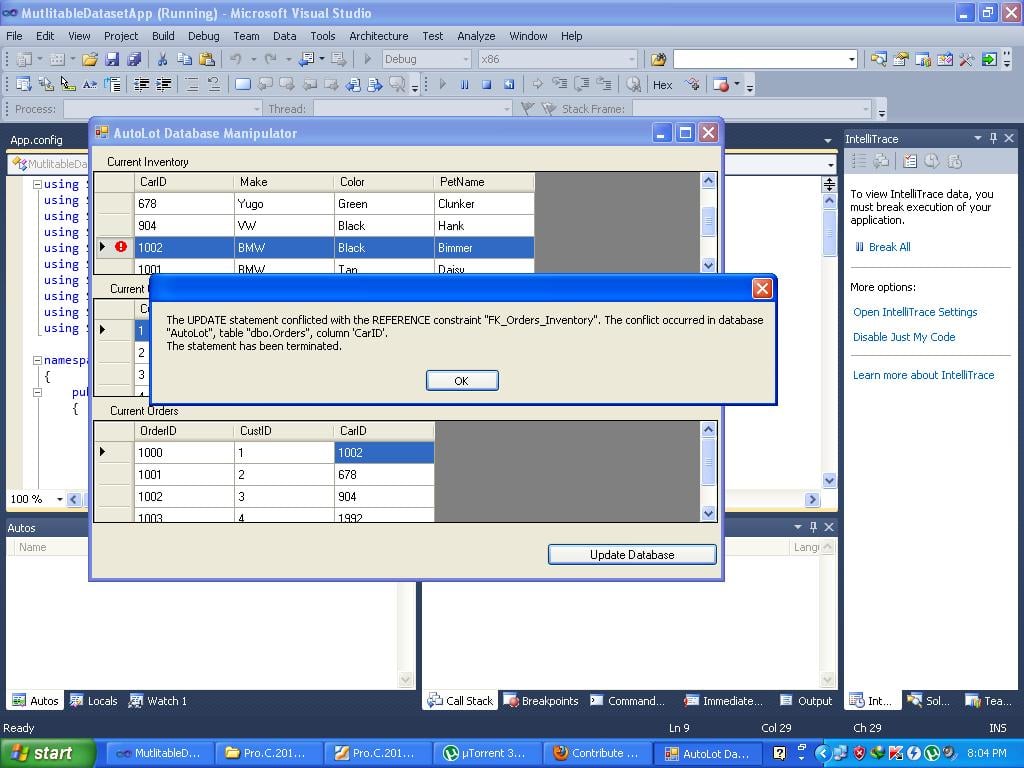
i have 3 tables my problem is when i update the col CarID in Inventory table it should update the Orders CarID col too but it gives me an error
untitled28

as you can see on the image please help me i really want to learn this language its really cool and fun

Dani AI

Generated

Short diagnosis — the exception in the screenshot is a foreign-key referential-integrity error: Orders.CarID references Inventory.CarID, so changing the parent key in Inventory without also updating the child rows will be blocked. is correct that primary keys are usually best left immutable; changing them is the root cause of this trouble.

Practical options (pick one depending on design constraints):

  • Prefered design: keep CarID as a stable surrogate primary key (Identity) and put any editable business identifier in a separate column (e.g., CarNumber). That removes the need to update FK values and avoids these problems.

  • Database-level cascade: add an ON UPDATE CASCADE to the FK so SQL Server will automatically propagate parent updates to Orders. Example steps (replace the constraint name with the actual one used):

    ALTER TABLE Orders
    DROP CONSTRAINT FK_Orders_Inventory;
    
    ALTER TABLE Orders
    ADD CONSTRAINT FK_Orders_Inventory FOREIGN KEY (CarID)
    REFERENCES Inventory (CarID)
    ON UPDATE CASCADE
    ON DELETE NO ACTION;

    Caveat: if Inventory.CarID is an IDENTITY column, updating it is not normally allowed — ON UPDATE CASCADE will not help if the DB disallows changing the key.

  • ADO.NET in-memory cascade + correct save order: enable in-memory cascading so child rows are adjusted inside the DataSet, then persist the child table first and the parent second to avoid FK violations. Example C# changes (add after creating the relation):

    dr.ChildKeyConstraint.UpdateRule = Rule.Cascade;

    And change the save order in the button handler so Orders updates are sent before Inventory:

    ordersTableAdapter.Update(autoLotDS, "Orders");
    invTableAdapter.Update(autoLotDS, "Inventory");

Also verify the DataColumn for CarID is not AutoIncrement/ReadOnly in the DataSet and consider wrapping the multi-table updates in a transaction (TransactionScope or SqlTransaction) so the whole change is atomic. These points explain why the original code (which updates Inventory first) triggers the FK error and how to resolve it.

Recommended Answers

All 7 Replies

If you carID column is a primary key field and it's a foreign key in another table i don't think you're allowed to update them because the foriegn key basically means it references the record in another table. For example if there is an ID of 1 and and it is changed to 3, anything that has a foreign key of the ID 1 can no longer find that ID and so you'll get that error i think.

So to sum up you can't/ shouldn't change primary key fields for consistancy and reliabilitry purposes.

oh thanks but if the carid column is not a primary key field then my code should work just fine?

is it a foreign key in another table or referenced it is still the same case i think. you would have to include the columns from the 2nd and 3rd tables in the update

Something like:

UPDATE table1.CarID, table2.CarID, table3.CarID VALUES (4,4,4) WHERE CarID = 4;

so you are updating CarID in the first table as well as the 2nd and 3rd table. The WHERE clause will define which row to update (so update the record WHERE the CarID is 4).

You should really use primary and foreign keys to avoid repatition and maintain consistancy throught the tables.

no im not updating the 2nd table just the 1st table inventory table the changes from table1 should reflect to table orders which is table 3 but thanks for the idea i will try your suggestion

Sorry if this sounds rude but have you had much experience with databases ? it might be a good idea to have a read of a few articles about relational databases as record IDs should be automaticalle incremented and shouldn't be changed once created so that you don't have the issue that you're currently facing.

i have basic knowledge in DB and im kind of new to the language so im very confuse you dont sound rude to me at all i know i still need references maybe you can give me a good begginers book title for csharp with database coz im only using 1 book and its kinda hard coz some idea isnt explaine by the author

To get a good idea of database concepts in general a book called Database principles and design.

Once you have an idea of the different concepts and designs the books would depend on what you use to create your databases as there are different database management systems which may use different variations of SQL. Judging by the image above your making your's in Visual studeos which is MicroSoft SQL i think so i would suggest you look at mcts self-paced training kit (exam 70-433) microsoft sql server 2008 - database development but only after you understand the types of databases available as it focuses more on functionality such as creating and deleting tables and other functions to manipulate your database using Microsoft SQL code.

Good luck and if you have anymore problems just ask.

Be a part of the DaniWeb community

We're a friendly, industry-focused community of developers, IT pros, digital marketers, and technology enthusiasts meeting, networking, learning, and sharing knowledge.