Hi guys,
I really don't know how to list the content of that box in AD.
Can you give me some hints - I found none so far :(
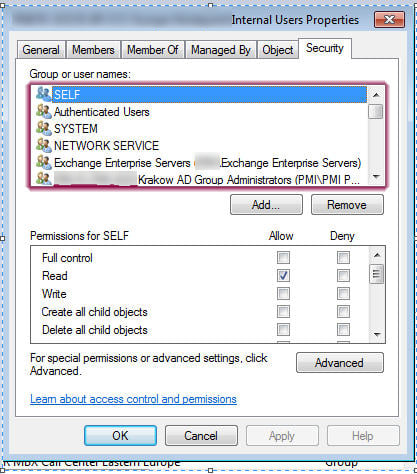
Thx for your help!
Hi guys,
I really don't know how to list the content of that box in AD.
Can you give me some hints - I found none so far :(
Thx for your help!
Short clarification up front: the AD "Security" tab shows the object ACL (the nTSecurityDescriptor) — that is, access control entries (ACEs) applied to the user object — not just the groups a user is a member of. pointed toward GUI membership views, and mentioned alternate APIs; for automated extraction you want to read each object’s security descriptor and enumerate its ACEs. (learn.microsoft.com)
A practical C# route is to bind each mailbox user with DirectoryEntry and read its ActiveDirectorySecurity via the ObjectSecurity property, then call GetAccessRules(...) to enumerate ACEs. The snippet below is a compact starting point (resolve the LDAP path list first, then loop):
using System.DirectoryServices;
using System.Security.Principal;
using System.Security.AccessControl;
using(var de = new DirectoryEntry("LDAP://CN=Shared Mailbox,OU=Mailboxes,DC=contoso,DC=com"))
{
var sd = de.ObjectSecurity;
var rules = sd.GetAccessRules(true, true, typeof(NTAccount));
foreach (ActiveDirectoryAccessRule r in rules)
{
Console.WriteLine("{0}\t{1}\t{2}\t{3}",
r.IdentityReference.Value,
r.AccessControlType,
r.ActiveDirectoryRights,
r.ObjectType); // GUID for extended rights or 0000... for property rights
}
} The ObjectSecurity / GetAccessRules pattern is the documented .NET way to access an AD object’s ACL programmatically. Use typeof(NTAccount) to get readable names or typeof(SecurityIdentifier) and resolve SIDs when name resolution is unreliable. (learn.microsoft.com)
Note about mailbox-specific rights: Exchange-related permissions (Send As, Full Access) often show up as ExtendedRight ACEs whose ObjectType is a GUID. The Send‑As extended‑right uses GUID ab721a54-1e2f-11d0-9819-00aa0040529b, so filter ACEs for ActiveDirectoryRights.ExtendedRight and that GUID to detect Send‑As assignments; for managing or changing mailbox delegates, Exchange cmdlets (Add-ADPermission / Add-MailboxPermission, Get‑Mailbox/Get‑ADPermission) are the supported tools. (learn.microsoft.com)
Operational tips: the caller needs READ_CONTROL to enumerate a DACL (you’ll get access failures otherwise). For scale (300 mailboxes) retrieve DNs in bulk (DirectorySearcher or AD PowerShell) and then fetch each object's security descriptor; for more efficient LDAP returns consider the Security Descriptor control (LDAP_SERVER_SD_FLAGS_OID) to request only the DACL portion. Also remember ACEs can reference groups — expand nested group membership if you need user-level lists. (learn.microsoft.com)
Jump to Post— skatamatic 371This has nothing to do with C#, and everything to do with Active Directory for Windows Server 2003/2008. If you go to 'Server Manager', go to Roles->Active Directory Domain Services->your.domain.name->Users you will see a list of users and groups, and when you double click a user and go to the …
Jump to Post— samsylvestertty 12Try WMI......
This has nothing to do with C#, and everything to do with Active Directory for Windows Server 2003/2008. If you go to 'Server Manager', go to Roles->Active Directory Domain Services->your.domain.name->Users you will see a list of users and groups, and when you double click a user and go to the MemberOf tab you will see all the User Groups that user belongs to :). Note that there's some built-in user groups under BuiltIn (rather than under Users) that you won't see in the users list.
Try posting it in a different forum for better/faster results next time.
I write program in C# to extract/modify data in AD.
I need to write a function which lists content of that tab for 300 groups.
Thats why it has been posted in C# category.
Try WMI......
Security tab contains groups which gives access to SHARED MAILBOXES (created as USER ACCOUNT with email adress)
Basicaly - we have about 300 mailboxes, and access groups to those mailboxes is stored in SECURITY TAB.
I need to list them badly :/
I hope WMI can be used in this context.
Download the WMI code creator http://www.microsoft.com/en-us/download/details.aspx?id=8572
You can see various classes of WMI there. Check whether it satisfies your needs,
Wow - looks interesting - will check that in the evening
We're a friendly, industry-focused community of developers, IT pros, digital marketers, and technology enthusiasts meeting, networking, learning, and sharing knowledge.