Dear All ,

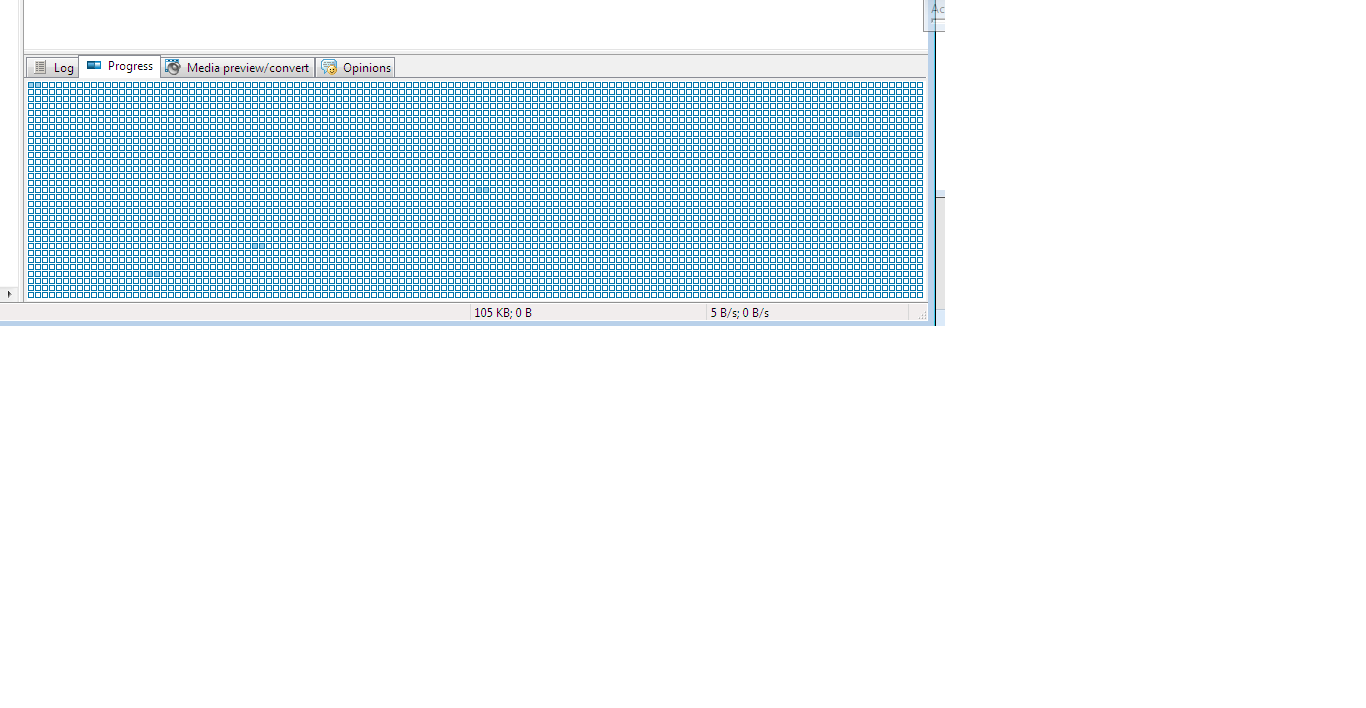
I am looking for a .net control to act as progressBar. it shoule have many empty boxes , and which progress , it gets filled. as in Free Download manager. Please refer to attached screen shot.

Thanks,
Waleed

Dani AI

Generated

A concise, practical plan to get the “table/boxed” progress look (like Free Download Manager). As observed, the stock ProgressBar is limited; ’s PictureBox/panel idea is a quick prototype. For a robust, reusable control two approaches work best:

  • Quick: a TableLayoutPanel or FlowLayoutPanel filled with small Panel/PictureBox cells. Toggle BackColor on cells as progress advances. Easy to build, simple to style, but slower if there are hundreds of cells.
  • Recommended: a single owner-drawn WinForms control. It draws N equally spaced boxes in OnPaint, fills whole boxes and optionally a partial box for fractional progress. This keeps flicker low, scales nicely, and exposes simple properties (TotalSegments, Value, MaxValue, SegmentSpacing, FilledColor, EmptyColor).

Example VB.NET OnPaint sketch (core idea):

Protected Overrides Sub OnPaint(e As PaintEventArgs)
    MyBase.OnPaint(e)
    Dim g = e.Graphics
    g.Clear(BackColor)
    Dim total = Math.Max(1, TotalSegments)
    Dim spacing = SegmentSpacing
    Dim w = (ClientSize.Width - (total - 1) * spacing) \ total
    Dim filledTotal = (Value / CSng(MaxValue)) * total
    Dim full = Math.Floor(filledTotal)
    Dim frac = filledTotal - full

    For i As Integer = 0 To total - 1
        Dim r As New Rectangle(i * (w + spacing), 0, w, ClientSize.Height)
        If i < full Then
            g.FillRectangle(FilledBrush, r)
        ElseIf i = full AndAlso ShowPartial AndAlso frac > 0 Then
            g.FillRectangle(FilledBrush, New Rectangle(r.X, r.Y, CInt(r.Width * frac), r.Height))
            g.FillRectangle(EmptyBrush, New Rectangle(r.X + CInt(r.Width * frac), r.Y, r.Width - CInt(r.Width * frac), r.Height))
        Else
            g.FillRectangle(EmptyBrush, r)
        End If
        g.DrawRectangle(Pens.Gray, r)
    Next
End Sub

Practical tips: set ControlStyles.UserPaint, AllPaintingInWmPaint and OptimizedDoubleBuffer to avoid flicker; call Invalidate() when Value changes; cache a bitmap for very large segment counts; expose sizing and color properties; handle ResizeRedraw for DPI/resize. This approach provides a maintainable, performant segmented bar that matches the visual goal without stacking many controls.

Recommended Answers

All 10 Replies

Dear Sir ,
Kinly feedback , why this post was deleted?
Thanks,
Waleed

very good

Dear Sir,

I know default progress bar which is 20 years old. I need another progress control as in the attached screenshot to the original post. Please take a look into it.

Thanks for support.

oh,
Your question is really nice,
I think that you want your progressbar which is divided into sub parts?
Am I right?
I don't know any of this Code, but you can do one thing.
You can use Picturebox in the panel and create your own progressbar.
So this may be look differently from the original ones too,
If you want the same progressbar as VB.net in divided content then you can place those progressbar together, (I means: 1st progressbar end touches 2nd progressbar starting.
And if you think that this make the Progressbar with cutted lines then you can add the new big progressbar on it, and when the initial progressbar starts, hide the big progressbar,

I think, you got the point.

Sure , good point. I can design it from scratch. I thought there is someone who did it before.

Thanks,

waleed.makarem
I don't know if some one did it so before,
but this can be done.
Usually I do same thing at some places, i create the image with gradient fill and add to picture box so that it look nice,
So i just give idea from it. this idea was stuck by me, And i think that on your situation this can be done so...

PFA...
In this Attachment I show how to do and so.
this is easy, I am unable to show with picture box now,
If you want to learn on picture box then msg me, I will do for it too...
This attachment include how to make look like divided progressbar.

If my solution works for you,
Please Upvote and comment, and not forgot to mark the thread as solve

commented: great idea, it help me, thanks man +2

hey, have you got the solution ?
if no, then what happened?
Isn't my project help you?

Be a part of the DaniWeb community

We're a friendly, industry-focused community of developers, IT pros, digital marketers, and technology enthusiasts meeting, networking, learning, and sharing knowledge.