I am developing a C# Windows Form Application.

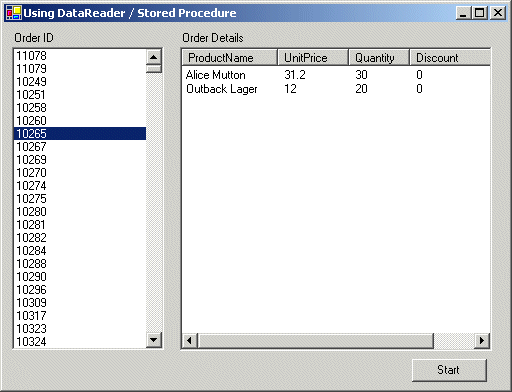
Now i am trying to select value from Listbox and load corresponding value in List view using the stored procedure.

And this is my stored Procedure:
ALTER PROCEDURE [dbo].[spPOExport]
@BST_BESTELLUNG INT
AS
BEGIN
SELECT
BH.BST_LIEFERANT AS Product Name,
BZ.BDT_REFNUMMER AS Unit Price,
BZ.BDT_ANZ_RESTMENGE AS Quantity,
BZ.BDT_EKP_BESTELLT AS Discount,

FROM BESTHEAD BH
INNER JOIN BESTZEIL BZ ON BH.BST_ORIGNR=BZ.BDT_ORIGNR AND BH.BST_BESTELLUNG=BZ.BDT_BESTELLUNG
WHERE
BST_FILIALE = 150
AND
BST_STATUS IN(1,2)
AND
BZ.BDT_ANZ_RESTMENGE > 0
AND
BH.BST_BESTELLUNG=@BST_BESTELLUNG
END

Can any one help please?

Thanks bb41218964e1c3836d7690a0ced14c22bb41218964e1c3836d7690a0ced14c22
Dani AI

Generated

Two focused points based on ’s stored-proc post and ’ troubleshooting question:

The stored procedure as posted contains two common SQL problems that will stop execution: an extra trailing comma before the FROM clause, and column aliases that contain spaces but are not bracketed. Both must be fixed (for example use AS [Product Name] or avoid spaces in aliases). Confirm the procedure runs and returns the expected columns and types in SQL Server Management Studio with a concrete parameter (for example EXEC spPOExport @BST_BESTELLUNG = 123) before wiring the UI.

A reliable pattern in C# for the ListBox → stored-proc → ListView flow (use SelectedValue when the ListBox is data-bound) looks like this:

private void listBoxOrders_SelectedIndexChanged(object sender, EventArgs e)
{
    if (listBoxOrders.SelectedValue == null) return;
    if (!int.TryParse(listBoxOrders.SelectedValue.ToString(), out int orderId)) return;
    FillListView(orderId);
}

private void FillListView(int orderId)
{
    using (var cn = new SqlConnection(connectionString))
    using (var cmd = new SqlCommand("spPOExport", cn))
    {
        cmd.CommandType = CommandType.StoredProcedure;
        cmd.Parameters.Add("@BST_BESTELLUNG", SqlDbType.Int).Value = orderId;

        var da = new SqlDataAdapter(cmd);
        var dt = new DataTable();
        da.Fill(dt);

        listView1.BeginUpdate();
        listView1.Items.Clear();
        foreach (DataRow r in dt.Rows)
        {
            var item = new ListViewItem(r[0].ToString());
            item.SubItems.Add(r[1].ToString());
            item.SubItems.Add(r[2].ToString());
            listView1.Items.Add(item);
        }
        listView1.EndUpdate();
    }
}

Extra checks and tips: ensure the ListBox ValueMember is the order-id field when binding; match the number of ListView columns to the subitems added; wrap DB calls in try/catch and log exceptions; verify database, schema and permissions. After fixing SQL syntax and validating results in SSMS (as suggested), the C# pattern above should populate the ListView from the selected ListBox item.

What exactly is going wrong? Can you not pass the order id to the stored procedure or is the stored procedure failing? Your screen shots indicate that selecting an order ID returns the order details...

Be a part of the DaniWeb community

We're a friendly, industry-focused community of developers, IT pros, digital marketers, and technology enthusiasts meeting, networking, learning, and sharing knowledge.