I've asked this on SO AND Reddit without so much as a peep...was hoping DW would turn up the answer!

I have an ascx user control that has a custom event added to it.

I can get the event to work without problem, but the event doesn't show up in Visual Studio's property editor, only in intellisense. Is there an attribute I am missing or something?

The event definition is:

[Browsable(true), EditorBrowsable(EditorBrowsableState.Always)]
public event EventHandler<EventArgs> SelectedIndexChanged;

The event doesn't show up in the property box but all of my custom properties do:
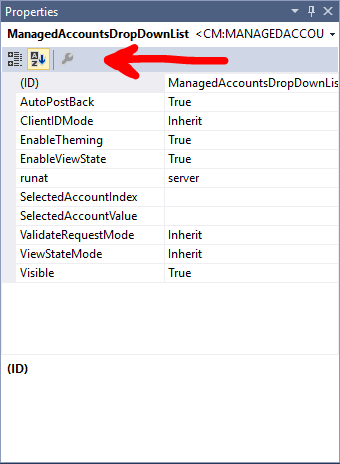
01.png

But is accessable through intellisense:

02.png

Is there a way to have the events show up in the property editor?

Dani AI

Generated

Short answer: this is a Visual Studio / Web‑Forms designer limitation, not a missing attribute on the ascx. The designer fills the Events (lightning) list from design‑time metadata it can discover; public events show up in Intellisense but ASCX user controls (markup-based, loaded at runtime) normally lack the compiled design‑time metadata the Properties grid expects. (learn.microsoft.com)

Practical options tied to what was said above and to ’s comment about design-time extensions:

  • Fast: wire the handler in the page markup or in code-behind instead of relying on the Properties grid. Example markup pattern:

    <uc:MyControl runat="server" ID="myCtl" OnSelectedIndexChanged="myCtl_SelectedIndexChanged" />

    Or in code-behind attach the delegate. Also try rebuilding the project and switching the .aspx/.ascx to Split or Design view once — VS will often repopulate the property/event list after a build + designer refresh. (stackoverflow.com)

  • If the Properties/events UI is essential: turn the control into a compiled server control (or add a design-time designer class and class-level attributes such as DefaultEvent/Designer). Compiled controls with design-time metadata show up in the toolbox and expose full Properties/Event behavior in VS. That is the proper route for a polished design-time experience. (learn.microsoft.com)

Brief note on attributes: attributes like Browsable or EditorBrowsable help IntelliSense and the object browser, but they do not magically make a markup user control present full design‑time metadata to the WebForms designer. The tooling decides what to show. (learn.microsoft.com)

Summary for : expected behavior; fastest fix is markup or code wiring; long‑term fix is to add proper design‑time support by making a compiled control or designer.

Recommended Answers

All 3 Replies

From memory this is an old complaint about VS2005 and VS2008. I will forego sharing any googles about it. Be sure to ask Microsoft to add this in the future.

Yes, for some reason intellisense will autocomplete it.

That stinks.

I was hoping they would fix it.

I'm assuming it isn't fixed in the latest version either?

In app controls you made appear to be just like you noted (office is still using VS2008 for now so I can't test newer for a few months.)

But I think you want to publish your extensions to get the effects you noted. https://msdn.microsoft.com/en-us/library/ff728613.aspx
This is not something I've done. Just something that came up a few yarns ago.

Be a part of the DaniWeb community

We're a friendly, industry-focused community of developers, IT pros, digital marketers, and technology enthusiasts meeting, networking, learning, and sharing knowledge.