Greetings,
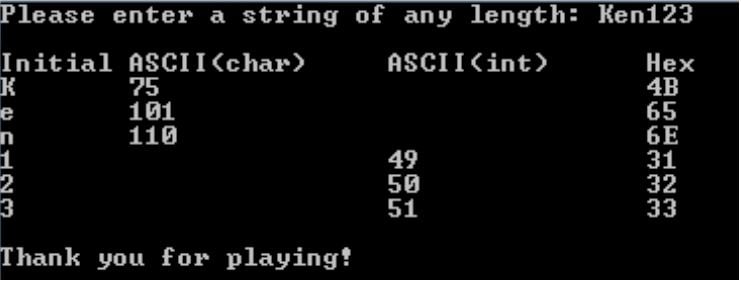
I have been trying to figure this out for hours with no avail. Basically I need to print out user input as Initial value, ASCII(char), ASCII(int), and Hex. I can get everything to work however I am not supposed to have the char values print if its a digit, and int values print if its a char. I can get everything to work except I cannot figure out how to exclude both the letters and digit in the same for loop. The way it has to be printed is quite strict. My code below will print the Initial, ASCII(char) and Hex values. I have another if statement that will work by itself to print the ASCII(int) - but obviously if I include that if statement it will exclude everything.. Any help would be Amazing thank you.. ExampleOutput.JPG
import java.util.*;

/****************************************************************************************
HNUnit3Ch12.java
xx

Write a program that gets input for a string, then output the initial character, ascii 
values of the character and number, and hex values of each character. Repeat until quit.
Get input for a string containing both numbers and letters of any length
Use a for loop with postfix notation to increment through the string, printing the
following:
The initial digit/character
The ASCII value of each character
The ASCII value of each integer converted to a string
Only output the ASCII(char) for letters and ASCII(int) for integers
Spaces should output ASCII(char) and hex only
The Hex value of each integer/character output in upper case
Output “Thank you for playing!”
****************************************************************************************/

public class HNUnit3Ch12
{
    public static void main (String[] args)
    {
        Scanner input = new Scanner(System.in);
        final String HEADER = "%-10s%-15s%-15s%s";
        //final String OUTPUT = "%s\n %-15s\n %-15s\n %s";
        String userString;

        System.out.print("Please enter a string of any length: ");
        userString = input.nextLine();
        System.out.printf(HEADER, "\nInitial", "ASCII(char)", "ASCII(int)", "Hex\n");

        for (int i = 0; i < userString.length(); i ++)
        {
            char ch = userString.charAt(i);

            char initialCase = userString.charAt(i);

            if (!Character.isDigit(ch))
                {
                int letters = (int) ch;

            //if (!Character.isLetter(ch))
            //  {
            //  int numbers = (int) ch;

            String hex = Integer.toString(ch, 16).toUpperCase();

            System.out.printf("%-9s%-9s%-9s%n",initialCase,letters,hex);
                }
            //  }
        }

    } // End main
} // End public class HNUnit3Ch12

Dani AI

Generated

A clean way to meet the assignment rules is what suggested: reuse one format string and keep two separate string variables for the two ASCII columns so the unused one can be empty. A few practical refinements and gotchas to avoid common mistakes:

  • Detect ASCII digits/letters explicitly if the exercise expects only 0–9 and A–Z/a–z. Character.isDigit and Character.isLetter accept many Unicode characters; use ch >= '0' && ch <= '9' or (ch >= 'A' && ch <= 'Z') || (ch >= 'a' && ch <= 'z') when you mean ASCII only. Treat space (ch == ' ') as the special case it is.
  • Use (int) ch to get the numeric code point for printing. For hex prefer String.format("%02X", (int) ch) — that yields uppercase hex and pads single-byte values to two digits.
  • Use %c (or %s) for the initial character column and %s for the two ASCII columns so you can print an empty string when a column is not applicable. Use "%n" in printf for portable newlines.

Example (concise) approach:

char ch = userString.charAt(i);
String asciiChar = ((ch >= 'A' && ch <= 'Z') || (ch >= 'a' && ch <= 'z') || ch == ' ') ? Integer.toString((int) ch) : "";
String asciiInt  = (ch >= '0' && ch <= '9') ? Integer.toString((int) ch) : "";
String hex       = String.format("%02X", (int) ch);
System.out.printf("%-10c%-15s%-15s%s%n", ch, asciiChar, asciiInt, hex);

Final notes: if you ever expect characters outside the BMP (supplementary Unicode), process code points with codePointAt instead of charAt. For debugging, try mixed strings with letters, digits and spaces and verify alignment and hex output.

Recommended Answers

All 2 Replies

Some things I noticed:

  • Instead of trying to create 2 format strings, reuse the one you used for the header, this way you can get things to line up consistently.

  • In line with that, HEADER isn't really a good name for that string. How about LINE_FORMAT?

  • Use 2 strings to represent whether the char is a digit or a letter. This way the one you don't need can be an empty string, invisible to the user.

  • Now you need 2 conditionals, one to assign ch to the letter string if it's a letter and one to assign it to the digit string if it's a digit.

  • Since you don't need to be modifying ch, you don't need to copy it to another variable.

Put it all together and it could look something like this:

public static void main(String[] args)
{
    Scanner input = new Scanner(System.in);
    final String LINE_FORMAT = "%-10s%-15s%-15s%s";
    String userString;
    System.out.print("Please enter a string of any length: ");
    userString = input.nextLine();
    System.out.printf(LINE_FORMAT, "\nInitial", "ASCII(char)", "ASCII(int)", "Hex\n");
    for (int i = 0; i < userString.length(); i++)
    {
        char ch = userString.charAt(i);
        String letter = "";
        String digit = "";
        if (Character.isDigit(ch))
        {
            digit = Integer.toString(ch, 10);
        }
        if (Character.isLetter(ch) || ch == ' ')
        {
            letter = Integer.toString(ch, 10);
        }
        String hex = Integer.toString(ch, 16).toUpperCase();
        System.out.printf(LINE_FORMAT + "\n", ch, letter, digit, hex);
    }
}

In looking over the assignment, I noticed a special case needed for the space character, so I added that in.

The output looks like this:

Please enter a string of any length: Ken 123

Initial  ASCII(char)    ASCII(int)     Hex
K         75                            4B
e         101                           65
n         110                           6E
          32                            20
1                        49             31
2                        50             32
3                        51             33

tinstaafl

Use 2 strings to represent whether the char is a digit or a letter. This way the one you don't need can be an empty string, invisible to the user.
Now you need 2 conditionals, one to assign ch to the letter string if it's a letter and one to assign it to the digit string if it's a digit.

Thank you so much for the quick response! It looks rather simple looking back at it. I never thought to use empy Strings and pass digit, and letter through base 10. This assignment has been one of the most frustrating ones I have done thus far do to my inexperience with printf.

Be a part of the DaniWeb community

We're a friendly, industry-focused community of developers, IT pros, digital marketers, and technology enthusiasts meeting, networking, learning, and sharing knowledge.