Below is my line item - it returns 'meeting times'. However, there are some cases in my DB where the meeting time is not known and the field is null. I'm wondering if I can completly remove the 'echo' on my page if the field is null?

echo "<p<b>Meetings:</b> $variable21</p>";

Dani AI

Generated

Short summary and what helped (so the thread stays useful later): was trying to hide a whole line when the DB value had nothing useful. The community correctly pointed out comparison vs assignment (), conditional checks ( and ), and the real root cause: MySQL stored a zero date instead of NULL and file checks needed a filesystem path (). Below are robust, production-friendly options that avoid broken HTML and broken-image icons.

Fix it at the database level when possible

  • Convert zero-dates to true NULLs in queries so PHP can check for null instead of special strings. Example SQL uses a small conversion so PHP receives NULL for empty dates:
SELECT id, NULLIF(meeting_date,'0000-00-00') AS meeting_date FROM lodges;
  • To change the schema so future rows can be NULL: alter the column to allow NULL rather than defaulting to zeros:
    ALTER TABLE lodges MODIFY meeting_date DATE NULL DEFAULT NULL;

Validate and escape before you echo

  • For textual fields, validate and escape output. Use PHP validation before creating a mailto link (accept only valid addresses) and wrap any user/DB text with htmlspecialchars() to prevent markup injection. See the PHP docs for filter_var() and htmlspecialchars() for details (filter_var) (htmlspecialchars).

Avoid broken-image icons; check the file reliably

  • Filesystem checks must use the server path, and it helps to confirm the file is actually an image. One safe approach is to test the filesystem image (server-side) and only emit the IMG tag when the probe succeeds; otherwise output nothing or a placeholder image. See getimagesize() and is_file() for server-side checks (getimagesize).

Performance and maintainability notes

  • If you render hundreds or thousands of rows, avoid per-row disk probes on every page load. Instead keep a flag in the DB when an image is uploaded or generate thumbnails during upload and mark existence. Also prefer server-side checking/cleanup over relying on client-side onerror hacks. For MySQL zero-date behavior and SQL modes, see the MySQL docs on SQL mode settings (MySQL SQL mode).

Recommended Answers

All 16 Replies

put it in an if statement:

if ($variable21="")
{
//do nothing
}
else
{
echo "<p<b>Meetings:</b> $variable21</p>";
}

I tried your suggestion, but it made my test run a blank field when the value was not null..
Any ideas what I should put in the parenthesis? The value is different for over 300 records..
Thanks

Another way to do the same thing:
This should be in a loop when you are querying the database for each "row" of data.

echo ($variable21 != '') ? "<p><b>Meetings:</b> $variable21</p>" : '';

;

I may be too new to understand what you are talking about.
But I inserted your suggestion and it returns the same value as before Null or not...
Do you have time to provide me w/ a little more insight?

Another way to do the same thing:
This should be in a loop when you are querying the database for each "row" of data.

echo ($variable21 != '') ? "<p><b>Meetings:</b> $variable21</p>" : '';

;

I believe ryan_vietnow meant ($variable21=="") instead of ($variable21="") . It may not fix your problem, but == is used to compare a variable to a value or to another variable. = is used to assign a value to a variable. Don't get is equal to (==) confused with equals(=). You could also try:

if(empty($variable21)){
echo "Meeting time is not yet determined. Please check again later.";
}
else{
echo "<p<b>Meetings:</b> $variable21</p>";
}

If all else fails, use strlen to check the strings length aka the number of characters in the string assigned to the variable:

if(strlen($variable21)>1){ 
echo "<p<b>Meetings:</b> $variable21</p>";
}
else{
echo "Meeting time is not yet determined. Please check again later.";
}

I may be too new to understand what you are talking about.
But I inserted your suggestion and it returns the same value as before Null or not...
Do you have time to provide me w/ a little more insight?

This

echo ($variable21 != '') ? "<p><b>Meetings:</b> $variable21</p>" : '';

is basically saying:

if ($variable21 != '') { //if $variable21 is NOT blank/empty/null... it has something in it
  echo "<p><b>Meetings:</b> $variable21</p>"; //then echo this
} else { //or else it is blank and echo nothing '';
  echo '';
}

Thanks for your time. Unfortunately, neither worked.
I'm wondering if it is because it is a date field in MySQL?

I believe ryan_vietnow meant ($variable21=="") instead of ($variable21="") . It may not fix your problem, but == is used to compare a variable to a value or to another variable. = is used to assign a value to a variable. Don't get is equal to (==) confused with equals(=). You could also try:

if(empty($variable21)){
echo "Meeting time is not yet determined. Please check again later.";
}
else{
echo "<p<b>Meetings:</b> $variable21</p>";
}

If all else fails, use strlen to check the strings length aka the number of characters in the string assigned to the variable:

if(strlen($variable21)>1){ 
echo "<p<b>Meetings:</b> $variable21</p>";
}
else{
echo "Meeting time is not yet determined. Please check again later.";
}

Thanks. Unfortunately, it didn't work....

This

echo ($variable21 != '') ? "<p><b>Meetings:</b> $variable21</p>" : '';

is basically saying:

if ($variable21 != '') { //if $variable21 is NOT blank/empty/null... it has something in it
  echo "<p><b>Meetings:</b> $variable21</p>"; //then echo this
} else { //or else it is blank and echo nothing '';
  echo '';
}

What is the output that it does give you? Just a sample of it would be nice.

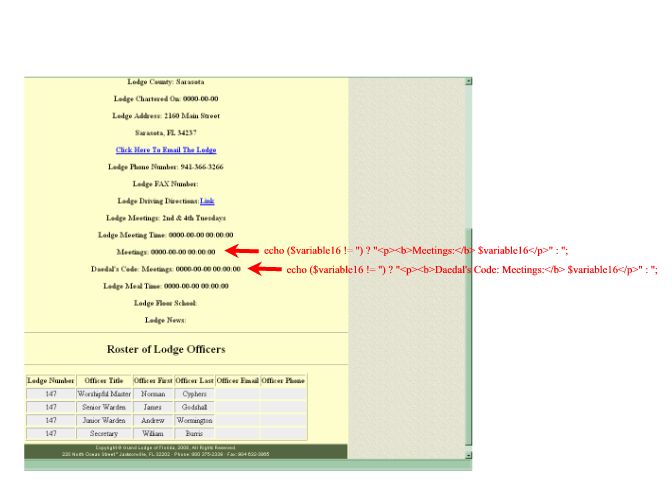
Dae-Here is a screen shot of the output... hopefully it can help the first line is my code and the second line is your code. Both lines are returning the value when the value is Null...

What is the output that it does give you? Just a sample of it would be nice.

Dae - I think I figured it out - its a date field in MySql and instead of having no value it actually put in "0000-00-00"

Let me play with it some more.. you may have solved my issue... hang in...
thanks

D - Thank you very much. Two days of working on this and indeed it was the MySQL settings and the fact the values were not null - they were zeros.

Now I'm just trying to make your solution work with an email field that has a null value?


echo "<a href=\"mailto:$variable12\">Click Here To Email The Lodge</a>";

D - Thank you very much. Two days of working on this and indeed it was my MySQL settings and the fact the values were not null - they were zeros.

Now I'm just trying to make your solution work with a complicated image field - when there is no image to return..

There is always a value in the 'intLodgeNumber' field, but the $imagesFolder may not have an image.... I'm trying to make the line go away if there is no image - because the various browsers want to display a 'missing image' icon -

echo "<img src='" . $imagesFolder . $row . ".jpg' /></p>";

Dae - I think I figured it out - its a date field in MySql and instead of having no value it actually put in "0000-00-00"

Let me play with it some more.. you may have solved my issue... hang in...
thanks

For date fields such as that try:

echo ($variable21 > 0 '') ? "<p><b>Meetings:</b> $variable21</p>" : '';

D - Thank you very much. Two days of working on this and indeed it was my MySQL settings and the fact the values were not null - they were zeros.

Now I'm just trying to make your solution work with a complicated image field - when there is no image to return..

There is always a value in the 'intLodgeNumber' field, but the $imagesFolder may not have an image.... I'm trying to make the line go away if there is no image - because the various browsers want to display a 'missing image' icon -

echo "<img src='" . $imagesFolder . $row . ".jpg' /></p>";

One way to do that is:

if (file_exists($imagesFolder.$row['intLodgeNumber'].".jpg")) {
  echo "<img src='" . $imagesFolder . $row['intLodgeNumber'] . ".jpg' /></p>";
} else { //just because it was on the end of your line... echo the </p> if no image
  echo "</p>";
}

Thanks D!

At first it didn't work, then it was recommended (by another forum) that I:
change your line:

if (file_exists($imagesFolder.$row['intLodgeNumber'].".jpg")) {

to:

if (file_exists($_SERVER['DOCUMENT_ROOT'].$imagesFolder.$row['intLodgeNumber'].".jpg")) {

Thank you very much!!!!


One way to do that is:

if (file_exists($imagesFolder.$row['intLodgeNumber'].".jpg")) {
  echo "<img src='" . $imagesFolder . $row['intLodgeNumber'] . ".jpg' /></p>";
} else { //just because it was on the end of your line... echo the </p> if no image
  echo "</p>";
}
Be a part of the DaniWeb community

We're a friendly, industry-focused community of developers, IT pros, digital marketers, and technology enthusiasts meeting, networking, learning, and sharing knowledge.