Hi,

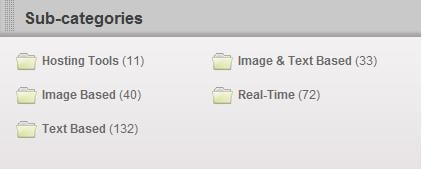
On my website I have a lot of folders with lists of article links. I want to display the number of links in these lists on the folders people select, so they know how much articles are inside a folder and where to search. I've looked for help creating this, but I can't find a suitable solution. I hope somebody can give me an idea or send me in the right direction.

Thank you in advance.
Dani AI

Generated

The thread settled on a database solution (props to and ) after some filesystem ideas from and . Below are practical, production-minded options that complement those replies and work whether your articles are database rows, static HTML files, or plain HTML lists you cannot refactor immediately.

For dynamic sites (long term)

  • Keep counts out of hot page-render paths: maintain a small, denormalized counter per category (increment/decrement on create/delete, or update via a background job) and expose a tiny JSON endpoint that front-end code can call. Cache the endpoint (in-memory store or file cache) with a short TTL so you don't recompute counts on every view. On bulk imports, schedule a batch recompute instead of recalculating per-request.

For existing static HTML or file-based lists

  • Add a stable marker to article links (a CSS class or data-attribute) or wrap the list in a specific container id. That makes reliable counting trivial without touching sidebars or nav. A server-side parser (PHP DOMDocument + XPath) can load the index file and count only the marked links.
<?php
libxml_use_internal_errors(true);
$doc = new DOMDocument();
$doc->loadHTMLFile('/path/to/page.html');
$xpath = new DOMXPath($doc);
$nodes = $xpath->query("//div[@id='category-list']//a[contains(concat(' ', normalize-space(@class), ' '), ' article-link ')]");
echo $nodes->length;
?>

Lightweight client-side shortcut

  • If same-origin and an async update is acceptable, fetch the page and parse it in the browser, then inject the count. This avoids server changes but watch CORS and performance.
fetch('/category-page.html').then(r => r.text()).then(html => {
  const doc = new DOMParser().parseFromString(html, 'text/html');
  const count = doc.querySelectorAll('#category-list a.article-link').length;
  document.querySelector('#counter').textContent = count;
});

Practical notes

  • Avoid parsing the full page on every request in production; prefer precompute or cache. Use clear selectors or classes to avoid counting unrelated nav links. Sanitize inputs and rate-limit any public count endpoint. For PHP DOMDocument reference see PHP DOMDocument manual.

Recommended Answers

All 8 Replies

To list all files from a current directory try with this below code,

// open the current directory by opendir
$handle=opendir(".");
while (($file = readdir($handle))!==false) {
echo "$file <br>";
}
closedir($handle);

Try changing the opendir with which pepople selected folder to get the list of the selected directory.

<?php

$directory = "directory you want to choose";
if (glob("$directory*.*") != false)
{
 $filecount = count(glob("$directory*.*"));
 echo $filecount;
}
else
{
 echo "0 items";
}
?>

sorry didn't see you already had an answere

Sorry! I have asked the wrong question. What I tried to say, is that I want people who visit my website to see how much article links are on a certain page, so they know what page to select. Is there a way to automatically display the number of links that are on another page of my website.

I shouldn't have used the word folder, that made it a whole different question :$ Kind of annoying that you can't reformulate your title or opening post, why is that?

To list all files from a current directory try with this below code,

// open the current directory by opendir
$handle=opendir(".");
while (($file = readdir($handle))!==false) {
echo "$file <br>";
}
closedir($handle);

Try changing the opendir with which pepople selected folder to get the list of the selected directory.

This is what I mean: a category counter, that displays the number of article links inside the folder (for my website, that is)

Any ideas?

I suppose you have some kind of a database where you are storing your articles or are you storing your articles as html files in folders?

The answer to your question depends on the structure you are using to arrange your articles. For e.g, if you are using a database to store you articles you can use a MYSQL Count statement. Or if you are using a html page as an index, I suppose you can count by checking the number of <a> tags on the page (I know you can use Mootools for that).

So please let us know how your articles are arranged and we'll help you figure out a way to get your numbers.

commented: helped me in the right direction +1

I suppose you have some kind of a database where you are storing your articles or are you storing your articles as html files in folders?

The answer to your question depends on the structure you are using to arrange your articles. For e.g, if you are using a database to store you articles you can use a MYSQL Count statement. Or if you are using a html page as an index, I suppose you can count by checking the number of <a> tags on the page (I know you can use Mootools for that).

So please let us know how your articles are arranged and we'll help you figure out a way to get your numbers.

The latter, I use a html page as an index and I want to automatically count the number of <a> tags. Not on the whole page, but inside a certain <div> (because there are some other links on the page in the sidebars that should not be counted).

I should change to tables in the future, but I would need to change a lot, because of the number of folders. Right now I'm looking for a short-term solution.

Thank you for your help!

Never mind, I'm going for tabels, because there are a lot of advantages. Thank you for your comments.

I suppose you have some kind of a database where you are storing your articles or are you storing your articles as html files in folders?

The answer to your question depends on the structure you are using to arrange your articles. For e.g, if you are using a database to store you articles you can use a MYSQL Count statement. Or if you are using a html page as an index, I suppose you can count by checking the number of <a> tags on the page (I know you can use Mootools for that).

So please let us know how your articles are arranged and we'll help you figure out a way to get your numbers.

Solved my 'problem' with Mysql count, as sudeepjd said. So people who have trouble with the same issue, look it up, because it is a very small and easy to use PHP statement.

Be a part of the DaniWeb community

We're a friendly, industry-focused community of developers, IT pros, digital marketers, and technology enthusiasts meeting, networking, learning, and sharing knowledge.