Hello Friends,

I am working in JME. Now, I have situation in which, I suppose to connect with Database which has been used with PHP. So, How can I access to Mysql? As usual same as to connect mysql with JDBC? Is Mysql and Mysql in WAMP Server different?
Please Reply.

Thanking You,
Hakoo Desai.

Dani AI

Generated

Short answer and the practical path forward: MySQL is the database server. Tools like phpMyAdmin, MySQL Administrator or Workbench are just clients that talk to that server. For a JME client you generally do not use JDBC directly (JME profiles normally lack the JDBC libraries). The usual, reliable architecture is: keep MySQL on the server, expose a tiny HTTP API (PHP, servlet, etc.) that runs the SQL and returns JSON/XML, and have the JME app call that API. This builds on points by and and avoids putting database credentials on the device.

Minimal server-side example (PHP API returning JSON):

<?php
$mysqli = new mysqli('localhost','dbuser','dbpass','dbname');
if ($mysqli->connect_error) { echo json_encode(['error'=>$mysqli->connect_error]); exit; }
$id = isset($_GET['id']) ? (int)$_GET['id'] : 0;
$stmt = $mysqli->prepare('SELECT id,name FROM users WHERE id=?');
$stmt->bind_param('i',$id);
$stmt->execute();
$stmt->bind_result($rid,$rname);
$data = [];
while ($stmt->fetch()) $data[] = ['id'=>$rid,'name'=>$rname];
echo json_encode($data);

Tiny JME-side pattern (HTTP GET + read response):

HttpConnection conn = (HttpConnection) Connector.open("http://yourserver/api/user.php?id=1");
InputStream is = conn.openInputStream();
ByteArrayOutputStream baos = new ByteArrayOutputStream();
int b;
while ((b = is.read()) != -1) baos.write(b);
String json = new String(baos.toByteArray(), "UTF-8");
is.close(); conn.close();

About your WAMP/MySQL problems: if the MySQL CLI and phpMyAdmin work but a GUI fails, you likely have either (a) two MySQL installs fighting for port 3306, or (b) a GUI/tool-version mismatch (missing runtime/DLLs). Before reinstalling, back up the data directory and my.ini. To find what’s using 3306 on Windows use netstat -aon | findstr 3306 and then tasklist /fi "PID eq <pid>" (or check Services.msc for MySQL/WAMP services). Either stop/uninstall the duplicate server or change the port in my.ini. If the GUI shows DLL errors try the GUI that matches your OS/Server bitness or use an alternative client as and suggested.

Recommended Answers

All 12 Replies

I think there is no difference. Actually I didn't even think that they might be different. And PHPMyAdmin is just a software for managing database.

MySQL is a relational database management system.
Phpmyadmin is just a user interface with mysql.
There are some software based tool like Workbench, SQLyog, Mysql query browser and some web based application like phpmyadmin.

Thanks for replies.
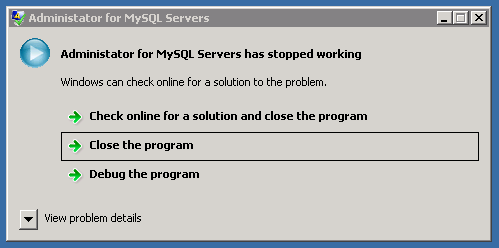
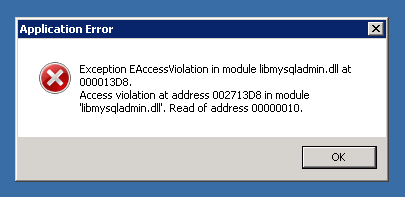
Here the thing is, on our organization server, wamp server is installed but not MySql Essential, still they can connect. So, I installed it but now thing is configuration wizard goes failed and showing 3306 port is used. Still i can connect DB through MySQL command prompt. When I installed MySql GUI, MySql Administrator is not running and giving some dll file error.

I guess that if I uninstall WAMP server and then configure Mysql successfully and again install then it would work.

Usually when you install WAMP, mysql is automatically configured.You don't need extra efforts.
After successful installation when you open http://localhost/phpmyadmin you can see phpmyadmin window.
Try to reinstall wamp.

But thing is that GUI mysql administrator can't be opened. Here I am attaching snap shots.

I thought you were using phpMyAdmin, not Administrator for MySQL?

Your thumbnails looks like they're showing an error for Administrator for MySQL, which probably doesn't affect your MySQL installation.

Which system are you trying to use? Or is the problem that you can't access MySQL at all?

Get MySQL workbench and give it a go. If you use netbeans it have services tab and there you can connect

Hello,
Those errors I am facing when I try to connect with MySQL Administrator GUI(MySQL WorkBench). MySQL server is working. In server, MyphpAdmin is installed and then I installed Mysql server and then Mysql Administrator. MySQL command prompt is working but GUI is not working and when I try to login, I am facing those errors which I attached before.

Hello,
Those errors I am facing when I try to connect with MySQL Administrator GUI(MySQL WorkBench). MySQL server is working. In server, MyphpAdmin is installed and then I installed Mysql server and then Mysql Administrator. MySQL command prompt is working but GUI is not working and when I try to login, I am facing those errors which I attached before.

That have something to do with installation than PHP/MySQL. Just uninstall the whole thing and reinstall it!

That have something to do with installation than PHP/MySQL. Just uninstall the whole thing and reinstall it!

+1 for this idea.

I would hazard to guess that you may have 2 MySQL installations going, since WAMP usually includes that in the installation, but much easier to just get a fresh start, I would think.

Ok, Thanks for all of your reply. Actually, Administrator was stated by itself without doing anything, but in other pc its working with same problem. I'll try and reply .

Thanking You,
Hakoo Desai

Member Avatar for Member #120589

I haven't used WAMP, but I've never had a problem with XAMPP. I use SQLyog community version and sometimes MySQL Workbench. Much of a muchness.

Be a part of the DaniWeb community

We're a friendly, industry-focused community of developers, IT pros, digital marketers, and technology enthusiasts meeting, networking, learning, and sharing knowledge.