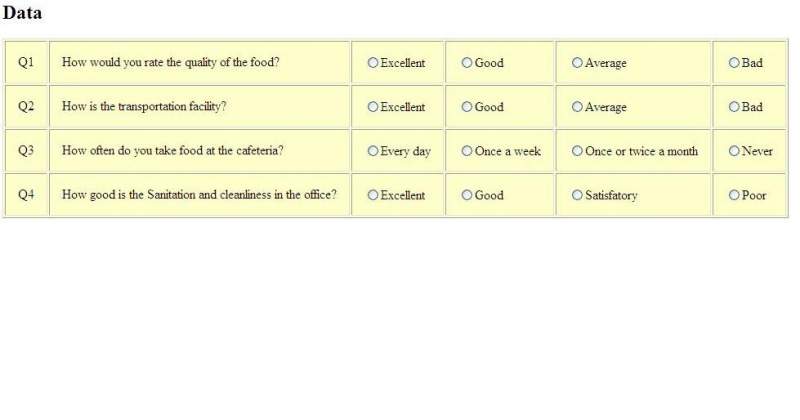
I have a set of radio buttons.These radio buttons are associated with some questions for survey.I also have a Submit button.I want that as soon as I click the Submit button, the application should read the status of radio buttons.But I am unable to figure out a way of doing this.My code is shown bellow.I am also posting a snapshot of the screen that I am getting when I run this code(Just for little help in understanding).Please help me with providing code for doing this.
<%@ page language="java" contentType="text/html; charset=ISO-8859-1"
    pageEncoding="ISO-8859-1"%>
<!DOCTYPE html PUBLIC "-//W3C//DTD HTML 4.01 Transitional//EN" "http://www.w3.org/TR/html4/loose.dtd">

      <%@ page import="java.sql.*" %>

      <%@ page import="java.io.*" %>
       <%@ page import="javax.swing.*" %>
   <%@ page import="java.awt.*" %>


      <html>

      <head>

      <title>display</title>

      </head>

      <body>

      <h2>Data</h2>

      <%

      try {

      Connection connection = null;

      Statement statement = null;

      ResultSet rs = null;
    System.out.println("loading class") ;

      Class.forName("com.ibm.db2.jcc.DB2Driver");

System.out.println("after loading class");

      connection  = DriverManager.getConnection("jdbc:db2://localhost:50000/Simple","administrator","welcome2sa2");
  System.out.println("after conncetion class");

      System.out.println(connection.getClass());


      statement = connection.createStatement();


      String QueryString = "select * from question";

      rs = statement.executeQuery(QueryString);

      int i=1;

      %>

      <TABLE cellpadding="15" border="1" style="background-color: #ffffcc;">

      <%

      while (rs.next()&&(i<=4)) {

      %>
       <TR>
        <TD><%=rs.getString(1)%></TD>
        <TD><%=rs.getString(2)%></TD>

        <TD><input type='radio' name="radio<%= i %>"><%=rs.getString(3)%></TD>
        <TD><input type='radio' name="radio<%= i %>"><%=rs.getString(4)%></TD>
        <TD><input type='radio' name="radio<%= i %>"><%=rs.getString(5)%></TD>
        <TD><input type='radio' name="radio<%= i %>"><%=rs.getString(6)%></TD>

    </TR>

      <%i++; %>

      <%   }   %>


      <%
      rs.close();

      statement.close();

      connection.close();

      } catch (Exception ex) {

      %>


      <font size="+3" color="red"></font>

     <%

     out.println("Unable to connect to database.");

           }
       %>


      </TABLE>


       <script type="text/javascript">
      function onsubmit()
      {


      document.write("Submitting");

      	return true;
      }
       </script>


      <form name="myform">
  <input type="submit" name="submit" value="Submit" align="middle" onclick="onsubmit();">
  </form>


      </body>

      </html>