Sorry this is so long but I don't know how else to show and explain it. I tried setting this up on a free webs.com account but it doesn;t allow forms so doesn't work.
I run an Apache server for my family's web site. One of the things it does is allow us to share messages. What I want to do is allow family members to add color to the text messages they are entering.
I had no problem getting things like Bold, Italic, Underline to works as they are all handled within the page.
In trying to add color, I've downloaded a few different color pickers. The one I am currently trying is which does everything I need except I can't figure out how to get the #rrggbb selected value back to the page the message is entered in and where the selected text to be colored is. I can get it back to a type=hidden variable but don't see how I then kick the page again to process the data the popup window placed there.
Part of my problem is I think serially and the popup window generated by Javascript is not modal so the javascript code in the page that invokes the color popup generator completes without any response from the popup window.
Basically I'm trying to implement the Colors (A) option that is available here (between Remove Text Formatting and Smiles). If someone can describe how that's done that would give me a good place to start.
I've written a lot of html/javascript/css to support the family web site. I'm usually able to figure out how to do things but am very frustrated with this one so any help would be greatly appreciated.
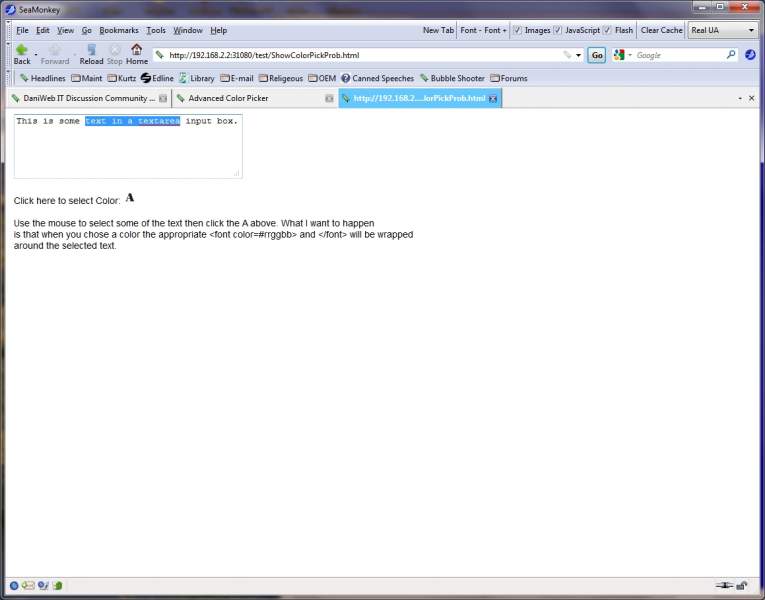
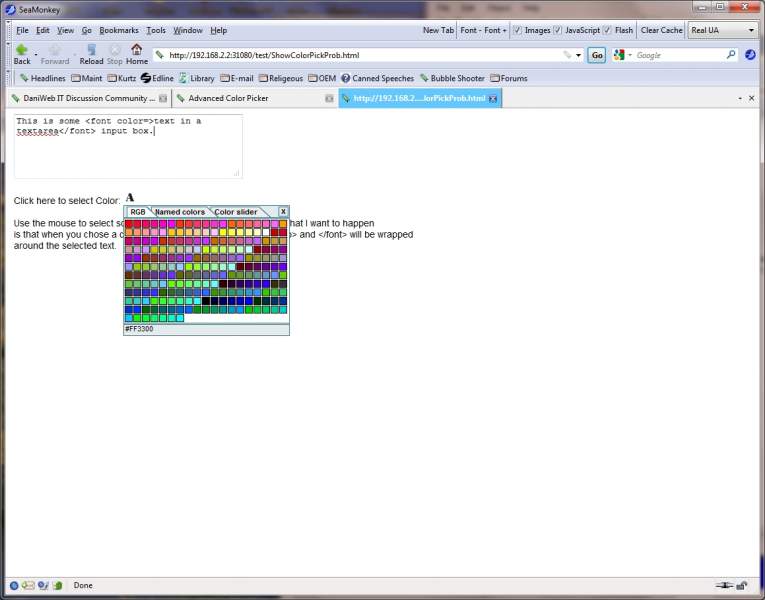
This is what it looks like when I run it:
As you can see (hopefully) the insert of the font tags occurs before I get a chance to select a color from the color picker.
Here is the code:
<!DOCTYPE html PUBLIC "-//W3C//DTD XHTML 1.0 Transitional//EN" "http://www.w3.org/TR/xhtml1/DTD/xhtml1-transitional.dtd">
<html xmlns="http://www.w3.org/1999/xhtml" xml:lang="en" lang="en">
<head>
<META http-equiv="Content-Style-Type" content="text/css"></meta>
<meta http-equiv="Content-Type" content="text/html; charset=iso-8859-1"></meta>
<meta name="GENERATOR" content="Mozilla/7.1b [en] (WinXP; U) [Netscape]"></meta>
<link rel="stylesheet" href="js_color_picker_v2.css" media="screen">
<script src="color_functions.js"></script>
<script type="text/javascript" src="js_color_picker_v2.js"></script>
</head>
<body>
<SCRIPT LANGUAGE="JavaScript">
// ---------------------------------------------------------------------------
// Choose a color then apply to the selected area text of the inut area.
// ---------------------------------------------------------------------------
function pickColor($obj1)
{
showColorPicker($obj1,document.forms[0].rgb2)
$color=document.forms[0].rgb2.value
//alert($color)
var $tb = document.getElementById("textinput");
if (document.selection)
{
var str=document.selection.createRange().text;
if (str != '' && str!= 'undefined')
{
var sel=document.selection.createRange();
sel.text="<font color="+$color+">"+str+"</font>";
}
}
else if (typeof $tb.selectionStart != 'undefined')
{
var $before, $after, $selection;
if ($tb.selectionStart == 0) // Starts at left edge?
$before = ''; // No before then
else
$before= $tb.value.substring(0, $tb.selectionStart);
$selection = $tb.value.substring($tb.selectionStart, $tb.selectionEnd);
if ($selection != "")
{
if ($tb.selectionEnd == $tb.value.length) // Ends at left edge?
$after = ''; // No after then
else
$after = $tb.value.substring($tb.selectionEnd, $tb.value.length);
$tb.value= String.concat($before, "<font color="+$color+">",$selection,"</font>",$after);
}
}
$tb.focus();
return false;
}
</SCRIPT>
<form name=form1 action=writemessage.html method=post>
<textarea id=textinput name=data rows=5 cols=40>This is some text in a textarea input box.</textarea>
Click here to select Color: <img src=colorPicker.png alt='Pick a color' title='Pick a color' onClick="pickColor(this)">
Use the mouse to select some of the text then click the A above. What I want to happen
is that when you chose a color the appropriate <font color=#rrggbb> and </font> will be wrapped
around the selected text.
<input type=hidden size="10" maxlength="7" name="rgb2">
</form>
</body>
</html>