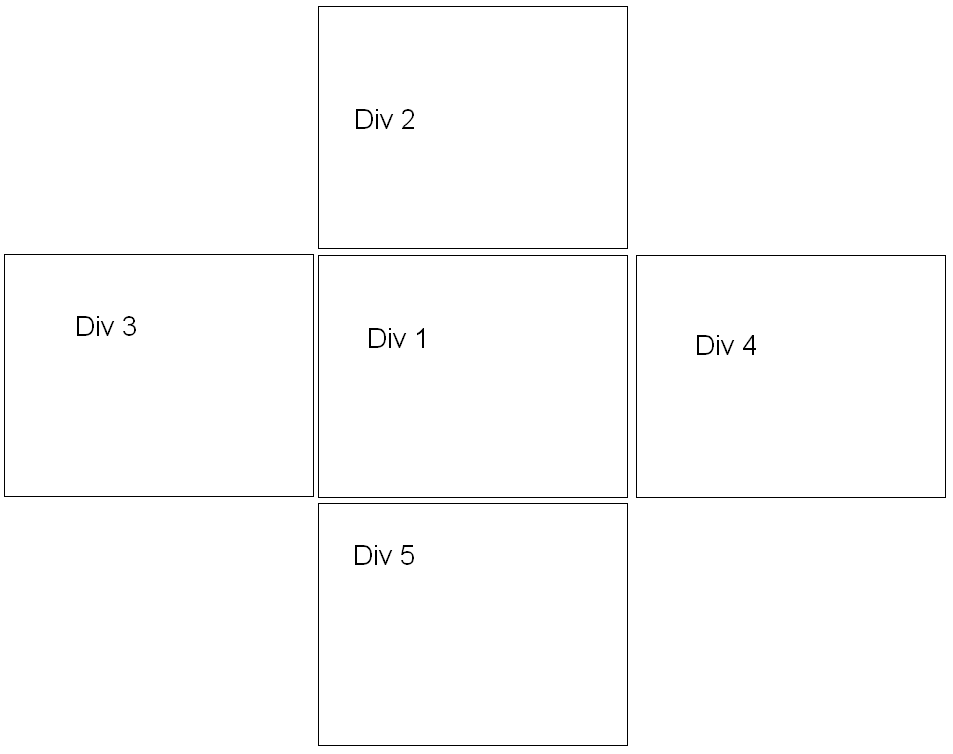
How to fix position of first div at center and add more div around first div as per requirement, to, left, right, top and bottom and scroll to that div using fix navigation at top of page

Dani AI

Generated

: 's absolute-position idea can work for fixed, small elements, but for five full-screen panels a scrollable 3x3 layout is easier to manage and to scroll programmatically. Put a wrapper sized to the viewport (100vw/100vh) with overflow:auto, then a CSS Grid inside with three columns and three rows (each 100vw/100vh). Place the center panel in the middle cell and the four neighbors in the adjacent cells. On load set the wrapper scroll position to the center cell (left = 1 innerWidth, top = 1 innerHeight). For navigation use the wrapper's scrollTo or call Element.scrollIntoView with smooth behavior so each panel animates into place.

Account for the fixed top nav by using CSS scroll-padding-top on the scroll container (set it to the header height) so scrollIntoView lands the panel below the header. Recompute scroll targets on window resize and be aware of mobile 100vh quirks (use a JS-set CSS variable for true viewport height if needed). See CSS Grid Layout and Element.scrollIntoView for details, and scroll-padding for header offsets.

Example snippets (structure only):

/* wrapper fills viewport and scrolls; adjust headerHeight */
.scroll-wrap {
  width: 100vw;
  height: 100vh;
  overflow: auto;
  scroll-behavior: smooth;
  scroll-padding-top: 60px;
}

/* 3x3 grid of full-window cells */
.grid {
  display: grid;
  grid-template-columns: 100vw 100vw 100vw;
  grid-template-rows: 100vh 100vh 100vh;
  width: 300vw;
  height: 300vh;
}
const wrap = document.querySelector('.scroll-wrap');
// center on load
wrap.scrollLeft = window.innerWidth;
wrap.scrollTop  = window.innerHeight;

// simple navigation: col,row in 0..2
function goTo(col, row) {
  wrap.scrollTo({ left: col * window.innerWidth, top: row * window.innerHeight, behavior: 'smooth' });
}

Recommended Answers

All 2 Replies

I will use absolute position styel for all five divs like shown below, just change top left for others

#div1 {
position:absolute;
top:1px;
left:300px;
}

How to scroll to each div when all div's are of 100% height and width ?

Be a part of the DaniWeb community

We're a friendly, industry-focused community of developers, IT pros, digital marketers, and technology enthusiasts meeting, networking, learning, and sharing knowledge.