I have this small project to mine that I am using to learn web development but I've been stuck at a certain point now with AJAX for 3 days now. I have this ajax code that is supposed to submit to a PHP file.

function submitArticle() { 
               xhr = new ajaxValue();
               function ajaxValue() {
                    try {
                         xhr = new XMLHttpRequest();                         
                      }
                      catch(e) {
                                try {
                                  var  xhr = new ActiveXObject("Microsoft.XMLHTTP");
                                }
                        catch(e) {
                                    try {
                                       var  xhr = new ActiveXObject("Msxml2.XMLHTTP");
                                    }
                                    catch(e) {
                                      alert("Your Browser is not Supported");

                                    }
                        }                          
                      }
                      return xhr;
                 }                                                                         

               var postTitle = document.getElementById('postTitle');
               var postDes   = document.getElementById('postDes');
               var postCont  = document.getElementById('postCont');   
               var data = "postTitle=" + postTitle + "&postDes=" + postDes + "&postCont=" + postDes;                            
               var url = '../engine/engine.php';
               xhr.open('POST', url , true);
               xhr.setRequestHeader("Content-type", "application/x-www-form-urlencoded");   
               xhr.send(data);                
               xhr.onreadystatechange = function() {
                      if(this.readyState === 4 && this.status ===200) {                     
                             alert(this.responseText);
                          }
                          else {
                            alert("status " + this.status);
                            alert("readyState " + this.readyState);
                      }
                  }           

              }

The problem i am facing is that I get an status of 0 where as my readyState is 4 which is the right value that I should get. I am confused on how to debug this sort of error. I have read a couple of articles and I am still confused on where I am going wrong.

    <?php             
        include_once('database.php');
        if (isset($_POST['blogsubmit']) ) {
            $title   =  $_POST['postTitle'];
            $summary =  $_POST['postDes'];
            $content =  $_POST['postCont'];
            insertPost($title,$summary,$content);
        }            
        else {
            return false;
        }
        function insertPost($title,$summary,$content) { 
            $query = "INSERT INTO `blogposts` SET
                    `title`     = '{$title}',
                    `summary`   = '{$summary}',             
                    `content`   = '{$content}' ";

            mysql_query($query) or die(mysql_error());
            echo "yattaa";                  
        } 
        ?>    

if it helps, this is how my folders and files are located
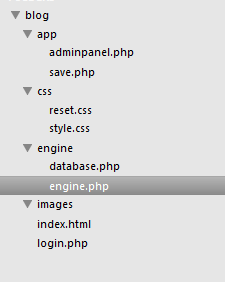
3d959f7221ca35c015d9086dbfabf6c0
adminpanel.php is where the javascript code is located

Dani AI

Generated

, a few things in your snippet explain both the status 0/readyState 4 and the empty response.

  • You are building the payload from DOM nodes, not their values, and postCont is using the description by mistake. Use .value and URL-encode. Also send the blogsubmit flag your PHP expects.
  • Register handlers before send(), and add onerror so you can see true network failures.
function submitArticle() {
  var postTitle = document.getElementById('postTitle');
  var postDes   = document.getElementById('postDes');
  var postCont  = document.getElementById('postCont');

  var data = 'blogsubmit=1'
    + '&postTitle=' + encodeURIComponent(postTitle.value)
    + '&postDes='   + encodeURIComponent(postDes.value)
    + '&postCont='  + encodeURIComponent(postCont.value);

  var xhr = new XMLHttpRequest();
  xhr.open('POST', '../engine/engine.php', true);
  xhr.setRequestHeader('Content-Type', 'application/x-www-form-urlencoded; charset=UTF-8');
  xhr.onload = function () {
    if (xhr.status === 200) alert(xhr.responseText);
    else alert('HTTP ' + xhr.status);
  };
  xhr.onerror = function () {
    alert('Network error (status 0).');
  };
  xhr.send(data);
}

About status 0: browsers report 0 before completion and also on network errors, so a 0 with readyState 4 usually means the request failed at the transport layer (blocked, aborted, or never reached the server). (developer.mozilla.org) If you are opening the page via file://, or the request is cross-origin or mixed-content, you can also see status 0; serve over HTTP(S) from the same origin and retest. ()

Your update saying "status 2 and readyState 200" is inverted. readyState is 0..4 (2 means headers received), while status is the HTTP code (200 means OK). I agree with : gate on readyState === 4 or just rely on onload. (developer.mozilla.org)

Last tip: when hand-rolling form bodies, always encodeURIComponent each value to avoid breaking on &, = or spaces. (developer.mozilla.org)

Recommended Answers

All 2 Replies

a small update I have made some changes to the code now the javascript code looks like this

function submitArticle() { 
           xhr = new ajaxValue();
           function ajaxValue() {
                try {
                     xhr = new XMLHttpRequest();                         
                  }
                  catch(e) {
                            try {
                              var  xhr = new ActiveXObject("Microsoft.XMLHTTP");
                            }
                    catch(e) {
                                try {
                                   var  xhr = new ActiveXObject("Msxml2.XMLHTTP");
                                }
                                catch(e) {
                                  alert("Your Browser is not Supported");

                                }
                    }                          
                  }
                  return xhr;
             }                                                                         

           var postTitle = document.getElementById('postTitle');
           var postDes   = document.getElementById('postDes');
           var postCont  = document.getElementById('postCont');   
           var data = "postTitle=" + postTitle + "&postDes=" + postDes + "&postCont=" + postDes;                            
           var url = '../engine/engine.php';
           xhr.open('POST', url , true);
           xhr.setRequestHeader("Content-type", "application/x-www-form-urlencoded");   
           xhr.send(data);                
           xhr.onreadystatechange = function() {
                  if(this.readyState === 4 && this.status ===200) {                     
                         alert(this.responseText);
                      }
                      else {
                        alert("status " + this.status);
                        alert("readyState " + this.readyState);
                  }
              }           
           return false;                                                                                                                                                                                                                                         
          }

Now im getting a status of 2 and a readyState of 200 but I'm still stuck with no results from the responseText. Please help

Ok well first I would change your onreadystatechange function a little. he way it is will cause the "else" block to execute very often.

I would reccomend first checking that the readyState == 4, if it's not then just return. The readyState will become 4 when the request is finished (whether it errors out or not) so it's not worth doing anyhting with until it reaches that state.

 xhr.onreadystatechange = function() {
                if(this.readyState !== 4) return;

                if(this.status === 200) {                     
                         alert(this.responseText);
                }
                else {
                    alert("status " + this.status);
                    alert("readyState " + this.readyState);
                }
              };           

So the two things I changed was the readyState check and added the semicolon at the end of the statement. Since you are assigning an anonymous function you need the end semicolon. Also, keep in mind you are using the strict comparison operators (=== and !==). This is good but make sure that the datatypes are exactly the same or else the "if" block will never get run.

Be a part of the DaniWeb community

We're a friendly, industry-focused community of developers, IT pros, digital marketers, and technology enthusiasts meeting, networking, learning, and sharing knowledge.