hello.

I have a table populated by name. The names are links when clicked will pop up a form for editing. each input (for editing) is populated by the equal value from database but im having trouble with one particular text box. this text box is for date of birth and it only shows part of the data. for example in the database dob is 2 January 1993 in the popped up form it only shows 2. the rest of the input are fine and display full data its just this one.

php code:

<?php
$contact = $_GET['contact'];

require "connection.php";

$getcontact = $dbh->prepare("SELECT * FROM contact1 WHERE contact_id = ? ");
$getcontact->bindParam(1, $contact, PDO::PARAM_INT);
$getcontact->execute();
if($getcontact->rowCount() > 0){

$getcontact->setFetchMode(PDO::FETCH_ASSOC);
while($row = $getcontact->fetch()){

echo "<form action=\"updateContact.php\" method=\"POST\">
        <fieldset class=\"updatecontact\">
                <label>Update Contact</label><br><br>
                    <input type=\"hidden\" name=\"contactid\" value=".$row['contact_id'].">
                    <label>Salutation :</label>
                    <select name=\"salutations\"  >
                        <option value=". $row['salutation'] ." selected>". $row['salutation'] ."</option>
                        <option value=\"Datin\">Datin</option>
                        <option value=\"Datin Paduka\">Datin Paduka</option>
                        <option value=\"Dato Paduka\">Dato Paduka</option>
                    </select><br>
                <label>First Name :</label><input type=\"text\" name=\"fname\" class=\"style\" value=". $row['fname'] .">
                <label>Last Name :</label><input type=\"text\" name=\"lname\"  class=\"style\" value=". $row['lname'] .">

                //THIS IS THE DOB INPUT that has the problem
                <label>Date of Birth : </label>
                <input type=\"text\" name=\"dob\" value=".$row['dob']."><br><br>


                <label>House Address :</label><textarea name=\"line1\" rows=\"2\" cols=\"20\">". $row['house'] ."</textarea>
                <label>Mobile No :</label><input type=\"text\" name=\"mobile\" class=\"style\" value=". $row['mobile'] .">
                <label>Office No :</label><input type=\"text\" name=\"office\" class=\"style\" value=". $row['office'] .">
                <label>Email Address : </label><input type=\"email\" name=\"email\" class=\"style\" value=". $row['email'] .">
        </fieldset>
        <br>
        <div><input type=\"submit\" name=\"updateC\" value=\"Update\" />
        <input type=\"button\" name=\"cancel\" value=\"Cancel\" /></div>
    </form>";
    }
}

?>

i have tried declaring the variable one by one and referencing them like:

$dob = $row['dob];

value= ".$dob."

but still get the same partially displayed data. also the php is the only coding in the page. no other coding, like js.

TIA!
Dani AI

Generated

A quick diagnosis and compact fix.

The visible symptom (DOB showing only "2" for "2 January 1993") is classic HTML parsing: an attribute written without quotes ends at the first whitespace, and an attribute quoted with single quotes will break if the value contains an apostrophe. That explains both the whitespace truncation and the later apostrophe-related truncation. Several helpful checks in the thread led to the root causes: @urtivedi advised verifying the DB value, suggested inspecting view‑source/quotes, noted the column type, and hinted at escaping. confirmed that escaping the output resolved the issue.

Prefer these practical steps and patterns:

  • Always wrap attribute values in quotes and escape output for HTML attributes (handle both double and single quotes and the page charset).
  • Store dates in a DATE/DATETIME column and normalize when outputting; consider using an HTML5 date input for consistent browser behavior.
  • Reduce large echo blocks — mix HTML and small PHP echoes to avoid quoting mistakes.

Example patterns (embed safely into the page):

<input type="text" name="dob" value="<?php echo htmlspecialchars($row['dob'], ENT_QUOTES, 'UTF-8'); ?>">

For an HTML5 date field (DB value formatted to YYYY-MM-DD):

<input type="date" name="dob" value="<?php echo htmlspecialchars(date('Y-m-d', strtotime($row['dob'])), ENT_QUOTES, 'UTF-8'); ?>">

Quick debug checklist:

  • View page source to confirm the full attribute value is present.
  • Inspect the input element in the browser DOM (Developer Tools) to see how the browser parsed it.
  • Confirm database storage type and raw value in phpMyAdmin.
  • Ensure the page sends the correct charset meta (e.g., UTF-8).

Summary: always quote attributes and escape injected values, use proper DB types for dates, and prefer embedding small PHP expressions in HTML to avoid quoting/concatenation mistakes.

Recommended Answers

All 13 Replies

run this query in phpymyadmin for whom you are clicking on name link
and see how dob column appears in phpmyadmin result

SELECT * FROM contact1 WHERE contact_id = yournumber

i did as u asked and the record of the contact_id is the result(full) urtivedi. like i said all results display except dob which displays partial data in the edit contact form.

Member Avatar for Member #120589

Is there any reason why you're creating all this html from php? Anyway, show a screenprint of "view source" in your browser. Are there any quotes in the dob value?

Check your database. Is the date column set to "date" and/or did you make it big enough to display what you want?

commented: good thinking +14

david, thanks. it was not set to dat in database it was set to varchar, my bad. but now its happening to a different text box.

$event = $_GET['event'];

    require "connection.php";

    $getevent = $dbh->prepare("SELECT * FROM event WHERE event_id = :event");
    $getevent->bindParam(':event', $event, PDO::PARAM_INT);
    $getevent->execute();
    if($getevent->rowCount() > 0)
    {

        $getevent->setFetchMode(PDO::FETCH_ASSOC);
        while($row = $getevent->fetch()) 
        {
            $id = $row['event_id'];
            $name = $row['event_name'];


            echo "
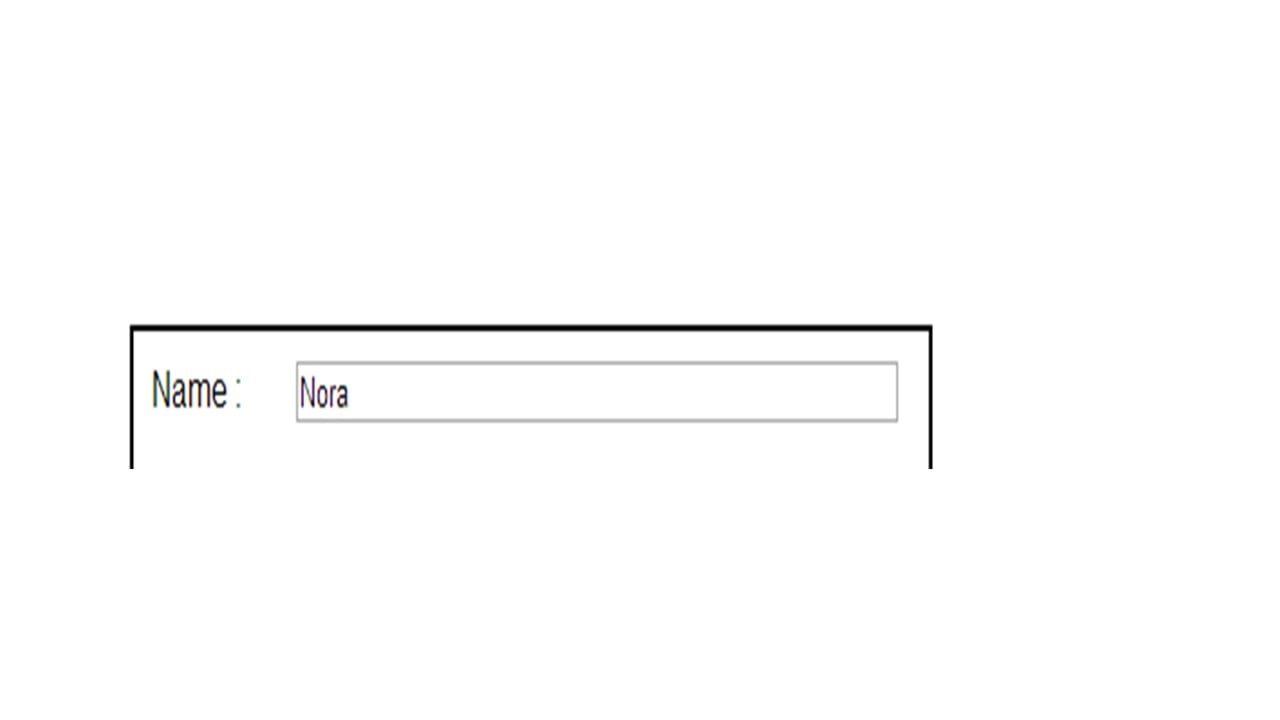
<label>Name : </label><input type='text' name='event_n' size='50' value='$name'>";
        }
    }

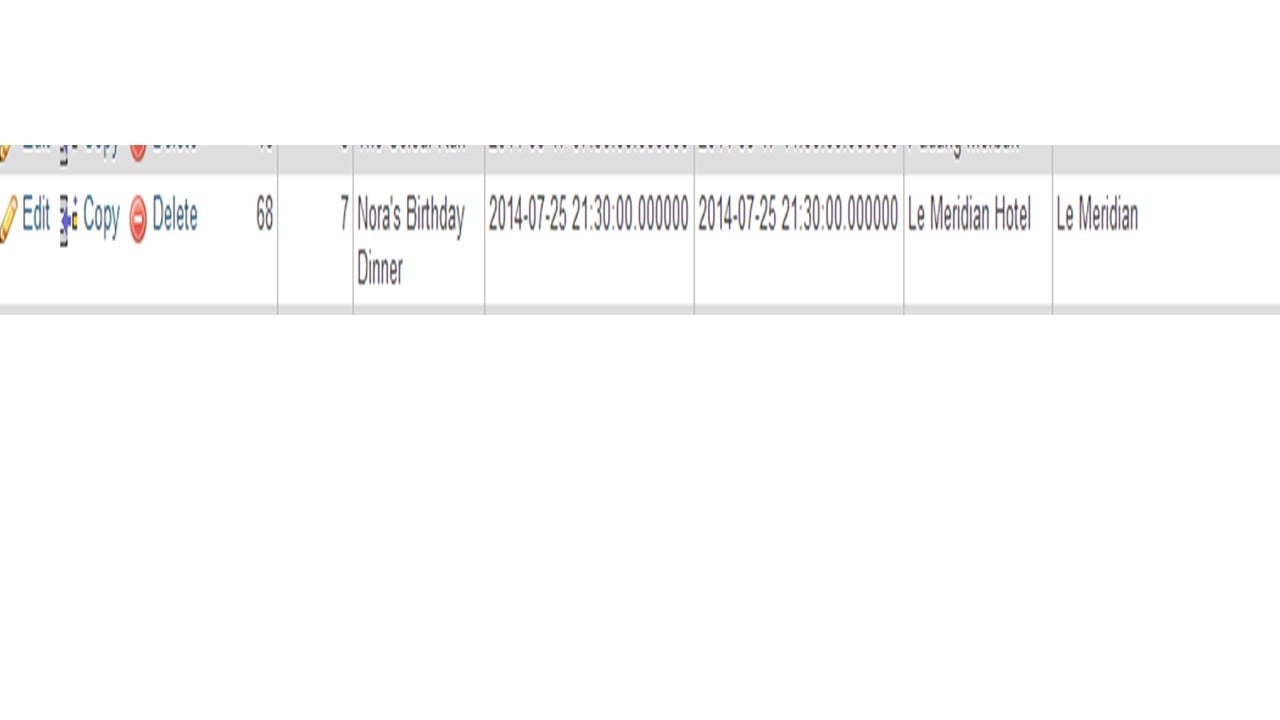
in database:

event_name varchar(255) latin1_swedish_ci

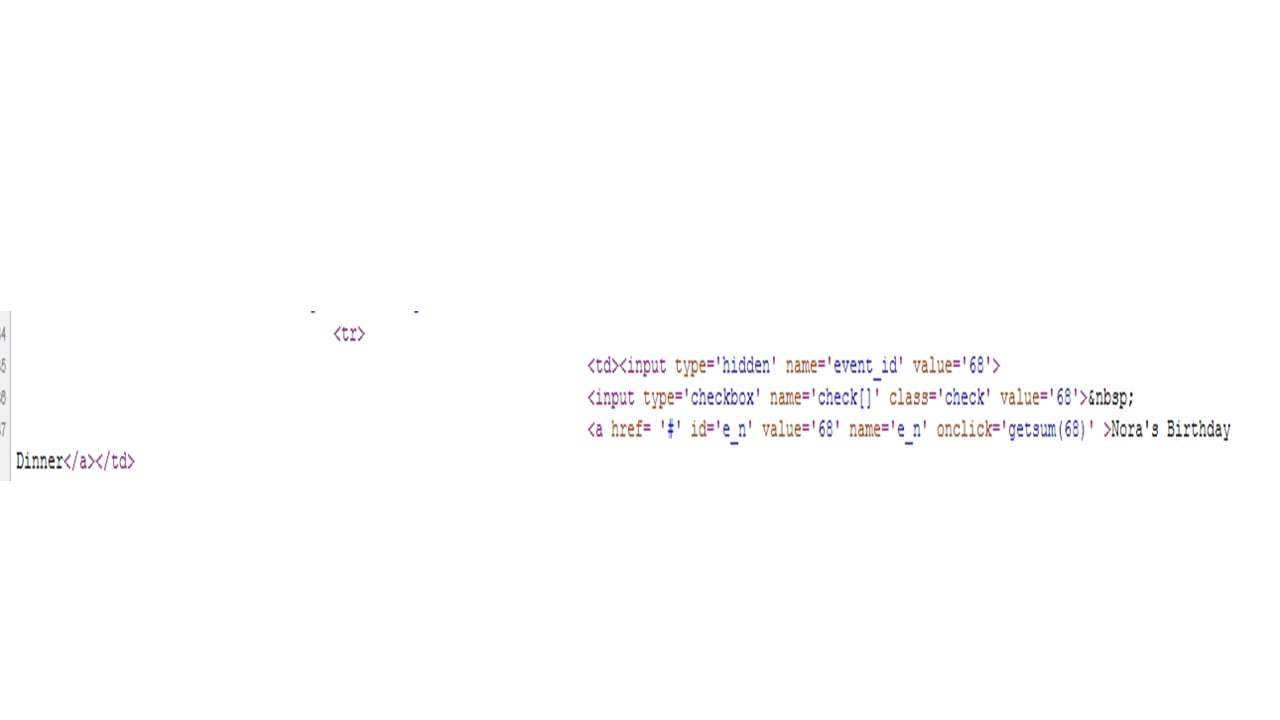
in "view page source", it does show the name full:
4ae5b1c8d7bc6ef704cbf0826bf98c26

real page:
9af574e2d166d2b8c94440b63e1706ca

Member Avatar for Member #120589

Have you checked that the complete data is present in the database table record itself? Check phpmyadmin or your favourite GUI.

yup in the database it is complete.

9b912ece4192173ca5a7b8a44b9e46b2

This post has no text-based content.

Is it the single quotation in the data that messes up the display? Have you tried escaping any characters like that (single/double quotation) in your display?

try changing the size in your input box? You have it set to 50 characters.

<label>Name : </label><input type='text' name='event_n' ***size='50'*** value='$name'>";

yes, i think taywin is correct. it is the single quotation i think. because for the particular data that i uploaded(the pictures)it has apostrophe while another data does not and displays data as full. trying to fix that now.

fixed using: $newname = htmlspecialchars($name,ENT_QUOTES);

Member Avatar for Member #120589

I think this was intimated earlier:

Are there any quotes in the dob value?

This is happening because you are using php to spit out all your html. This can be easily avoided if you're a bit more judicious with it, e.g.

<sometag><?php echo $somevalue;?></sometag>

or on modern versions of php:

<sometag><?= $somevalue ?></sometag>

Instead of

echo "<sometag>$somevalue</sometag>";

Minimise the amount of html you create via php, it rarely plays well.

Be a part of the DaniWeb community

We're a friendly, industry-focused community of developers, IT pros, digital marketers, and technology enthusiasts meeting, networking, learning, and sharing knowledge.