Hi guys, I have an application which allows users to upload a file. I managed to limit the types of files they can upload (the accept property helped) but I also want to do something else: when you upload a file and you click the browse button, as we know, an OS window with your local file system opens up and you can select your file from there. On this window, on the bottom right there is usually a drop down list of files, which shows which files you can upload as default selection. But you can open that menu and upload any file. Now, is there any way to change the list in that drop down list and have only the allowed files rather than all the possible file types? I know it's possible with jquery plugins, but can it be done without plugins and just with jquery or pure javascript?
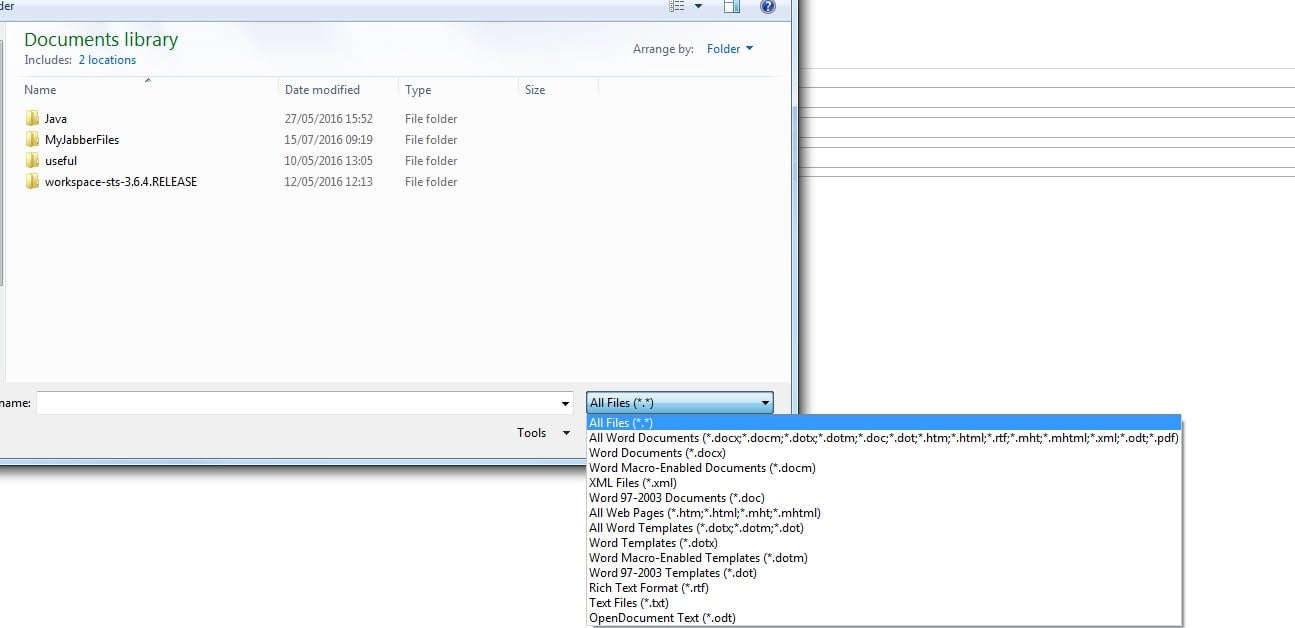
In case you're not sure what I'm talking about, here is an image which has that list displayed, I want to be able to change the options in there
fileSelection.jpg

Dani AI

Generated

Short answer: you cannot programmatically change the native file‑picker’s dropdown entries for a regular input type="file". The accept attribute only provides a hint to the browser/OS picker (how that hint is shown is up to the user agent), so you’ll still normally see an “All files” option or a different, combined label supplied by the OS/browser. (developer.mozilla.org)

Why you see that behavior: the file dialog UI is provided by the browser/operating‑system, not by web page JavaScript. Browsers map your accept specifiers to native filters in different ways (grouping extensions, showing generic categories like “Image files”, and keeping an “All files” override). The HTML spec purposely leaves the exact UI to the user agent. That means you can influence the picker (use extensions and/or MIME types) but you can’t remove or fully control the dropdown from the page. (html.spec.whatwg.org)

If you need stricter control in modern Chromium browsers, the File System Access API lets you open a picker and request specific filters — including an option to hide the “All files” choice (excludeAcceptAllOption: true). This requires a secure context, a user gesture, and browser support, so always feature‑detect and provide a fallback. Example (simplified):

const opts = {
  types: [{ description: "Images", accept: { "image/*": [".png", ".jpg"] } }],
  excludeAcceptAllOption: true
};
const [handle] = await window.showOpenFilePicker(opts);

See the File System Access docs and compatibility notes. (developer.mozilla.org)

Practical checklist: keep using accept on <input> as a hint, validate server‑side (and check file contents/mime), test on the OS/browser combos your users use, and consider the File System Access API for a desktop‑like picker where supported — but never rely on client UI for security. (developer.mozilla.org)

Recommended Answers

All 4 Replies

jkon, I'm already doing both these things but the value of the accept attribute is not reflected inside the dropdown box. The image attached above was just a demonstration, but the gist of it is that, my accept attribute has something like ".jpeg,.png" but inside the dropdown when I try to upload a file in my own application I don't get
.jpeg
.png
I only get all files and custom (or something along those lines, I don't have the application here with me right now)

Hello Violet,
Take a moment to read the links provided before answering , the input file accept doesn't take value as “.jpeg,.png” that you described , it takes value like e.g. “image/png,image/jpeg” or “image/*”. Also take a look the “can I use” link that I provided to you to find out what each browser support or not. Don't forget to validate the file type also client side but most important server side.

OK, sorry, I replied too quickly, let me update my app and see where I get to

Be a part of the DaniWeb community

We're a friendly, industry-focused community of developers, IT pros, digital marketers, and technology enthusiasts meeting, networking, learning, and sharing knowledge.