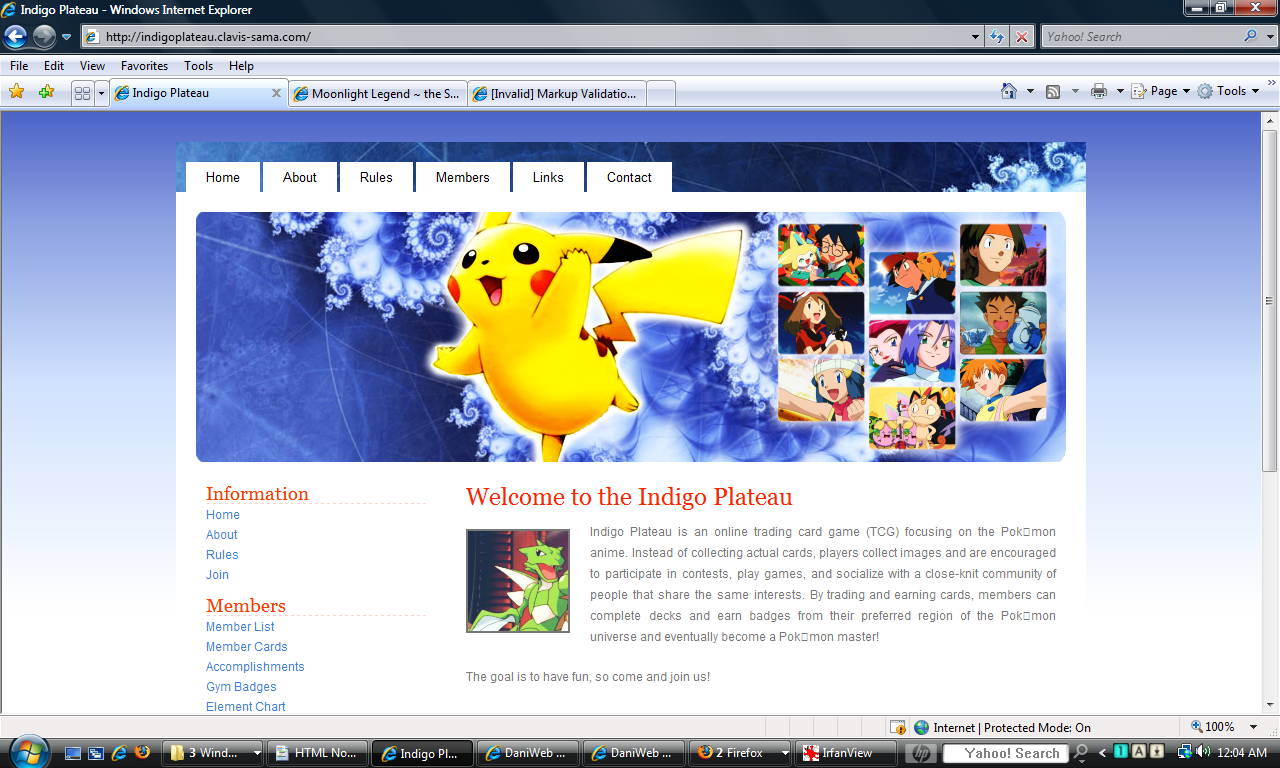
Like probably half of the people on this forum, I am definitely a beginniner when it comes to CSS. Since I don't trust my own codes just yet, I've been using a free layout to help generate a fan site for a friend. The site makes ample use of CSS and PHP code and relies rather heavily on div tags, but I've edited it with (seemingly) no problems and it seems to work just fine in IE.
My issue is that the header completely disappears and the whole page becomes a single column in everything except IE. I've attached screenshots of the window viewed in Internet Explorer and Firefox for reference.
I really want to be able to understand what is going wrong here, so would greatly appreciate some advice from people who are more knowledgeable about it than me. Thanks in advance, and I hope someone can help.
The CSS:
/*
Design by Free CSS Templates
http://www.freecsstemplates.org
Released for free under a Creative Commons Attribution 2.5 License
*/

body {
	margin: 20px;
	background: url(images/bg2.png) repeat-x;
	font-family: Arial, Helvetica, sans-serif;
	font-size: 12px;
	color: #787878;
}

h1, h2, h3 {
	margin: 0;
	font-family: Georgia, "Times New Roman", Times, serif;
	font-weight: normal;
	color: #F93D00;
}

h1 {
	font-size: 2em;
}

h2 {
	font-size: 1.6em;
}

h3 {
	font-size: 1.6em;
}

p, ul, ol {
	margin-top: 0;
	line-height: 180%;
}

ul, ol {
}

a {
	text-decoration: none;
	border-bottom: 1px dotted #999999;
	color: #417FDA;
}

a:hover {
	background: none;
}

#wrapper {
	width: 910px;
	margin: 0 auto;
	padding: 20px;
}

img.left {
	float: left;
	margin: 8px 20px 0px 0px;
	border: 2px solid #787878;
}

/* Avatar */

#avatar {

        {
	float: left;
	margin: 8px 20px 0px 0px;
	border: 2px solid #787878;
}

/* Header */

#header {
	width: 910px;
	height: 50px;
	margin: 0 auto;
}

/* Logo */

#logo {
	float: left;
	width: 640px;
	color: #FFFFFF;
}

#logo h1, #logo p {
}

#logo h1 {
	float: left;
	padding: 0;
	letter-spacing: -1px;
	text-transform: lowercase;
	font-size: 2.6em;
}

#logo p {
	float: left;
	margin: 0;
	padding: 10px 10px;
	font: normal 14px Georgia, "Times New Roman", Times, serif;
	font-style: italic;
}

#logo a {
	border: none;
	background: none;
	text-decoration: none;
	color: #FFFFFF;
}

/* Search */

#search {
	float: right;
	width: 230px;
	padding: 0;
}

#search form {
	height: 41px;
	margin: 0;
	padding: 70px 0 0 0px;
}

#search fieldset {
	margin: 0;
	padding: 0;
	border: none;
}

#search-text {
	width: 210px;
	border: none;
	text-transform: lowercase;
	font: bold 1.2em Arial, Helvetica, sans-serif;
	color: #FFFFFF;
}

#search-submit {
	display: none;
}


#banner {
	width: 870px;
	height: 250px;
	margin: 0 auto;
	padding: 0;
	background: url(images/header2.png) no-repeat left top;
}
/* Menu */

#menu {
	width: 910px;
	height: 50px;
	margin: 0 auto;
	padding: 0;
	background: #565F68 url(images/top1b.png) no-repeat left top;
}

#menu ul {
	margin: 0;
	padding: 0;
	padding-left: 10px;
	list-style: none;
	line-height: normal;
}

#menu li {
	float: left;
}

#menu a {
	display: block;
	margin-top: 20px;
	margin-right: 3px;
	padding: 7px 20px 7px 20px;
	background: #FFFFFF;
	text-decoration: none;
	font-family: Arial, Helvetica, sans-serif;
	font-size: 13px;
	color: #000000;
	border: none;
}

#menu a:hover, #menu .current_page_item a {
}

#menu a:hover {
	text-decoration: underline;
}

/* Page */

#page {
	width: 910px;
	margin: 0 auto;
	padding-top: 20px;
	background: #FFFFFF;
}

/* Content */

#content {
	float: right;
	width: 590px;
	padding: 20px 30px 0 0;
}

.post {
}

.post .title {
	color: #000000;
}

.post .title a {
	background: none;
	color: #FB2600;
	border: none;
}

.post .title a:hover {
	text-decoration: underline;
}

.post .meta {
	border-bottom: 1px dashed #D2D4C9;
	padding-bottom: 5px;
	text-align: left;
	font-family: Arial, Helvetica, sans-serif;
	font-size: 11px;
	font-style: italic;
}

.post .entry {
	padding: 10px 0 20px 0;
	text-align: justify;
}

/* Sidebar */

#sidebar {
	float: left;
	width: 220px;
	padding: 20px 0 0 30px;
	color: #787878;
}

#sidebar ul {
	margin: 0;
	padding: 0;
	list-style: none;
}

#sidebar li {
	margin: 0;
	padding: 0;
}

#sidebar li ul {
	padding-bottom: 10px;
}

#sidebar li li {
	line-height: 20px;
}

#sidebar li li span {
	display: block;
	margin-top: -20px;
	padding: 0;
	font-size: 11px;
	font-style: italic;
}

#sidebar h2 {
	letter-spacing: -.5px;
	color: #F93D00;
border-bottom: 1px dashed #F9D1CB;
}

#sidebar p {
	padding-bottom: 20px;
	text-align: justify;
}

#sidebar a {
	color: #417FDA;
	border: none;
}

#sidebar a:hover {
	text-decoration: underline;
	color: #787878;
}

/* Calendar */

#calendar {
}

#calendar_wrap {
	padding: 20px;
}

#calendar table {
	width: 100%;
}

#calendar tbody td {
	text-align: center;
}

#calendar #next {
	text-align: right;
}

/* Footer */

#footer {
	width: 910px;
	height: 20px;
	margin: 0 auto;
	padding: 20px 0 15px 0;
	background: url(images/bottom1b.png) no-repeat left top;
	font-family: Arial, Helvetica, sans-serif;
	color: #B2B2B2;
}

#footer p {
	margin: 0;
	line-height: normal;
	font-size: 9px;
	text-transform: uppercase;
	text-align: center;
}

#footer a {
	color: #FFFFFF;
}
The HTML (saved as a php document):
<!DOCTYPE html PUBLIC "-//W3C//DTD XHTML 1.0 Strict//EN" "http://www.w3.org/TR/xhtml1/DTD/xhtml1-strict.dtd">
<html xmlns="http://www.w3.org/1999/xhtml">
<head>
<meta name="keywords" content="" />
<meta name="description" content="" />
<meta http-equiv="content-type" content="text/html; charset=utf-8" />
<title>Indigo Plateau</title>
<link href="style.css" rel="stylesheet" type="text/css" media="screen" />
</head>
<body>
<!-- end #header -->
<div id="menu">
<ul>
<li><a href="#">Home</a></li>
<li><a href="#">About</a></li>
<li><a href="#">Rules</a></li>
<li><a href="#">Members</a></li>
<li><a href="#">Links</a></li>
<li><a href="#">Contact</a></li>
</ul>
</div>
<!-- end #menu -->
<div id="page">
<div id="banner"> </div>
<div id="content">
<div class="post">
<h1 class="title"><a href="#">Welcome to the Indigo Plateau</a></h1>
<div class="entry">
<p><img src="images/scyther1.png" alt="" width="100" height="100" class="left">Indigo Plateau is an online trading card game (TCG) focusing on the Pokemon anime. Instead of collecting actual cards, players collect images and are encouraged to participate in contests, play games, and socialize with a close-knit community of people that share the same interests. By trading and earning cards, members can complete decks and earn badges from their preferred region of the Pokemon universe and eventually become a Pokemon master!</p>
<p>The goal is to have fun, so come and join us! </p>
</div>
</div>
<div class="post">
<h2 class="title"><a href="#">Updates</a></h2>
<?PHP
$template = "Default";
$number=5;
include("/home/.lafayette/indigoplateau/indigoplateau.clavis-sama.com/cutenews/cutenews/show_news.php");
?>
</div>
</div>
<!-- end #content -->
<div id="sidebar">
<ul>
<li>
<h2>Information</h2>
<ul>
<li><a href="index.php">Home</a></li>
<li><a href="#">About</a></li>
<li><a href="#">Rules</a></li>
<li><a href="#">Join</a></li>
</ul>
</li>
<li>
<h2>Members</h2>
<ul>
<li><a href="#">Member List</a></li>
<li><a href="#">Member Cards</a> </li>
<li><a href="#">Accomplishments </a></li>
<li><a href="badges.php">Gym Badges</a></li>
<li><a href="#">Element Chart</a></li>
</ul>
</li>
<li>
<h2>Activities</h2>
<ul>
<li><a href="games.php">Games</a></li>
<li><a href="#">Donations</a></li>
<li><a href="#">Forum</a></li>
<li><a href="#">Forms/Services</a></li>
<li><a href="vote.php">Vote!</a></li>
</ul>
</li>
<li>
<h2>Site</h2>
<ul>
<li><a href="#">Link to Us</a></li>
<li><a href="#">Affiliates</a></li>
<li><a href="#">Credits</a></li>
<li><a href="#">Staff Pay</a></li>
<li><a href="randomizer.php">Randomizer</a></li>
</ul>
</li>
</ul>
</div>
<!-- end #sidebar -->
<div style="clear: both;"> </div>
</div>
<!-- end #page -->
<div id="footer">
<p>Copyright (c) 2008 Sitename.com. All rights reserved. Design by <a href="http://www.freecsstemplates.org/">Free CSS Templates</a>.</p>
</div>
<!-- end #footer -->
</div>
</body>
</html>