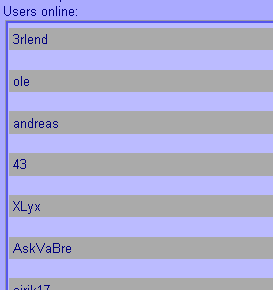
Hi! I am making a chat program, I am currently making the online list. All elements (users that are online) should have one gray solid background, that also is wide. so it don't look like this;


How should I do that? all the backgrounds should be just as long as each other.

Dani AI

Generated

Good direction already in the thread: 's suggestion to use a list is the semantic choice for a roster, and 's table approach can work but is really for tabular data. confirming a stray <br> was the culprit is a useful debugging reminder — check for stray markup and cell spacing before changing layout.

Make each user row behave like a true full-width row and keep markup simple. Put the avatar and name inside an <li>, make the item a block-level row (or use flexbox) so the background fills the container, and put the clickable element (<a> or <button>) inside the row and have it fill the available space. For long names use truncation so rows stay consistent. Use borders for separators instead of extra <br>s or empty cells.

ul.online { max-width:320px; }
ul.online li { display:flex; align-items:center; padding:8px 12px; background:#f2f2f2; border-bottom:1px solid #ddd; }
ul.online li .name { flex:1; white-space:nowrap; overflow:hidden; text-overflow:ellipsis; }
ul.online li a { display:block; width:100%; }

Quick tips: ensure keyboard focus by using focusable controls, test at different widths, and inspect computed styles in devtools to spot unexpected margins/padding imposed by user-agent styles or frameworks.

Recommended Answers

All 6 Replies

You can enclose it in a table and set absolute table width that way, each user name (data) will be confined or constrained within the specified table width.

Member Avatar for Member #120589

Hmm, I wouldn't use tables. An unordered list would probably be the way to go. background-color on the 'ul' element should do the trick.

Hm but if I use an unordered list, how to get rid of the dots?

I used tables and that worked best. Thanks!

hm or... it is not so good. look at this


how to chose the distance between the TDs?

EDIT: it was just that I had one BR between all the TDs :)

Member Avatar for Member #120589

Leave the table out.

ul{
 margin:0;
 padding:0;
 background-color: red;
}
li{
 list-style:none;
 margin:0;
 padding:0;
}

change the margins/padding to suit you

Be a part of the DaniWeb community

We're a friendly, industry-focused community of developers, IT pros, digital marketers, and technology enthusiasts meeting, networking, learning, and sharing knowledge.