Hello,

The website has horizontal navigation menu, but without submenu. I want to those submenus, but I have no luck.

I try using tutorial to make new menu, and after I will make it, I just edit the style so it look similar to an earlier menu.

So I have this code for now:

#navigation{
margin-left: 15px;
width:100%;
height:30px;
background-color:#999;
}

#navigation ul
{
	margin:0px; padding:0px;
}
#navigation ul li
{
	display:inline; height:30px; float:left; list-style:none;
}
<div id="navigation">
		<ul>
			<li>Menu Item 1</li>
			<li>Menu Item 2</li>
			<li>Menu Item 3</li>
			<li>Menu Item 4</li>
		</ul>
	</div>

The earlier navigation has different id which is called 'nav', so there should not be problems.

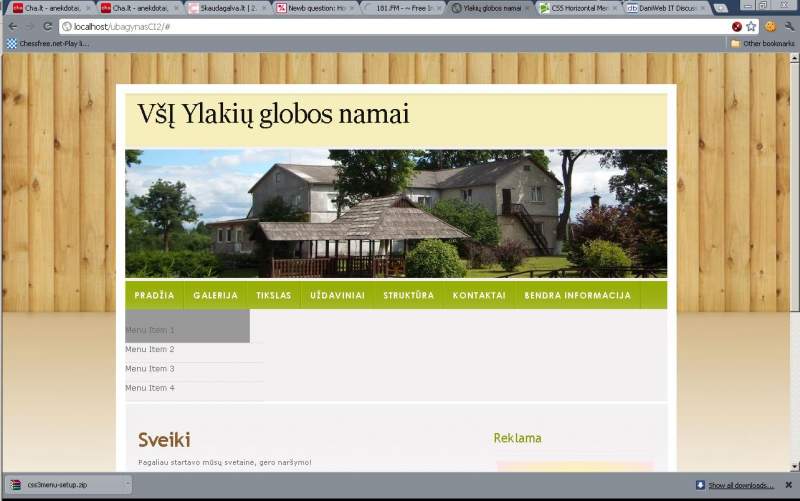
I added the picture of how it looks.

But it should already be horizontal, because there is display and float properties.

Where could be the problem with this?
Dani AI

Generated

Good outcome — the problem turned out to be a selector/ID mismatch plus a stacking-context issue. was right to point out the selector problem, and ’s followup shows how a duplicate ID and the page’s stacking context hid the dropdown until a z-index/positioning change fixed it.

Quick debugging checklist that avoids retyping code already in the thread:

  • Confirm the selector actually targets the element you think it does (a selector that looks for a descendant is different from one that targets the element with the ID). Use the browser inspector to view the Styles and Computed panels and see which stylesheet rule is applying or being crossed out. For a reference on how selectors match, see the CSS selectors guide on MDN (CSS selectors).
  • Check for duplicate IDs. IDs must be unique in the document; duplicates will cause unpredictable matches. Prefer classes for reusable nav styling and reserve IDs for unique anchors (id attribute (uniqueness)).
  • If the dropdown is rendered but appears under the page content, it’s a stacking-context issue. z-index only works on positioned elements and can be affected by parent stacking contexts (transforms, opacity, positioned ancestors). Usually the fix is to position the menu (or its parent) and give it a higher z-index. See MDN’s explanation of z-index and stacking contexts (z-index and stacking context).

Extra tips: remove redundant declarations (floating an element already makes it block-level), consider modern layout with Flexbox for horizontal navs, and account for touch and keyboard users (hover-only submenus need JS or focus handling for accessibility). For layout options and keyboard-friendly patterns, see MDN Flexbox guides and the WAI-ARIA menubar pattern.

Recommended Answers

All 5 Replies

Something like this is what you're probably looking for.

<!DOCTYPE html>
<html lang="en">
	<head>
		<style type="text/css">
			ul {							
				height: 30px;
				line-height: 30px;
				margin: 0;
				padding: 0;
			}
			ul li {
				border: 1px solid #444444;
				display: inline;
				float: left;	
				height: auto;
				line-height: 30px;
				margin-right: 18px;
			}
			ul li:first-child {
				
			}
			ul li a {
				border: none;
				display: block;
			}
			ul li a:first-child {
				
			}
			ul li ul {				
				height: auto;
				line-height: normal;
			}
			ul li ul li {
				border: none;
				display: block;
				float: none;
				margin: 0;
				padding: 0;
			}
			ul li ul li a {
				border-top: 1px solid #444444;
				display: block;
				width: 100%;
			}
		</style>
	</head>
	<body>
		<ul>
			<li>
				<a href="#">Menu 1</a>
				<ul>
					<li><a href="#">Submenu 1 Link 1</a></li>
					<li><a href="#">Submenu 1 Link 2</a></li>
					<li><a href="#">Submenu 1 Link 3</a></li>
					<li><a href="#">Submenu 1 Link 4</a></li>
				</ul>
			</li>
			<li>
				<a href="#">Menu 2</a>
				<ul>
					<li><a href="#">Submenu 2 Link 1</a></li>
					<li><a href="#">Submenu 2 Link 2</a></li>
					<li><a href="#">Submenu 2 Link 3</a></li>
					<li><a href="#">Submenu 2 Link 4</a></li>
				</ul>
			</li>
			<li>
				<a href="#">Menu 3</a>
				<ul>
					<li><a href="#">Submenu 3 Link 1</a></li>
					<li><a href="#">Submenu 3 Link 2</a></li>
					<li><a href="#">Submenu 3 Link 3</a></li>
					<li><a href="#">Submenu 3 Link 4</a></li>
				</ul>
			</li>
			<li>
				<a href="#">Menu 4</a>
				<ul>
					<li><a href="#">Submenu 4 Link 1</a></li>
					<li><a href="#">Submenu 4 Link 2</a></li>
					<li><a href="#">Submenu 4 Link 3</a></li>
					<li><a href="#">Submenu 4 Link 4</a></li>
				</ul>
			</li>
		</ul>
		<div style="clear: both;"></div>
	</body>
</html>

I inserted your code and here (added id's to make it different from existing)

<style type="text/css">
			#n ul {							
				height: 30px;
				line-height: 30px;
				margin: 0;
				padding: 0;
			}
			#n ul li {
				border: 1px solid #444444;
				display: inline;
				float: left;	
				height: auto;
				line-height: 30px;
				margin-right: 18px;
			}
			#n ul li:first-child {
				
			}
			#n ul li a {
				border: none;
				display: block;
			}
			#n ul li a:first-child {
				
			}
			#n ul li ul {				
				height: auto;
				line-height: normal;
			}
			#n ul li ul li {
				border: none;
				display: block;
				float: none;
				margin: 0;
				padding: 0;
			}
			#n ul li ul li a {
				border-top: 1px solid #444444;
				display: block;
				width: 100%;
			}
		</style>

and of course made this:

<ul id="n">

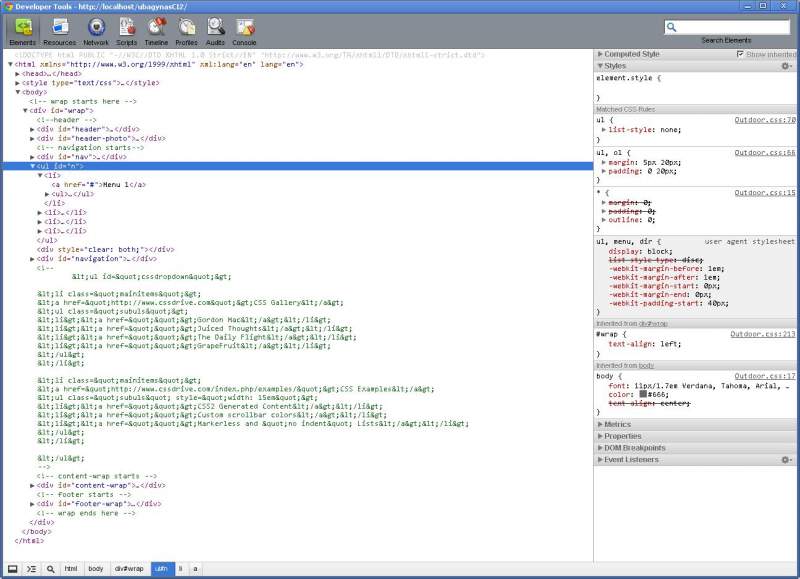
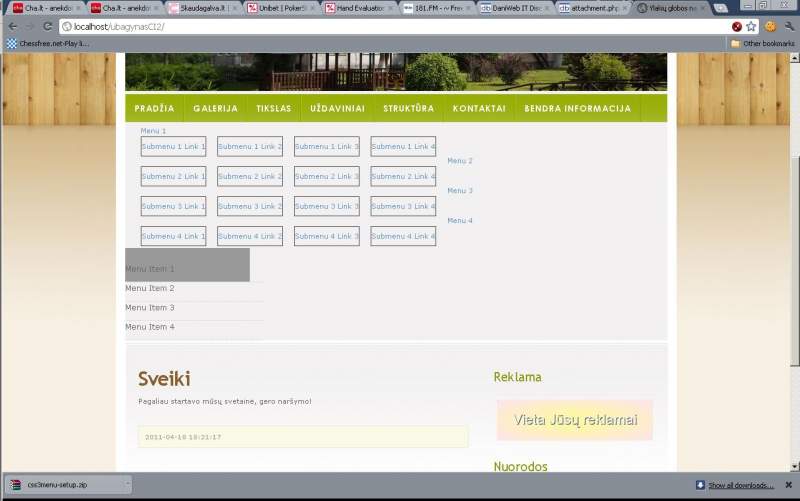
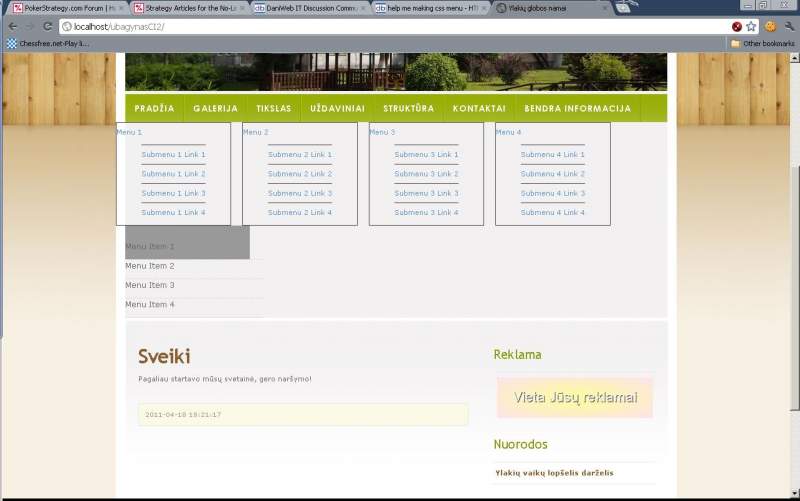
and what happens is in another screenshot. Plus I made one screenshot of developer tools - you can see that ul tag does not have the properties of #n. Why could be that?

The reason your UL isn't receiving CSS is because you're trying to select TWO ULs.

#n ul should be ul#n

I changed the css to this, but it still is something wrong:

ul#n{							
	height: 30px;
	line-height: 30px;
	margin: 0;
	padding: 0;
}
ul#n li {
	border: 1px solid #444444;
	display: inline;
	float: left;	
	height: auto;
	line-height: 30px;
	margin-right: 18px;
}
ul#n li:first-child {
	
}
ul#n  li a {
	border: none;
	display: block;
}
ul#n  li a:first-child {
	
}
ul#n  li ul {				
	height: auto;
	line-height: normal;
}
ul#n li ul li {
	border: none;
	display: block;
	float: none;
	margin: 0;
	padding: 0;
}
ul#n li ul li a {
	border-top: 1px solid #444444;
	display: block;
	width: 100%;
}

Finally made it :) by this http://www.devinrolsen.com/pure-css-horizontal-menu/ tutorial. But had to make some adjustmenst to code - added z-index property because my main content area of website was hiding the dropdown meniu. Now I will just have to make similar design to original, will see how I succeed :) Thanks for trying to help.

Edit: and earlie I was not succesfull, because in other place I had vertical navigation menu with the same id - navigation :D

Be a part of the DaniWeb community

We're a friendly, industry-focused community of developers, IT pros, digital marketers, and technology enthusiasts meeting, networking, learning, and sharing knowledge.