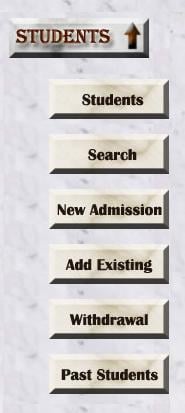
I am trying to create a drop down menu using UL and LI elements. Each LI is an image (of same size) and there are no Bullets in the List. In IE, the list Items are left-aligned as I want them. In Chrome the list Items are right aligned with a lot of space on the left.

The CSS Code is

.menuBar
{
    background:url('./images/SideMenu/MenuTable_Bg.jpg');
    margin-left:0;
    padding-left:0;
    text-align:left;    
}

.menubar UL
{
    list-style-type: none;
    text-align:left;        
}

.menuBar LI
{   
    padding-top:5px;
    padding-bottom:5px; 
    cursor: hand;
    padding-left:0;
    margin-left:0;
    text-align:left;    
}

How do I get the images to left-align in Chrome ?

I have included 2 images to show the menu - left aligned in IE and right-aligned in chrome.
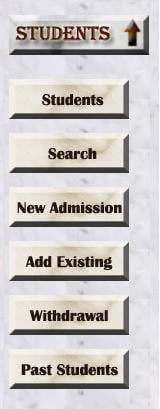
Menu_IEMenu_Chrome

Dani AI

Generated

Nice follow-up and resolved — the problem boiled down to the class-name mismatch and the browser’s default list inset. was right to call out the inconsistent casing and ’s pointer to the UL padding was on-target: user-agent styles give ULs left inset (Chrome commonly uses a 40px inline start) so an un-reset list looks shifted in some engines. (developer.mozilla.org)

A few small, robust improvements that avoid similar cross-browser surprises: make the anchor fill the list item and turn images into block-level content so they don’t leave inline baseline gaps; replace the nonstandard cursor: hand with the standard cursor: pointer; and use responsive sizing if you need it. Example tweaks you can add (don’t overwrite the fixes you already made — these just harden the layout):

.menubar li a {
  display: block;
  line-height: 0;       /* prevents small baseline gaps under inline images */
  cursor: pointer;      /* use the standard keyword, not "hand" */
}
.menubar li img {
  display: block;
  max-width: 100%;
  height: auto;
}

The pointer keyword is the standard value for "clickable" cursors (old IE used hand, which is not standard). Use DevTools’ Styles/Computed view to confirm which rule is adding space. (developer.mozilla.org)

A couple more troubleshooting notes: ensure the page uses a modern DOCTYPE so you’re in standards mode (quirks mode can change default spacing), and remember that class/id matching must be exact — class attribute values are treated as case-sensitive for selector matching. If anything still looks off, inspect the UL’s computed padding-inline-start/margin in DevTools or apply a small reset/normalize to the menu container. (developer.mozilla.org)

(If you need, a quick reset rule for that menu context and the DevTools steps to find which rule wins can be posted.) (stackoverflow.com)

Recommended Answers

All 5 Replies

What about adding margin-left:0; to the .menubar UL style? Could you also provide the HTML?

Hi dcdruck
Here's the HTML code you asked for :

<div class="menubar">
<ul id="mnuStudent">
    <li><a href="Students.asp"><img src="../images/SideMenu/MB_Students.jpg" WIDTH="120" HEIGHT="40"></a></li>
    <li><a href="Search.asp"><img src="../images/SideMenu/MB_Search.jpg" WIDTH="120" HEIGHT="40"></a></li>
    <li><a href="NewAdmin.asp"><img src="../images/SideMenu/MB_NewAdmission.jpg" WIDTH="120" HEIGHT="40"></a></li>
    <li><a href="AddExisting.asp"><img src="../images/SideMenu/MB_AddExisting.jpg" WIDTH="120" HEIGHT="40"></a></li>
    <li><a href="Withdrawal.asp"><img src="../images/SideMenu/MB_Withdrawal.jpg" WIDTH="120" HEIGHT="40"></a></li>
    <li><a href="PastStudents.asp"><img src="../images/SideMenu/MB_PastStudents.jpg" WIDTH="120" HEIGHT="40"></a></li>
</ul>
</div>

The first thing you need to correct before continuing to troubleshoot is to fix your CSS. Classes and ids are case sensitive. So in your HTML code, you have a div with a class assigned as "menubar". In your CSS, you references to .menubar and .menuBar.

commented: Good catch! I overlooked that in the CSS. +3

Yes, as JorgeM states, make sure you correct the class names in your css so that "menubar" is lowercase everywhere ("menubar" does not equal "menuBar").

Once you do that, add padding-left:0; to the styles for .menubar UL and that should do it. I originally thought margin-left:0; would do it but it turns out it's the padding.

Thanks JorgeM and dcdruck. I corrected the case-sensitive problem and added the padding-left style and everything is working fine now.

Be a part of the DaniWeb community

We're a friendly, industry-focused community of developers, IT pros, digital marketers, and technology enthusiasts meeting, networking, learning, and sharing knowledge.