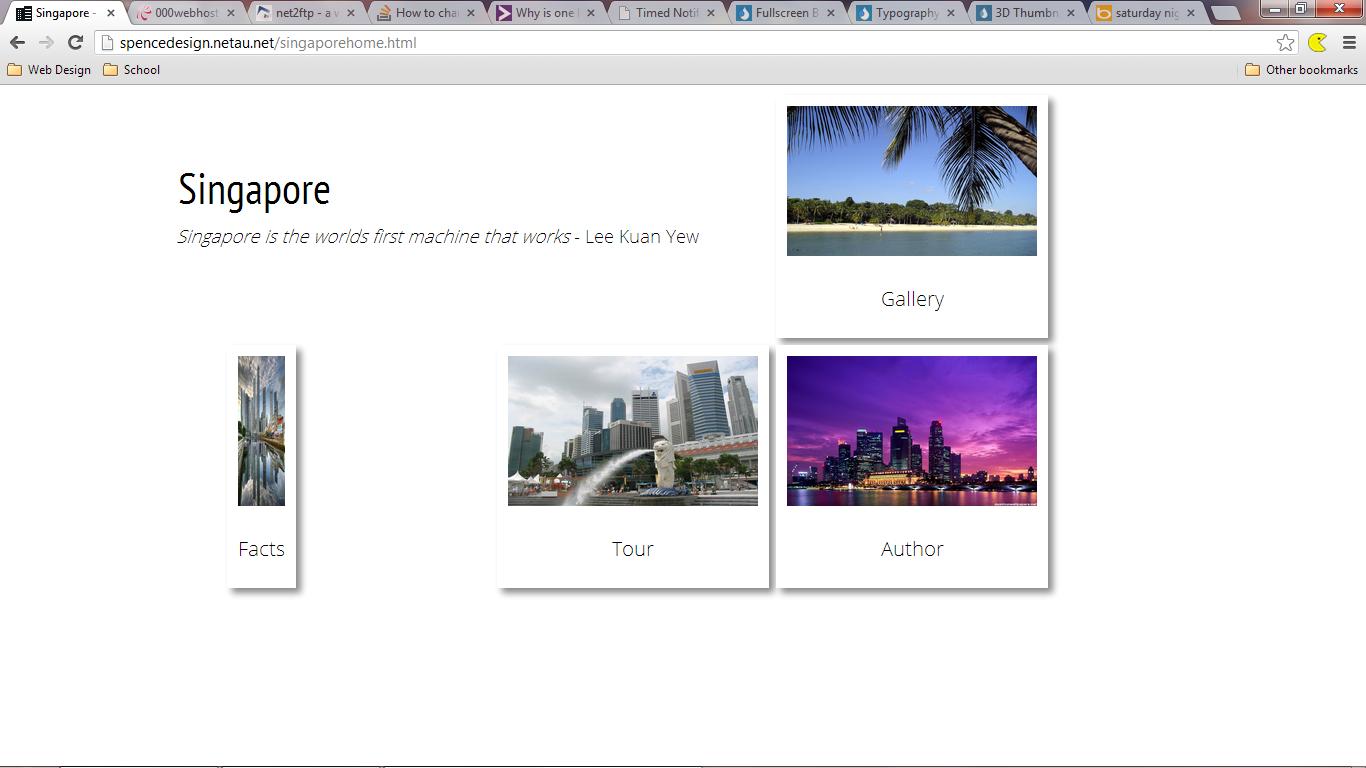
My facts link is smaller than the rest for some unknown reason?

Dani AI

Generated

Quick checklist and practical fixes when a single link’s text looks smaller than the others.

Most causes are CSS-related and easy to confirm with the browser tools. Inspect the specific anchor and look at the Computed panel to see the final font-size, transform, and any inherited rules. If the computed font-size differs from siblings, follow the rule chain up the DOM to find where it changes.

Things to check (fast):

  • Inspect computed font-size, line-height, and transform for the anchor and each parent.
  • Look for nested tags (small, sup, a span with its own style) or pseudo-elements (:before, :after) that alter size.
  • Search stylesheets for selectors that might only match that link (attribute selectors, :nth-child, or a specific class).
  • Temporarily disable rules in DevTools to isolate the offending declaration.
  • Disable browser extensions or user stylesheets; they can inject different font rules.
  • Test by forcing a size inline to confirm it’s a CSS override and not an image/font-rendering issue.

Quick debug snippets:

document.querySelectorAll('a').forEach(function(a){
  var s = window.getComputedStyle(a);
  console.log(a, s.fontSize, s.transform, s.fontFamily);
});

Temporary test CSS to force-equalize links:

a { font-size: 16px !important; font-family: inherit !important; transform: none !important; }
a * { font-size: inherit !important; }

Follow-up tips: after finding the rule, fix it by raising selector specificity or restructuring HTML so the anchor doesn’t inherit an unintended font-size. If the issue persists, capture the anchor’s HTML/CSS snippet (element plus matching stylesheet rules) and compare it side-by-side with a normal link. Credit to the thread contributors , , and for prompting the cross-check approach and starting points for narrowing the problem.

Recommended Answers

All 3 Replies

It's seems alright to me. Tested in IE, Opera and Firefox. Also, all links have the same styles applied.

I am using chrome it looks like

On a tablet at the moment so I can't see your source code, but my guess from seeing your code before is that you applied a width property on that element. You may want to view the site from a tablet, it doesn't look formatted well with regard to the placement of the divs containing the pics.

Be a part of the DaniWeb community

We're a friendly, industry-focused community of developers, IT pros, digital marketers, and technology enthusiasts meeting, networking, learning, and sharing knowledge.