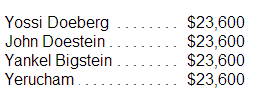
I am trying to make a dotted horizontal line between a column of names and a column of numbers. how do I do this using css?
here's a url to see what I mean:

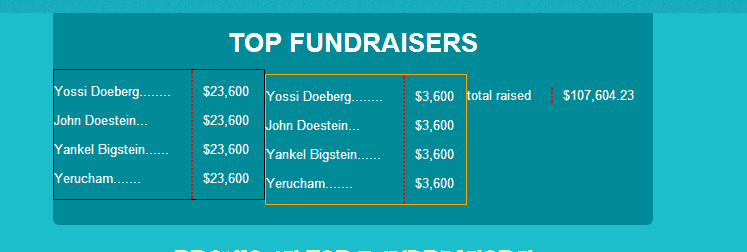
in the box titled "top fundraisers" there is a list of names, with a dollar amount near each name. how do I make ain the box titled "top fundraisers" there is a list of names, with a dollar amount near each name. how do I make a horizontal vertical dotted line stretching between them?

Dani AI

Generated

If you want the dots on the same baseline as the text (not under the row), treat each row as a flex line with a dedicated filler element that draws the rule between the left and right columns. This avoids images and manual periods, works responsively, and plays nicely with Bootstrap. It also addresses ’s point that a border-bottom on the whole row puts the line below the text, as observed earlier.

Here is a minimal pattern you can drop into your list. The middle .leader element is purely presentational and hidden from assistive tech; it expands to fill the space and paints a dotted rule on the baseline.

<ul class="leaders">
  <li>
    <span class="name">Yossi Doeberg</span>
    <span class="leader" aria-hidden="true"></span>
    <span class="amount">$23,600</span>
  </li>
  <!-- repeat li... -->
</ul>

<style>
.leaders { list-style: none; margin: 0; padding: 0; }
.leaders li { display: flex; align-items: baseline; gap: .5rem; }
.leaders .name,
.leaders .amount { white-space: nowrap; }
.leaders .leader {
  flex: 1;
  height: 0;                 /* do not affect line height */
  border-bottom: 1px dotted #999;
  transform: translateY(-.15em);  /* nudge onto the text baseline */
}
/* Optional: crisper dots with a repeating gradient instead of border */
@supports (background: repeating-linear-gradient(to right, #999 0 2px, transparent 2px 6px)) {
  .leaders .leader {
    border: 0;
    height: 1px;
    background: repeating-linear-gradient(to right, #999 0 2px, transparent 2px 6px);
  }
}
</style>

Tips:

  • Keep names and amounts white-space: nowrap to prevent wrapping that would break the leader.
  • Adjust dot density by changing the gradient stops (e.g., 2px dot, 6px spacing).
  • For better numeric alignment, consider font-variant-numeric: tabular-nums; on .amount.

Recommended Answers

All 9 Replies

Well, instead of using the border property, you can be more specific and use border-right, border-left, border-top, etc..

For example...

border-right:1px dotted #ff0000;

also, use padding to help you create some space between the content and border.
520a7318793ce115970ad83d345f2707

sorry about that, for some reason I misunderstood about the line that you wanted. I created a vertical dotted line. I think i know what you mean now... you mean like in a table of contents where there is a horizontal line between the items...

no, I mean a line stretching the width between the name and the amount, instead of the periods I have there now.
thank you!

yes, sorry about that..

Something like this maybe should work...

<!DOCTYPE html>
<html>
<head>
 <meta charset="UTF-8" />
 <title>Demo</title>

 <style>
#group {width:50%}
ul {list-style:none;}
ul li {
    border-bottom: 1px dotted #000;
    text-align: right;
}

span.name{
    float: left;
}

span {
    display: inline-block;
    border: 2px solid #fff;
    margin: 0 0 -1px 0;
}

 </style>

</head>
<body>
<div id="group">
  <ul>
    <li><span class="name">Yossi Doeberg</span><span>$23,600</span></li>
    <li><span class="name">John Doestein</span><span>$23,600</span></li>
    <li><span class="name">Yankel Bigstein</span><span>$23,600</span></li>
    <li><span class="name">Yerucham</span><span>$23,600</span></li>
  </ul>
</div>
</body>
</html>

3d4f30f6f98c98c5f91ad321acca3337

thanks for your replies. however, you see that in your code, the dotted line is under the name. (since it's a border-bottom)I want it to be on the same line as the name, not under it. do you know how to so that?

Interesting thread you posted... I did some additional reading and came across these examples on the W3C site. Nice!

http://www.w3.org/Style/Examples/007/leaders.en.html

<!DOCTYPE html>
<html>
<head>
 <title>Demo</title>
<style>
ul {
    max-width: 15em;
    padding: 0;
    overflow-x: hidden;
    list-style: none}
ul li:before {
    float: left;
    width: 0;
    white-space: nowrap;
    content: ". . . . . . . . . . . . . . . . . . . . . .  "
 }
ul span:first-child {
    padding-right: 0.33em;
    background: white}
ul span + span {
    float: right;
    padding-left: 0.33em;
    background: white}
 </style>
</head>
<body>

  <ul>
    <li><span>Yossi Doeberg</span><span>$23,600</span></li>
    <li><span>John Doestein</span><span>$23,600</span></li>
    <li><span>Yankel Bigstein</span><span>$23,600</span></li>
    <li><span>Yerucham</span><span>$23,600</span></li>
  </ul>

</body>
</html>

93b0837951c0d6a5d98c1b4fad726019

Here's another approach I found after further research. This approach uses a background image for repeating dots and places text over the image. I like the other example i posted previous to this one, but this seems to work nicely as well.

<!DOCTYPE html>
<html xmlns="http://www.w3.org/1999/xhtml">
<head>
    <title>Demo</title>
    <style>
        .dots {  background: url('dot.png') repeat-x bottom; width:250px; }
        .field {  background-color: #FFFFFF;padding-right:2px; } 
    </style>
</head>
<body>
    <table>
        <tr><td><div class="dots"><span class="field">Yossi Doeberg</span></div></td><td>$23,600</td></tr>
        <tr><td><div class="dots"><span class="field">John Doestein</span></div></td><td>$23,600</td></tr>
        <tr><td><div class="dots"><span class="field">Yankel Bigstein</span></div></td><td>$23,600</td></tr>
        <tr><td><div class="dots"><span class="field">Yerucham</span></div></td><td>$23,600</td></tr>
    </table><br /><br />
    http://www.catchmyfame.com/2007/06/02/leader-dots-with-css/
</body>
</html>

a0462b75132031a46b4bd21bf92dc1af

there are some special characters you can also use . like &uml;

thanks a lot, jorgeM, your help is greatly appreciated!

Be a part of the DaniWeb community

We're a friendly, industry-focused community of developers, IT pros, digital marketers, and technology enthusiasts meeting, networking, learning, and sharing knowledge.