I am having the website and it's based on the Educational Purposes...
I am having the code for different programs and all so etc...

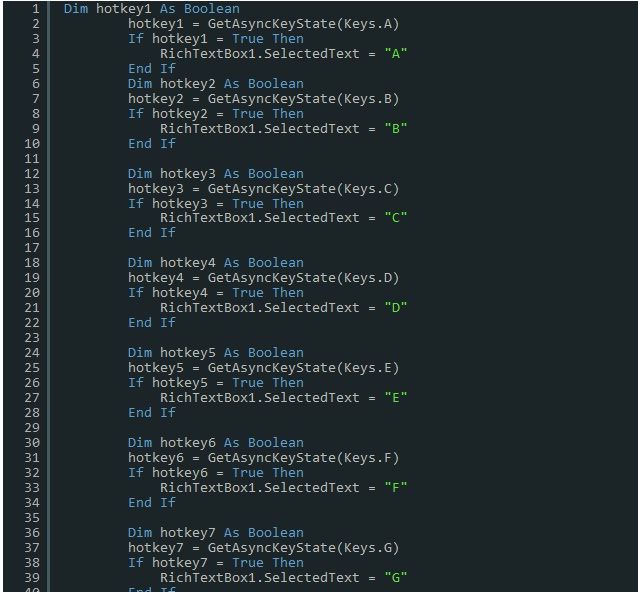
So The question is that How can i add the code as syntax highlighter
PFA...
d71ec5623473d0f488c3f95f9bcc962e

Dani AI

Generated

— the screenshot and replies show two distinct needs that should be treated differently: (A) display syntax-highlighted code snippets (read‑only), and (B) an in-browser code editor where visitors type and edit. already noted the editor used here; pointed to a tutorial-style approach. The right path depends on whether editing is required: static highlighting is lightweight and ideal for documentation pages; a full editor (line numbers, tab handling, keybindings) is better for interactive examples or exercises.

Minimal workflow for static/highlighted snippets:

  • Store the raw source as plain text (no HTML).
  • HTML‑encode on output to prevent XSS.
  • Wrap in a semantic block like <pre><code class="language-vbnet">...</code></pre>.
  • Include a client highlighter and call its init after DOM load.

Example server-side VB.NET encoding and output:

' VB.NET: store raw text, then encode for safe output
Dim safe = System.Web.HttpUtility.HtmlEncode(codeText)
Response.Write("<pre><code class='language-vbnet'>" & safe & "</code></pre>")

Then call the chosen highlighter's initialization on DOM ready (replace the placeholder below with the library's real init function):

<!-- include highlighter CSS/JS -->
<script>
  document.addEventListener('DOMContentLoaded', function() {
    highlighter.highlightAll(); // replace with hljs.highlightAll() or Prism.highlightAll()
  });
</script>

If an editable in-browser editor is required, initialize a textarea-based editor (CodeMirror/Ace/Monaco) with language mode, lineNumbers and sensible tab settings, and autosave to avoid data loss. Keep raw code on the server (not HTML) and always sanitize any user-submitted metadata.

Quick troubleshooting & UX tips: ensure whitespace and tabs are preserved, enable horizontal scrolling for very long lines, add a copy-to-clipboard button, include a visible language selector for autodetection, and always HTML‑encode on output to avoid XSS.

Recommended Answers

All 7 Replies

Here on DaniWeb, our editor is powered by

Is that what you're referring to?? I am slightly confused by your question.

yeah,
but can you explain it how can i add it to my site.
and thanks for editing post

I want the Editor as to get the acknowlge to user about code.
and yes I also want comment box like here, (daniweb)

I'm sorry, but I still don't understand exactly what you want. Do you mean you want syntax highlighted code snippets, the way that our code snippets have line numbers, etc? Or do you want people to be able to type in code snippets? Is the screenshot you provided what you're looking for, because I'm pretty sure that would be something like CodeMirror.

yes,

Do you mean you want syntax highlighted code snippets, the way that our code snippets have line numbers, etc?

and also (YES)

do you want people to be able to type in code snippets

I am too bit confused.
i might get the correct point from any video link
Is theree ?

Be a part of the DaniWeb community

We're a friendly, industry-focused community of developers, IT pros, digital marketers, and technology enthusiasts meeting, networking, learning, and sharing knowledge.