I have a database with items which I want to populate to a listbox.
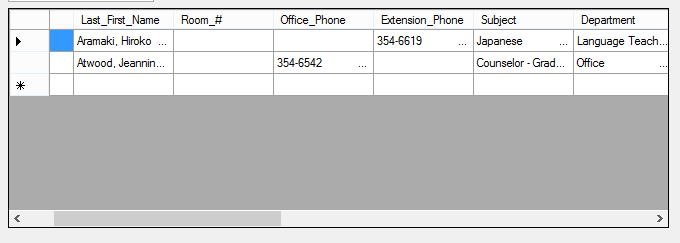
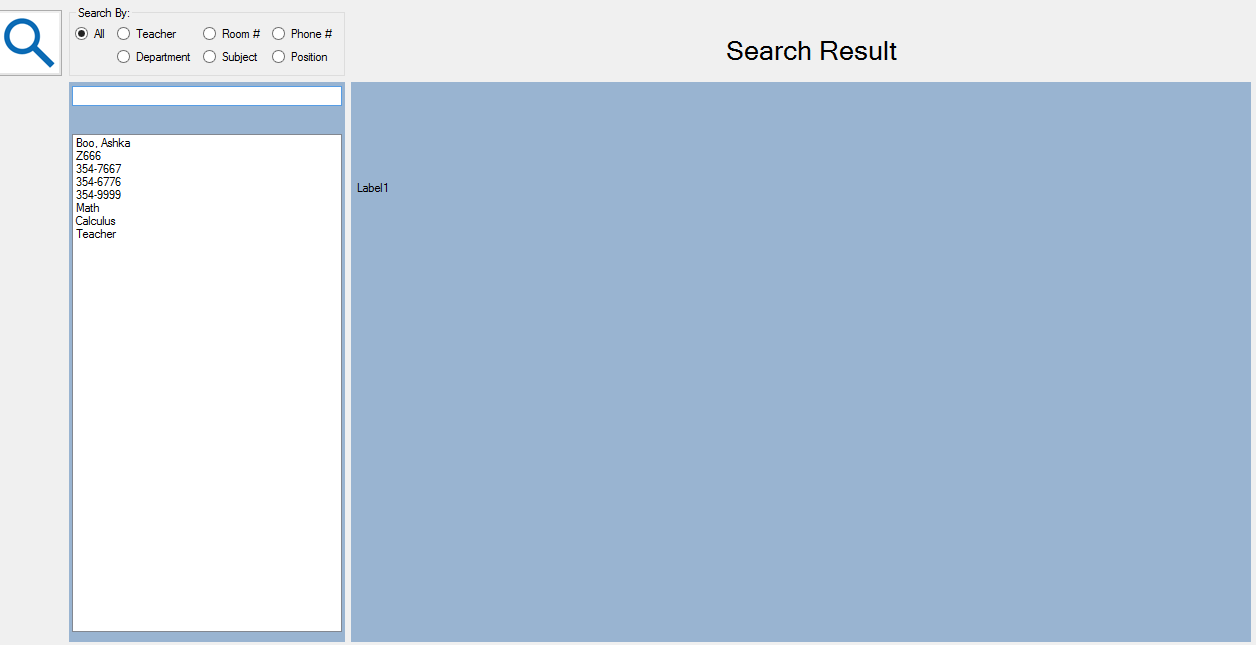
The first image shows how its right now, and the second shows how I want the final result to look like.
dd3aaa66fdb74cecb5cca11999b6b6dc2645978b29622fc539c0725c199c3e13

Dani AI

Generated

The thread shows the right-now vs desired screenshots. wanted DB items in a ListBox; correctly emphasized parameterized queries; provided a working WinForms loop. The loop works, but binding the result set is cleaner, faster and easier to maintain — and it avoids common bugs (missing IsPostBack, DBNull, UI freezes).

For ASP.NET WebForms: return only the columns needed (id and text), use a parameterized query or stored procedure, then set the ListBox DataSource, DataTextField and DataValueField and call DataBind only on first load. To present combined columns (e.g., "Code - Name") either return a computed column from SQL or add an expression column to the DataTable before binding.

' VB.NET (WebForms) — run on first load
If Not IsPostBack Then
    Dim dt As DataTable = GetItemsTable()  ' returns Id, Name (or combined label)
    lstItems.DataSource = dt
    lstItems.DataTextField = "Name"
    lstItems.DataValueField = "Id"
    lstItems.DataBind()
End If

For WinForms: avoid manual Add loops like the one in this thread by using DataSource + DisplayMember/ValueMember. For large result sets perform the query on a background Task or use async APIs so the UI stays responsive.

' VB.NET (WinForms)
Dim dt As DataTable = GetItemsTable()
lstSample.DataSource = dt
lstSample.DisplayMember = "Name"
lstSample.ValueMember = "Id"

Troubleshooting & best practices: keep connection strings in config (not hard-coded); use Using blocks to dispose connections/commands; always parameterize queries; check that the query actually returns rows and that the DataTextField/DataValueField names match column names; handle DBNulls or empty strings; for multi-column display choose GridView/ListView or build a single display column in SQL. This builds on and while avoiding manual loop pitfalls.

Recommended Answers

All 2 Replies

There are examples here for both OleDB and SQLDB. Just modify the code to add the items to a listbox instead of a listview.

The first one is an image of a gridview and if that is how you want it to be then check this article.

An example of a "CheckListBox"

Vb.Net

Option Explicit On

Imports System.Data.SqlClient

Public Class Form1

    Dim SqlAdapter As System.Data.SqlClient.SqlDataAdapter
    Dim ds As New DataSet
    Dim objConn As SqlConnection

    Private Sub Form1_Load(ByVal sender As Object, ByVal e As System.EventArgs) Handles Me.Load

        setConn()
        Populate_DataSet()
        FillListbox()

    End Sub

    Private Sub FillListbox()
        Dim row As DataRow
        Dim iRowCnt As Integer = 0

        lstSample.Items.Clear()
        For Each row In ds.Tables("BookName").Rows
            lstSample.Items.Add(ds.Tables("BookName").Rows(iRowCnt).Item(1))
            iRowCnt = iRowCnt + 1
        Next
    End Sub

    Private Sub Populate_DataSet()
        Dim sClarity As String = "SELECT *FROM dbo.BOOKS"

        SqlAdapter = New System.Data.SqlClient.SqlDataAdapter(sClarity, objConn)
        SqlAdapter.Fill(ds, "BookName")
    End Sub

    Private Function setConn() As Boolean
        Dim gs_ConnString = "Data Source=CLUB;Persist Security Info=False;" & _
                    "Initial Catalog=BookStore;User Id=sa;Password=123;Connect Timeout=500;"

        objConn = New SqlConnection(gs_ConnString)
        objConn.Open()

        Return True
    End Function
End Class
Be a part of the DaniWeb community

We're a friendly, industry-focused community of developers, IT pros, digital marketers, and technology enthusiasts meeting, networking, learning, and sharing knowledge.