
Hi,
I have one website and decided to do some changes, for example to use Vertical flyout menu. So, I picked the right one from this page: http://cssmenumaker.com/menu/green-segoe-flyout-menu
Added link Menu CSS file in websites html code. Then wrote desired menu items and problem appeared - an arrow in front of list items (on the left). See image. 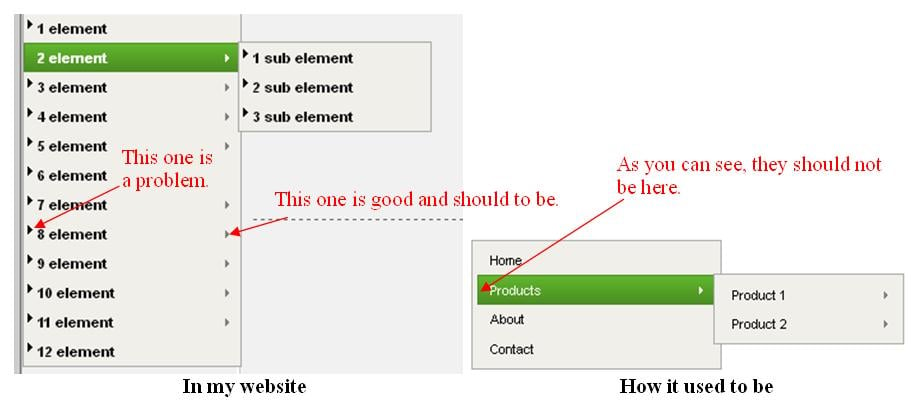
As website uses <li> too, I decided, that menu and website CSS files are messing up.
"Example.html" code:
<!DOCTYPE html PUBLIC "-//W3C//DTD XHTML 1.0 Transitional//EN" "http://www.w3.org/TR/xhtml1/DTD/xhtml1-transitional.dtd">
<html xmlns="http://www.w3.org/1999/xhtml">
<head>
<meta http-equiv="Content-Type" content="text/html; charset=UTF-8" />
<title>Me & Co. - Only for you</title>
<meta name="author" content="www.meandco.com" />
<link rel="stylesheet" href="template_css.css" type="text/css"/>
<link rel="stylesheet" href="menu-styles.css" type="text/css">
</head>
<body>
<table width="852" border="0" align="center" cellpadding="0" cellspacing="0">
<tr>
<td width="1" bgcolor="#666666"></td>
<td width="850">
<div align="center">
<table width="850" border="0" align="center" cellpadding="0" cellspacing="0">
<tr>
<td height="220" align="center" valign="top" background="images/banner.jpg"></td>
</tr>
<tr>
<td height="28" valign="top" background="images/head-1.png">
<div class="mainlevel-nav"></div>
</td>
</tr>
<tr>
<td bgcolor="#CCCCCC">
<table width="100%" border="0" cellpadding="0" cellspacing="1">
<tr>
<td width="170" valign="top" background="images/leftbar.png">
<div class="leftrow">
<table cellpadding="0" cellspacing="0" class="moduletable">
<div id='cssmenu'>
<ul>
<li class='active'><a href='#'><span>1 element</span></a></li>
<li class='has-sub'><a href='#'><span>2 element</span></a>
<ul>
<li><a href='#'><span>1 sub element</span></a></li>
<li><a href='#'><span>2 sub element</span></a></li>
<li><a href='#'><span>3 sub element</span></a></li>
</ul>
</li>
<li class='has-sub'><a href='#'><span>3 element</span></a>
<ul>
<li><a href='#'><span>1 sub element</span></a></li>
<li><a href='#'><span>2 sub element</span></a></li>
<li><a href='#'><span>3 sub element</span></a></li>
</ul>
</li>
<li class='has-sub'><a href='#'><span>4 element</span></a>
<ul>
<li><a href='#'><span>1 sub element</span></a></li>
<li><a href='#'><span>2 sub element</span></a></li>
<li><a href='#'><span>3 sub element</span></a></li>
</ul>
</li>
<li class='has-sub'><a href='#'><span>5 element</span></a>
<ul>
<li><a href='#'><span>1 sub element</span></a></li>
<li><a href='#'><span>2 sub element</span></a></li>
<li><a href='#'><span>3 sub element</span></a></li>
</ul>
</li>
<li><a href='#'><span>6 element</span></a></li>
<li class='has-sub'><a href='#'><span>7 element</span></a>
<ul>
<li><a href="#"><span>1 sub element</span></a></li>
<li><a href="#"><span>2 sub element</span></a></li>
<li><a href="#"><span>3 sub element</span></a></li>
</ul>
</li>
<li class='has-sub'><a href='#'><span>8 element</span></a>
<ul>
<li><a href="#"><span>1 sub element</span></a></li>
<li><a href="#"><span>2 sub element</span></a></li>
<li><a href="#"><span>3 sub element</span></a></li>
<li><a href="#"><span>4 sub element</span></a></li>
<li><a href="#"><span>5 sub element</span></a></li>
</ul>
</li>
<li class='has-sub'><a href='#'><span>9 element</span></a>
<ul>
<li><a href="#"><span>1 sub element</span></a></li>
<li><a href="#"><span>2 sub element</span></a></li>
<li><a href="#"><span>3 sub element</span></a></li>
<li><a href="#"><span>4 sub element</span></a></li>
<li><a href="#"><span>5 sub element</span></a></li>
<li><a href="#"><span>6 sub element</span></a></li>
<li><a href="#"><span>7 sub element</span></a></li>
</ul>
</li>
<li class='has-sub'><a href='#'><span>10 element</span></a>
<ul>
<li><a href='#'><span>1 sub element</span></a></li>
<li><a href='#'><span>2 sub element</span></a></li>
<li><a href='#'><span>3 sub element</span></a></li>
<li><a href='#'><span>4 sub element</span></a></li>
<li><a href='#'><span>5 sub element</span></a></li>
<li><a href='#'><span>6 sub element</span></a></li>
<li><a href='#'><span>7 sub element</span></a></li>
</ul>
</li>
<li class='has-sub'><a href='#'><span>11 element</span></a>
<ul>
<li><a href='#'><span>1 sub element</span></a></li>
<li><a href='#'><span>2 sub element</span></a></li>
<li><a href='#'><span>3 sub element</span></a></li>
<li><a href='#'><span>4 sub element</span></a></li>
</ul>
</li>
<li class='last'><a href='#'><span>12 element</span></a></li>
</ul>
</div>
</table>
<p> </p>
<table width="100%" border="0" cellpadding="0" cellspacing="0">
<tr align="center">
<td>
<script>
<!-- Here will be calendar code -->
</script>
</td>
</tr>
</table>
</div>
<table align="center">
<tr>
<td align="center">
<a target="_blank" href=""><img width=88 height=31 border=0 src="" alt=""></a>
</td>
</tr>
<tr>
<td width="125">
<a target="_blank" href=""><img src="" width="125" height="71" border="0" /></a>
</td>
</tr>
</table>
</td>
<td valign="top" bgcolor="#F1F1F1">
<h1>TITLE</h1>
<h2>POST TITLE</h2>
<table align="center" width="447" border="0">
<td width="447">
<p style="padding-left: 240px;"><i><strong>Words</strong></i></p>
<p></p>
</td>
</table>
<div class="aukstyn"><a href="#top">To top</a></div>
<div class="separator"></div>
<p> </p>
</td>
</tr>
</table>
</td>
</tr>
<tr>
<td valign="middle" background="images/foot-1.png" height="28">
<div class="mainlevel-nav"></div>
</td>
</tr>
<tr>
<td valign="middle" align="center" background="images/bg-2.png" height="30">
<div class="footer">
<div align="center">© <strong>2007-2014</strong></div>
<div align="center"><a href="">Me & Co.</a></div>
</div>
</td>
</tr>
</table>
</div>
</td>
</tr>
</table>
</body>
</html>
"menu-styles.css" code:
@charset 'UTF-8';

#cssmenu {
    padding: 0;
    margin: 0;
    border: 0;
}

#cssmenu ul,
#cssmenu li {
    display: block;
    position: relative;
    margin: 0;
    padding: 0;
    width: 100%;
}

#cssmenu ul {
    display: block;
    position: relative;
    z-index: 597;
    float: left;
    width: 100%;
}

#cssmenu ul li {
    float: left;
    /*min-height: 1px;
    line-height: 1.5em;*/
    vertical-align: middle;
    width: 100%;
}

#cssmenu ul li.hover,
#cssmenu ul li:hover {
    position: relative;
    z-index: 599;
    /*cursor: default;*/
}

#cssmenu ul ul {
    visibility: hidden;
    position: absolute;
    top: 100%;
    left: 0;
    z-index: 598;
    width: 100%;
}

#cssmenu ul ul li {
    float: none;
}

#cssmenu ul ul,
#cssmenu ul ul ul {
    top: -1px;
    left: 99%;
}

#cssmenu ul li:hover > ul {
    visibility: visible;
}

#cssmenu ul li {
    float: none;
}

#cssmenu a {
    display: block;
}

/* Custom CSS Styles */
#cssmenu {
    font-family: 'Segoe UI', Arial, sans-serif;
    font-size: 11px;
    text-align: left;
}

#cssmenu:after,
#cssmenu ul:after {
    content: '';
    display: block;
    clear: both;
}

#cssmenu ul {
    background: #F0EFEA;
    border: 1px solid #aaaaaa;
    /*padding: 4px;*/
    width: 100%;
}

#cssmenu ul li {
    color: #000000;
    position: relative;
}

#cssmenu ul li.hover,
#cssmenu ul li:hover {
    background: #61b72d;
    background: -moz-linear-gradient(#61b72d 0%, #4b8e23 100%);
    background: -webkit-gradient(linear, left top, left bottom, color-stop(0%, #61b72d), color-stop(100%, #4b8e23));
    background: -webkit-linear-gradient(#61b72d 0%, #4b8e23 100%);
    background: linear-gradient(#61b72d 0%, #4b8e23 100%);
    color: #FFF;
}

#cssmenu ul li.hover > a,
#cssmenu ul li:hover > a {
    color: #FFF;
    border: 1px solid #4b8e23;
}

#cssmenu ul ul {
    width: 150px;
}

#cssmenu a {
    border: 1px solid transparent;
    padding: 3px 10px;
}

#cssmenu a:link,
#cssmenu a:visited {
    color: #000000;
    text-decoration: none;
}

#cssmenu a:hover {
    background: #61b72d;
    background: -moz-linear-gradient(#61b72d 0%, #4b8e23 100%);
    background: -webkit-gradient(linear, left top, left bottom, color-stop(0%, #61b72d), color-stop(100%, #4b8e23));
    background: -webkit-linear-gradient(#61b72d 0%, #4b8e23 100%);
    background: linear-gradient(#61b72d 0%, #4b8e23 100%);
    color: #FFF;
}

#cssmenu a:active {
    color: #ffa500;
}

#cssmenu .has-sub:hover > a:after,
#cssmenu .has-sub.hover > a:after {
    border-color: transparent transparent transparent #FFF;
}

#cssmenu .has-sub > a:after {
    content: '';
    width: 0px;
    height: 0px;
    border-style: solid;
    border-width: 4px 0 4px 4px;
    border-color: transparent transparent transparent #808080;
    position: absolute;
    top: 50%;
    right: 5%;
    margin-top: -4px;
    -webkit-transform: rotate(360deg);
}
"template_css.css" code:
body {
    color        : #000000;
    margin-top       : 10px;
    margin-bottom    : 10px;
    padding          : 0px;
    /*background-color : #cccccc;*/
    background-color : #cccccc;
    font-family      : Tahoma, Verdana, arial, sans-serif;
    font-size        : 12px;
}
td, tr, p, div {
    font-family      : Tahoma, Verdana, Arial, Helvetica, sans-serif;
    font-size        : 12px;
    color            : #333333;
}
p {
    font-family      : Tahoma, Verdana, Arial, Helvetica, sans-serif;
    font-size        : 12px;
    color            : #333333;
    margin-left      : 20px;
    margin-right     : 10px;
}
hr {
    color            : #999999;
    height           : 1px;
    width            : 100%;
}
h1 {
    font-family      : Tahoma, Verdana, Arial, Helvetica, sans-serif;
    font-size        : 18px;
    font-weight      : bold;
    color            : #333333;
    margin-top       : 15px;
    margin-bottom    : 20px;
    text-align       : center;
}

h2 {
    font-family      : Tahoma, Verdana, Arial, Helvetica, sans-serif;
    font-size        : 14px;
    font-weight      : bold;
    color            : #333333;
    margin-top       : 20px;
    margin-bottom    : 20px;
    text-align       : center;
}

h3 {
    font-family      : Tahoma, Verdana, Arial, Helvetica, sans-serif;
    font-size        : 12px;
    font-weight      : bold;
    color            : #333333;
    margin-top       : 20px;
    margin-bottom    : 20px;
    text-align       : center;
}

table.moduletable {
    width       : 100%;
    table-layout    : auto;
    border-top  : 1px solid #FFFFFF;
    border-bottom   : 1px solid #999999;
}

table.moduletable th { /* meniu žodis */
    font-size        : 11px;
    font-weight      : bold;
    text-transform   : none;
    text-align       : center;
    height           : 21px;
    line-height      : 21px;
    text-indent      : 4px; /* atsumas meniu žodžio nuo krašto */
    letter-spacing   : 1px; /* atstumai tarp meniu raidžiu */
    color            : #FFFFFF;
    background-image : url(images/bgmenu-1.png);  /* meniu pavadinimo spalva */
}

table.moduletable td {
    padding-left     : 0px;
    padding-right    : 0px;
}

.button {
    font-size        : 11px;
    color            : #333333;
    border           : 1px solid #999999;
    margin-bottom    : 5px;
    background-color : #EDEDED;
    padding          : 1px;
}

a.mainlevel  {
    margin           : 0px;
    padding          : 0px;
    font-size        : 12px;
    width            : 170px;
    background-color : #ECEAD8;
    text-indent      : 10px;
}

a.mainlevel: link {
    padding          : 0px 0px 0px 0px;
    font-size        : 12px;
    width            : 170px;
    background-color : #DD763F;
    text-indent      : 10px;
}

a.mainlevel:link, a.mainlevel:visited {
    display          : block;
    font-size        : 12px;
    border-top       : 1px solid #ffffff;
    border-bottom    : 1px solid #999999;
    background-color : #99CCFF; /* meniu neužvedus */
    font-weight      : normal;
    padding          : 2px 0px 2px 0px;
    color            : #333333;
    width            : 170px;
    text-indent      : 10px;
}

a.mainlevel:hover {
    background-color : #88BFF7; /* meniu užvedus */
    font-size        : 12px;
    font-weight      : bold;
    text-decoration  : none;
    text-indent      : 10px;
}

#active_menu {
    color            : #333333;
    background-color : #DD763F;
    font-weight      : bold;
}

a#active_menu:hover {
    color            : #333333;
}

a:link, a:visited {
    font-size        : 11px;
    color            : #6699CC; /* linko spalva */
    text-decoration  : none;
    font-weight      : bold;
}

a:hover {
    font-size        : 11px;
    color            : #333333;
    text-decoration  : none;
    font-weight      : bold;
}

a.category:link, a.category:visited {
    font-size        : 11px;
    font-weight      : bold;
}

ul {
    margin           : 2px;
    padding          : 0px;
    list-style       : none;
}

li {
    line-height      : 15px; /* tarpas tarp eiluciu */
    padding-left     : 20px;
    padding-top      : 0px;
    background-image : url(images/arrow3.png);
    background-repeat : no-repeat;
    background-position : 0px 3px;
}

.footer {
    font-family      : Tahoma, Verdana, Geneva, Arial, Helvetica, sans-serif;
    color            : #FFFFFF;
    font-size        : 10px;
    font-weight      : normal;
}

.footer a:link, .footer a:visited {
    font-size        : 11px;
    color            : #FFFFFF;
    text-decoration  : none;
    font-weight      : bold;
}

.footer a:hover {
    font-size        : 11px;
    color            : #333333;
    text-decoration  : none;
    font-weight      : bold;
}

.contact_email  {
    width            : 100%;
}

.contact_email .inputbox {
    width            : 345px;
}

.separator {
    border-bottom   : 1px dashed #666;
    margin-left : 10px;
    margin-right    : 10px;
    padding     : 1px 0 0;
}

.aukstyn {
    font-family      : Tahoma, Verdana, Arial, Helvetica, sans-serif;
    font-size        : 11px;
    margin-left      : 10px;
    margin-right     : 10px;
    text-align       : right;
    padding      : 0 0 10px;
}

.update_time {
    font-family      : Tahoma, Verdana, Arial, Helvetica, sans-serif;
    font-size        : 11px;
    font-style   : italic;
    margin-left      : 10px;
    margin-right     : 10px;
    text-align   : right;
    color            : #666;
    padding      : 10px 0 0;
}
May your attention, please!
For code writing I use Notepad++, so in this program codes indentation is perfect, but if you use ordinary Notepad it could be a little bit messy. Sorry for that.
Also, I can send a whole site folder in P.M., if needed (with images).
I will be grateful for your help.

