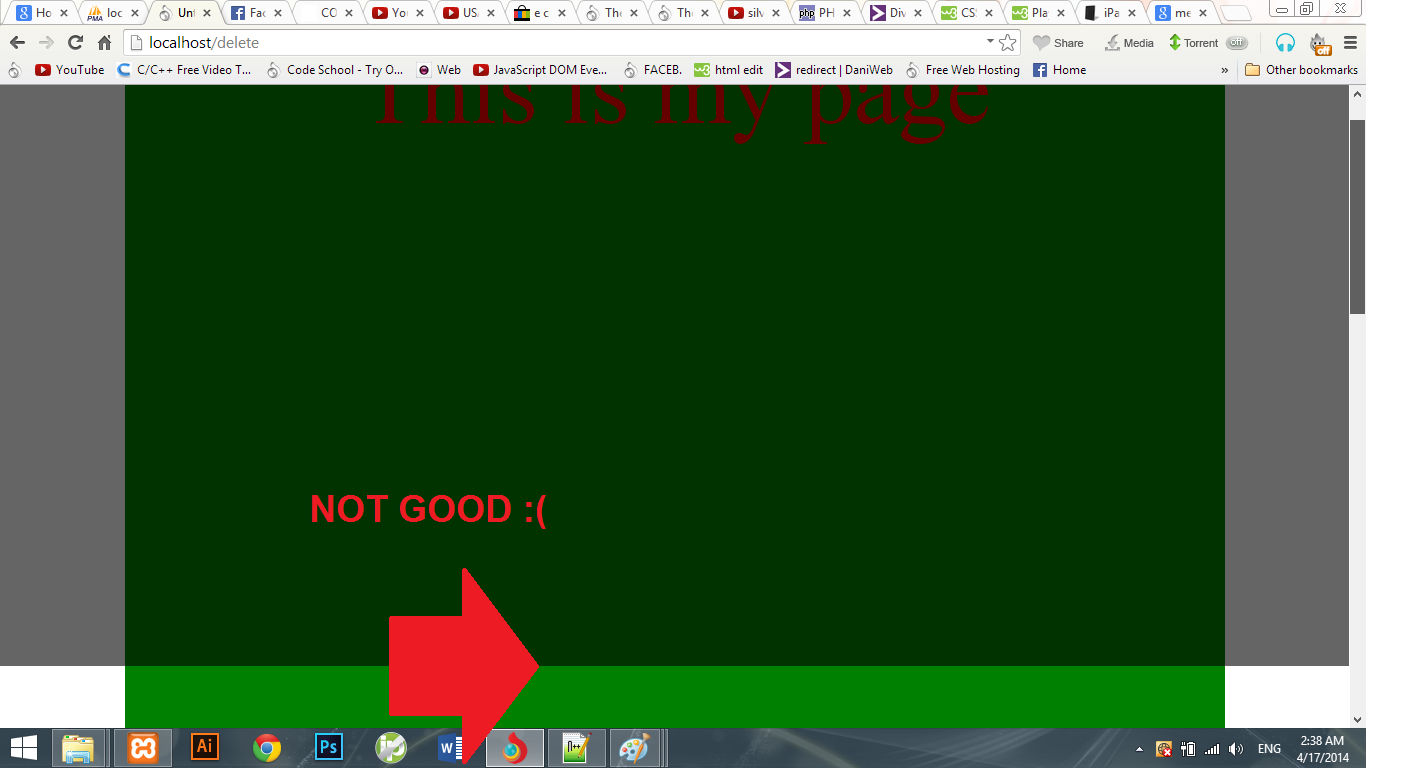
okay so i want a div that has an absolute positioning with height and width at 100%, like when u click on a facebook photo, the div that the color is black, with an opacity or a rgba color that u can see tru .. the problem is that when i set it, it just take 100% of the sreen height, and when i scroll down the page it shows the end of the div...

<div style="position:absolute;top:0;left:0;height:100%;width:100%;background:rgba(0, 0, 0, 0.6);"></div>

how can i fix this, without giving it a fixed positioning or a specified height?
Also this happens with the width too, it just take 100% of the screen width

Thanks!

Dani AI

Generated

Short answer: the overlay was only covering the viewport because percentage heights on absolutely positioned elements are resolved against their containing block. If there is no positioned ancestor the “containing block” is the initial containing block (the viewport), so height:100% matches the screen, not the full document — hence the overlay ends when you scroll.

A simple, reliable pattern that keeps the dark layer covering the viewport while letting the white “modal” box scroll with the page is: render the overlay as a fixed element that fills the viewport, and render the modal as a normal-flow element with a higher stacking order. That keeps the modal in the document flow (so it scrolls) but visually sits above the overlay.

/* overlay fills viewport */
.overlay {
  position: fixed;
  inset: 0;                 /* shorthand for top:0; right:0; bottom:0; left:0; */
  background: rgba(0,0,0,0.6);
  z-index: 1000;
}

/* modal stays in flow and scrolls with page */
.modal {
  position: relative;
  z-index: 1001;
  width: 600px;
  margin: 150px auto;
  background: #fff;
  padding: 16px;
}
<body>
  <!-- long page content -->
  <div id="page">...long content...</div>

  <div class="overlay" aria-hidden="true"></div>

  <div class="modal" role="dialog" aria-modal="true">...white box...</div>
</body>

Troubleshooting checklist: use devtools to inspect the overlay’s computed height; ensure the overlay is appended where you expect (putting it at the top-level <body> avoids parent-position surprises); control stacking with explicit z-index; if you want to lock background scroll use body { overflow: hidden } when the modal is open (but that prevents the modal from scrolling with the page). As discovered, moving the white box outside/after the fixed overlay is the practical fix — the explanation above clarifies why it behaves that way for . Include keyboard/ARIA handling (Esc to close, focus management) for better UX.

Recommended Answers

All 8 Replies

Hi,
I try this:

<!DOCTYPE HTML>
<html>
<head>
    <title>Untitled 1</title>
</head>

<body>
    <div style="position:absolute; top: 0px; left: 0px; height: 100%; width: 100%; background: rgba(0, 0, 0, 0.6); "></div>
</body>
</html>

and i dont have any scroll bar on browser.
Can you give some details of your html and css code ?

Hi,

I try this:

Thanks for the reply

oh men if i post my css code ud be dealing with a bunch of lines, yes u dont have a scroll bar cuz ur page is empty. try this and see what i meant

<!DOCTYPE HTML>
<html>
<head>
    <title>Untitled 1</title>

    <style>
        #content {
            width:1100px;
            border:4px solid black;
            background:green;
            margin:0 auto;
            height:2000px;
            font-size:100px;
            color:red;
            text-align:center;
        }
    </style>
</head>
<body>
    <div id="content"> This is my page   </div>
    <div style="position:absolute; top: 0px; left: 0px; height: 100%; width: 100%; background: rgba(0, 0, 0, 0.6); "></div>
</body>
</html>

Thanks again for the reply

Hi again,
This is work.

<!DOCTYPE HTML>
    <html>
    <head>
    <title>Untitled 1</title>
    <style>
    #content {
        width:1100px;
        border:4px solid black;
        background:green;
        margin:0 auto;
        height:2000px;
        font-size:100px;
        color:red;
        text-align:center;
    }
    </style>
    </head>
    <body>

    <div style="float:left; height: 100%; width: 100%; background: rgba(0, 0, 0, 0.6); ">
        <div id="content"> This is my page </div>
    </div>
    </body>
    </html>

Hi again,
This is work.

Hi albucurus, floating the div is not an option since i have floating element in my real page, it will end up beside another floating element... what im trying to do is not a body background, its something like this...

<!DOCTYPE HTML>
    <html>
    <head>
    <title>Untitled 1</title>
    <style>
    #content {
        width:1100px;
        border:4px solid black;
        background:green;
        margin:0 auto;
        height:2000px;
        font-size:100px;
        color:red;
        text-align:center;
    }
    </style>
    </head>
    <body>
    <div id="content"> This is my page 
        <div style="position:absolute;top:0;left:0;height:100%;width:100%;background:rgba(0, 0, 0, 0.8); ">
            <div style="position:relative;top:150px;font-size:16px;background:white;height:auto;width:600px;margin:0 auto;padding-bottom:40px;">
                <div style="width:100%;text-align:right;font-size:40px;"><b>[x]</b></div>
                <img src=""  />
            </div>
        </div>
    </div>  

    </body>
    </html>

Thanks for ur time

Me by this ?!

<div style="position:absolute; top:0px;left:0px; height:2020px; width:100%; background:rgba(0, 0, 0, 0.8); z-index: 10;">
            <div style="position:relative;top:150px;font-size:16px;background:white;height:auto;width:600px;margin:0 auto;padding-bottom:40px;">
                <div style="width:100%;text-align:right;font-size:40px;"><b>[x]</b></div>
                <img src="" />
            </div>
        </div>

Me by this ?!

No, i cant give it a specified height nor position:fixed; unless u have a way to position:fixed the black div , and when scroll down some how the white div dont get in the same position, like actualy scroll down..

  <body>
    <div id="content"> This is my page 
        <div style="position:fixed;top:0;left:0;height:100%;width:100%;background:rgba(0, 0, 0, 0.8); ">
            <div style="position:relative;top:150px;font-size:16px;background:white;height:auto;width:600px;margin:0 auto;padding-bottom:40px;">
                <div style="width:100%;text-align:right;font-size:40px;"><b>[x]</b></div>
                <img src=""  />
            </div>
        </div>
    </div>  

    </body>

Hi,
Move the white div after the fixed div, the fixed div become without content.
This worked for me:

<div id="content"> This is my page
       <div style="position:fixed; top:0px;left:0px; height:100%; width:100%; background:rgba(0, 0, 0, 0.8); ">
       </div>
       <div style="position: relative; top:150px;font-size:16px;background:white; height:auto; width:600px; margin:0 auto;padding-bottom:40px;">
                <div style="width:100%;text-align:right;font-size:40px;"><b>[x]</b></div>
                <img src="" />
</div>


</div>

Hi,
Move the white div after the fixed div, the fixed div become without content.
This worked for me:

This would do the trick! many many thanks!

Be a part of the DaniWeb community

We're a friendly, industry-focused community of developers, IT pros, digital marketers, and technology enthusiasts meeting, networking, learning, and sharing knowledge.