Hi,

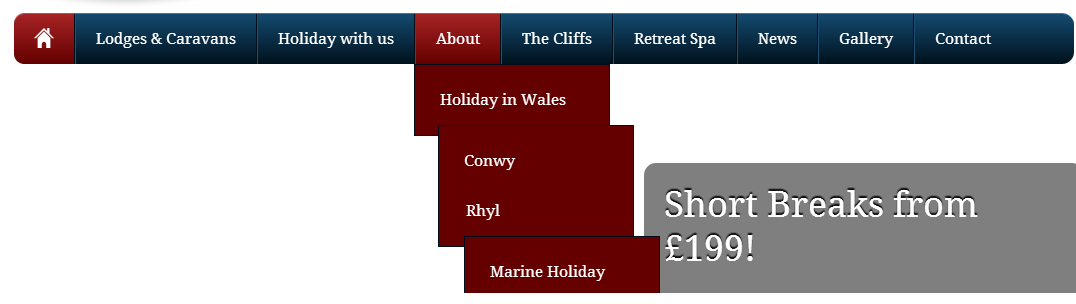
Im having issues with a drop down menu in wordpress, when hovering over the top level it displays the first child as well as any child links within them. I need it to only display the child links when the parent is hovered over just as any other drop down menu would.

Here is a screenshot:
c93ed891c4051aa19e28d9319737acdd

Here is the css associated with the sub menu:

#top-nav .sub-menu{position:absolute;min-width:144px;list-style:none;padding:0;margin:0;visibility:hidden;padding:10px 25px;margin:0 0 0 -2px;background:#640000;border:1px solid #000f1a; }


#top-nav .sub-menu:after{clear:both}
#top-nav .sub-menu.drop{visibility:visible;}
#top-nav .sub-menu li{float:left;clear:both;background:0;}
#top-nav .sub-menu li:first-child a{padding:0;width:auto;height:auto;text-indent:0;background:0;-webkit-border-radius:0;-moz-border-radius:0;border-radius:0;white-space:normal}
#top-nav .sub-menu a,#top-nav .sub-menu .current-menu-item a{margin:0;padding:0;color:#fff;border:0;background:0;-webkit-transition:color .1s ease;-moz-transition:color .1s ease;-ms-transition:color .1s ease;-o-transition:color .1s ease;transition:color .1s ease}#top-nav .sub-menu a:hover,#top-nav .sub-menu li:first-child:hover,#top-nav .sub-menu li.current-menu-item:first-child{margin:0;padding:0;color:#aaa;border:0;background:0}

P.s this is not my coding lol

Thanks

Dani AI

Generated

Likely cause and concise fix summary for : the theme’s CSS is revealing every descendant submenu when a top-level item is hovered instead of only the immediate child, and submenu list items are being floated so nested lists don’t stack. A robust solution is to make each li the containing block, use the child selector so only li > .sub-menu becomes visible on hover, and stop floating submenu li elements so they render as vertical lists.

Quick CSS pattern (place in the theme override or child theme — this is a different snippet from the one already posted):

#top-nav li { position: relative; }

#top-nav .sub-menu { display: none; position: absolute; left: 0; top: 100%; z-index: 999; }

#top-nav li:hover > .sub-menu { display: block; }

#top-nav .sub-menu li { float: none; display: block; }

#top-nav .sub-menu .sub-menu { left: 100%; top: 0; /* for flyout submenus */ }

Troubleshooting checklist: use browser DevTools to inspect which CSS rule is causing descendant ul elements to be visible; temporarily add an outline to every .sub-menu to see actual boxes; search theme/JS for any class toggles (words like drop or open) and check specificity — sometimes a more specific selector such as #top-nav .menu-item-has-children:hover > .sub-menu is required. Also clear any CSS caching/minification after changes.

This approach follows the same immediate-child pattern implied by @M/’s example and avoids changing submenu visibility for grandchildren. Overrides are safest in Appearance → Customize → Additional CSS or a child theme so core theme updates won’t be lost.

Recommended Answers

All 2 Replies

Here, look at this example:

hope that helps!

bump

commented: No bumping... -2
Be a part of the DaniWeb community

We're a friendly, industry-focused community of developers, IT pros, digital marketers, and technology enthusiasts meeting, networking, learning, and sharing knowledge.