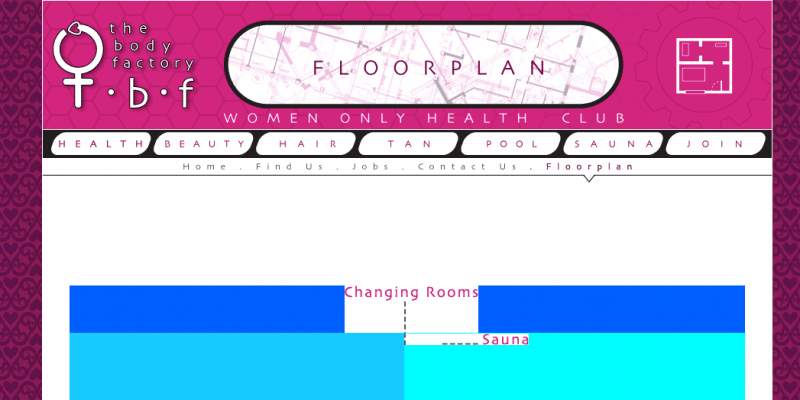
Does anyone know how to get rid of gap (seems to be 1px) between a the border of a table cell and the border of a div?

I just want the border of the table to collapse into the border of the div.

is border-collapse: collapse; the solution?

Dani AI

Generated

A 1px gap between a table (or a table cell border) and its parent div is a common layout artefact. asked whether border-collapse: collapse is the fix and correctly suggested zeroing margins/padding and removing table cellspacing/cellpadding. That advice is necessary but not always sufficient — ’s later report of a persistent top pixel shows other causes can be involved.

Important points:

  • border-collapse: collapse only affects how table cell borders join one another; it does not make a table border merge with an outer div’s border.
  • Ensure padding on the div and margin on the table are zero. Use border-spacing: 0 (CSS) or cellspacing="0" (legacy) to remove internal table spacing. Also zero td/th padding.
  • Tiny gaps can come from inline baseline/line-height behaviour or sub-pixel rounding. In some layouts a table behaves like an inline-level box and leaves baseline space; display:block on the table or vertical-align: top can eliminate that, but display:block will change table semantics/layout.

Practical CSS that fixes most cases:

.container { margin:0; padding:0; border:1px solid #369; }

.container table {
  margin:0;
  border-collapse: collapse; /* removes double borders between cells */
  border-spacing: 0;         /* ensures no extra cell spacing */
}

.container td, .container th {
  padding:0;
}

/* Optional diagnostics / fixes (use with caution) */
.container table { display:block; }    /* removes baseline gap but alters table behavior */
.container { line-height:0; }          /* removes inline whitespace but affects text */

Diagnostic checklist: inspect computed margins/padding in the browser dev tools, toggle border-spacing/border-collapse, try temporarily removing the div border to see whether the table border is actually offset, and test the optional fixes to identify whether the gap is caused by baseline/line-height, rounding, or residual padding. If the visual goal is a single continuous border, it’s often simpler to put the border on the table itself and remove the div’s border.

Recommended Answers

All 2 Replies

Member Avatar for Member #114696

first of all set margin, padding, (cellspacing, cellpadding for tables only) properties of table and div to 0.

border-collapse sets the space between beween the cells. collapse means no space between cells and seperated means space between cells.

H, I'm new to this but I have exactly the same problem. I have a table in a div but there's a gap at the top of about 1px between the table's top edge and the div's top edge. I've zeroed all padding and borders out on divs and tables but to no avail. You can just see the pale blue line where I've coloured the div. Any ideas how to get rid of it, as it's causing all the other graphics to mis-align.

Jack

Be a part of the DaniWeb community

We're a friendly, industry-focused community of developers, IT pros, digital marketers, and technology enthusiasts meeting, networking, learning, and sharing knowledge.