i have a virus called LOP and i cant get rid of it. i run ad-aware and it get everything, or soo you would think. everytime i run it i delete around 160 spywhere but never get the one that keeps re-installing lop. everytime i restart my computer it reinstalls itself about 10 minutes later. how can i get rid of it?
#tbone

Dani AI

Generated

This thread (Sept 2004–Sept 2005) documents a classic LOP/“lop.com” adware case. reports success after following ’s uninstall suggestion, but others like still saw LOP when it didn’t appear in Add/Remove Programs. LOP-style parasites survive by planting startup entries, services, scheduled tasks, browser helper objects (BHOs) or copies inside System Restore — so scans alone sometimes miss the persistent bit that reinstalls everything on each boot.

Practical removal workflow (safe, ordered):

  1. Disconnect from the network to stop remote re-installation.
  2. Boot into Safe Mode (F8) and temporarily disable System Restore.
  3. Run a full scan with an up-to-date on-demand scanner (use more than one engine).
  4. Use Autoruns (or an equivalent startup viewer) to find and disable unfamiliar Run/RunOnce entries, services and scheduled tasks. Note file paths before deleting.
  5. Use Process Explorer / Task Manager to locate any running process, open its file location, then kill the process and delete the file.
  6. Generate a HijackThis-style log and inspect browser shortcuts, proxy settings and BHOs; remove suspicious entries only after backing up the registry.
  7. Empty temp folders, clear browser cache and reset homepage/search settings.
  8. Reboot normally, re-scan; if clean, re-enable System Restore and create a fresh restore point.

If LOP returns minutes after reboot it’s likely a hidden service or a restore-point copy. Watch for newly created processes right after boot to catch the installer; if manual removal fails, consider a clean image/rescue-boot scan or a reinstall (back up only personal data, scan it before restoring). For targeted help, include a current HijackThis/Autoruns log and exact symptoms in a new thread — that makes diagnosis far quicker than “it’s back.”

Recommended Answers

All 11 Replies

you could try to find all of the files on your computer and delete them. Usually there is a main file for spyware programs like this. You could also try using spybot searh and destroy.

used spybot search and destroy and it doesnt find it either. how can i find the folder it is in? ive searched for LOP and nothing comes up.

First of all could you click Start>Settings>Control Panel>Add or Remove Programs and uninstall 'Window Search', 'Window Searching', '', 'LOP SEARCH', 'Browser Enhancer', or 'Ultimate Browser Enhancer' if listed. You may be given a code to insert, do so and reboot when done. If not listed there, run this uninstaller:

THANK YOU SOO MUCH!!!

I have run Ad-Aware over 30 times getting rid of over 150 files/folders etc everytime. Finally it is working and has not come back. thanks alot. yall are the best.

#tbone

You're welcome :) . Marking this as solved. Anyone else with the same problem, please start your own thread. Thank you.

yea.. none of the programs are listed on my add or remove programs menu and the site that is on there no longer exists, if anyone knows how to get rid of the LOP on my computer than tell me.. thanks

yea.. none of the programs are listed on my add or remove programs menu and the site that is on there no longer exists, if anyone knows how to get rid of the LOP on my computer than tell me.. thanks

Read crunchie's last post. Start your own thread.

i just registered.. how do you start a new thread

lvlIk3, hi and welcome to Daniweb :).

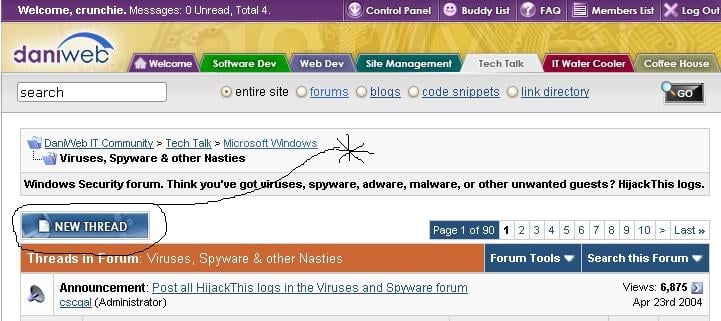
At the top of the forum you will see a button that says 'New Thread.' Hit that and away you go :).

i don't see the "new thread button" so can you just help me on this one... I can't find how to get rid of LOP and ive tried unistalling it at add/remove so i dunno what to do.
Thanks

Run the Lop Remover from:

Uploaded file to show the new thread button.

Be a part of the DaniWeb community

We're a friendly, industry-focused community of developers, IT pros, digital marketers, and technology enthusiasts meeting, networking, learning, and sharing knowledge.