I've been infected by a file (C:\windows\system32\adsldpw.dll) that I can't exterminate. I run all the usual suspects, but this guy seems particularly resistant to the tools I'm used to using. This one is more obnoxious than usual, primarily because it keeps respawning a new background version of Internet Explorer every minute or so if it doesn't find a copy already running. Here's what I've done so far:

1) HiJack_This (couldn't remove adsldpw.dll)
2) Security Task Manager (couldn't remove adsldpw.dll)
3) Adaware, AVG, CCleaner
4) Unlocker 1.8.5 (can unlock winlogon.exe and explorer.exe, but fails to delete or move adsldpw.dll
5) Avenger v1 (fails to remove adsldpw.dll, see log below)
6) VundoFix 6.5.6 using "Add more files" (fails to remove adsldpw.dll, see log below)
7) HiJack_This (see log below)

Logfile of Trend Micro HijackThis v2.0.0 (BETA)
Scan saved at 3:48:06 PM, on 1/29/2008
Platform: Windows XP SP2 (WinNT 5.01.2600)
Boot mode: Normal

Running processes:
C:\WINDOWS\System32\smss.exe
C:\WINDOWS\system32\csrss.exe
C:\WINDOWS\system32\winlogon.exe
C:\WINDOWS\system32\services.exe
C:\WINDOWS\system32\lsass.exe
C:\WINDOWS\system32\svchost.exe
C:\WINDOWS\System32\svchost.exe
C:\WINDOWS\system32\spoolsv.exe
C:\Program Files\Grisoft\AVG Anti-Spyware 7.5\guard.exe
c:\Program Files\Microsoft SQL Server\MSSQL.1\MSSQL\Binn\sqlservr.exe
C:\WINDOWS\System32\nvsvc32.exe
C:\WINDOWS\System32\svchost.exe
C:\WINDOWS\Explorer.EXE
C:\WINDOWS\System32\alg.exe
C:\packages\VerminTools\JackThis_v2.exe
C:\WINDOWS\System32\wbem\wmiprvse.exe

R0 - HKCU\Software\Microsoft\Internet Explorer\Main,Start Page = about:blank
N3 - Netscape 7: user_pref("browser.startup.homepage", ""); (C:\Documents and Settings\JOHN\Application Data\Mozilla\Profiles\default\sh27cbaj.slt\)
N3 - Netscape 7: user_pref("browser.search.defaultengine", "http://www.google.com/"); (C:\Documents and Settings\JOHN\Application Data\Mozilla\Profiles\default\sh27cbaj.slt\)
O2 - BHO: AcroIEHlprObj Class - {06849E9F-C8D7-4D59-B87D-784B7D6BE0B3} - C:\Program Files\Adobe\Acrobat 6.0\Reader\ActiveX\AcroIEHelper.dll
O2 - BHO: (no name) - {243D2809-6B85-4DF5-A1FB-F19618810A12} - C:\WINDOWS\system32\drmclienq.dll (file missing)
O2 - BHO: (no name) - {DFDBBDD6-1441-4715-B1BD-9D5540CCCA30} - c:\windows\system32\adsldpw.dll
O4 - HKLM\..\Run: [NvCplDaemon] RUNDLL32.EXE C:\WINDOWS\System32\NvCpl.dll,NvStartup
O4 - HKLM\..\Run: [Apoint] C:\Program Files\Apoint\Apoint.exe
O10 - Unknown file in Winsock LSP: c:\windows\system32\nwprovau.dll
O20 - Winlogon Notify: watfykcr - C:\WINDOWS\SYSTEM32\adsldpw.dll
O22 - SharedTaskScheduler: Browseui preloader - {438755C2-A8BA-11D1-B96B-00A0C90312E1} - C:\WINDOWS\System32\browseui.dll
O22 - SharedTaskScheduler: Component Categories cache daemon - {8C7461EF-2B13-11d2-BE35-3078302C2030} - C:\WINDOWS\System32\browseui.dll
O23 - Service: AVG Anti-Spyware Guard - GRISOFT s.r.o. - C:\Program Files\Grisoft\AVG Anti-Spyware 7.5\guard.exe
O23 - Service: InstallDriver Table Manager (IDriverT) - Macrovision Corporation - C:\Program Files\Common Files\InstallShield\Driver\11\Intel 32\IDriverT.exe
O23 - Service: NVIDIA Driver Helper Service (NVSvc) - NVIDIA Corporation - C:\WINDOWS\System32\nvsvc32.exe

--
End of file - 2615 bytes


Logfile of The Avenger version 1, by Swandog46
Running from registry key:
\Registry\Machine\System\CurrentControlSet\Services\dgwebmmj

*******************

Script file located at: \??\C:\Program Files\ikcwecrx.txt
Script file opened successfully.

Script file read successfully

Backups directory opened successfully at C:\Avenger

*******************

Beginning to process script file:

Could not open file C:\WINDOWS\SYSTEM32\adsldpw.dll for deletion
Deletion of file C:\WINDOWS\SYSTEM32\adsldpw.dll failed!

Could not process line:
C:\WINDOWS\SYSTEM32\adsldpw.dll
Status: 0xc0000022


Completed script processing.

*******************

Finished! Terminate.

VundoFix V6.5.6

Checking Java version...

Scan started at 11:33:17 AM 12/17/2007

Listing files found while scanning....

No infected files were found.


Beginning removal...

Attempting to delete c:\windows\system32\adsldpw.dll
c:\windows\system32\adsldpw.dll Could not be deleted.

Attempting to delete c:\windows\system32\adsldpw.dll
c:\windows\system32\adsldpw.dll Could not be deleted.

Attempting to delete c:\windows\system32\drmclienq.dll
c:\windows\system32\drmclienq.dll Could not be deleted.

Attempting to delete c:\windows\system32\drmclienq.dll
c:\windows\system32\drmclienq.dll Could not be deleted.

Performing Repairs to the registry.
Done!

Beginning removal...

Attempting to delete c:\windows\system32\adsldpw.dll
c:\windows\system32\adsldpw.dll Could not be deleted.

Attempting to delete c:\windows\system32\adsldpw.dll
c:\windows\system32\adsldpw.dll Could not be deleted.

Attempting to delete c:\windows\system32\drmclienq.dll
c:\windows\system32\drmclienq.dll Could not be deleted.

Attempting to delete c:\windows\system32\drmclienq.dll
c:\windows\system32\drmclienq.dll Could not be deleted.

Performing Repairs to the registry.
Done!

Beginning removal...

Attempting to delete C:\WINDOWS\SYSTEM32\adsldpw.dll
C:\WINDOWS\SYSTEM32\adsldpw.dll Could not be deleted.

Performing Repairs to the registry.
Done!

Beginning removal...

Attempting to delete C:\WINDOWS\SYSTEM32\adsldpw.dll
C:\WINDOWS\SYSTEM32\adsldpw.dll Could not be deleted.

Performing Repairs to the registry.
Done!

Beginning removal...

Beginning removal...

Attempting to delete C:\WINDOWS\SYSTEM32\adsldpw.dll
C:\WINDOWS\SYSTEM32\adsldpw.dll Could not be deleted.

Performing Repairs to the registry.
Done!

Beginning removal...

Attempting to delete C:\WINDOWS\SYSTEM32\adsldpw.dll
C:\WINDOWS\SYSTEM32\adsldpw.dll Could not be deleted.

Performing Repairs to the registry.
Done!

VundoFix V6.5.6

Checking Java version...

Scan started at 2:09:40 PM 1/29/2008

Listing files found while scanning....

No infected files were found.

Dani AI

Generated

This thread documents a classic case of a stubborn System32 DLL that resisted Unlocker, Avenger and VundoFix until an updated ComboFix was used. Credit to for the ComboFix suggestion and to and for the reminder to keep tools current; ’s confirmation that the updated tool worked closes the loop. The situation highlights two consistent lessons: persistence hooks must be removed before the file can be permanently deleted, and running current, reputable tools (or performing an offline removal) is often the difference between transient and permanent cleanup.

Common persistence points to check (and the practical checks that follow) include Windows logon notifications, browser helper objects and any LSP/service entries that recreate the DLL. These live in places such as HKLM\SOFTWARE\Microsoft\Windows NT\CurrentVersion\Winlogon\Notify and HKLM\SOFTWARE\Microsoft\Windows\CurrentVersion\Explorer\Browser Helper Objects\{CLSID}; Autoruns (from Sysinternals) can reveal and disable these entries, and Process Explorer can identify the process holding the DLL open so the handle can be closed. If the DLL is kernel-hooked or respawns immediately, an offline method (WinPE, a rescue CD, or Linux live boot) is required to delete the file and edit the registry without Windows locking it.

A practical, low-risk workflow: ensure current signatures and tools; isolate the machine from the network; record symptoms and back up the registry or create a disk image; use Autoruns and Process Explorer to disable startup hooks and close handles; attempt deletion in Safe Mode; if locked, perform offline deletion and then run updated rootkit scans and full malware scans. If removal tools are unfamiliar or the system is unstable, imaging and reinstalling Windows is the safest fallback. Advanced removers like ComboFix can be effective but should be used with caution and only after backups are taken.

Recommended Answers

All 7 Replies

first off goto filehippo.com and download the newer HiJackThis and post a new log and have you tried combofix.exe?

have you tried removing these from hijackthis
O2 - BHO: (no name) - {243D2809-6B85-4DF5-A1FB-F19618810A12} - C:\WINDOWS\system32\drmclienq.dll (file missing)

O2 - BHO: (no name) - {DFDBBDD6-1441-4715-B1BD-9D5540CCCA30} - c:\windows\system32\adsldpw.dll

how do you know that you are infected with that file? i just checked on it and it says its unclassified, meaning, that its not necessarily bad

ooh, I've just been overwhelmed :D. Sorry dude.

burnsy, while your at it;

Please download ComboFix by sUBs from or HERE

  • Save it to your Desktop
  • Physically disconnect from the internet.
  • Now STOP all your monitoring programs (Antivirus/Antispyware, Guards and Shields)
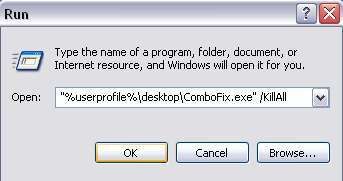
  • Click on your START button and choose Run. Then copy/paste the entire content of the following quotebox (Including the "" marks and the Symbols) into the run box.

    "%userprofile%\desktop\ComboFix.exe" /KillAll

    [IMG]http://i5.photobucket.com/albums/y153/crunchie1/thRunBox_KillAll.jpg[/IMG]

  • Click OK and this will start ComboFix.
  • When finished, it will produce a log. Please save that log to a Notepad File and include it in your next reply along with a fresh HJT log.

Note:
Do not mouse-click combofix's window while it is running. That may cause it to stall.

* Re-enable all the programs that were disabled prior to the running of ComboFix.

* Post the following logs/Reports:


  • ComboFix.txt
  • Fresh HijackThis log run after all the other tools have performed their cleanup.

CF disconnects your machine from the internet. The connection is automatically restored before CF completes its run. If CF runs into difficulty and terminates prematurely, the connection can be manually restored by restarting your machine.

Your vundofix is out of date, btw.... 6707 is current.

The latest version of ComboFix resolved the problem. Thanks gentlemen. I've attached the ComboFix and HJT logs.

Overwhelmed:
Yes, I had attempted to delete them with HJT and STM first... and I had run an older version of ComboFix. I probably should have been more anal in reporting my initial steps, but I had already moved on from the vermin sniffing phase to the vermin elimination phase. I only reported the steps related to file deletion problem.
And I was confident it was a nasty because 1) Security Task Manager reported it as 93% likely to be an infection, 2) it was a new file and couldn't be deleted through conventional means and 3) I watch the HJT log closely and ruthlessly prune detritus that turns up randomly.

Crunchie and Gerbil:
I guess I need to be more diligent about having up-to-date tools. I just updated everything in mid-December! I just got new versions of HJT, ComboFix, and VundoFix this morning and realized that my copies of Adaware, AVG, and Spybot are all outdated. Good grief. I think I need to give up my business and personal lives and spend more time caring for my computer.

1. Please open Notepad

  • Click Start , then Run
  • Type notepad .exe in the Run Box.

2. Now copy/paste the entire content of the codebox below into the Notepad window:

KillAll::

File::
C:\WINDOWS\SYSTEM32\tsrqr.bak1
C:\WINDOWS\SYSTEM32\tsrqr.bak2
C:\WINDOWS\SYSTEM32\tsrqr.ini2
C:\WINDOWS\SYSTEM32\ttstv.bak1
C:\WINDOWS\SYSTEM32\vvyxx.bak2

Note: the above code was created specifically for this user. If you are not this user, do NOT follow these directions as they could damage the workings of your system.

3. Save the above as CFScript.txt

4. Physically disconnect from the internet.

5. Now STOP all your monitoring programs (Antivirus/Antispyware, Guards and Shields) as they could easily interfere with ComboFix.

6. Then drag the CFScript.txt into ComboFix.exe as depicted in the animation below. This will start ComboFix again.


7. After reboot, (in case it asks to reboot), please post the following reports/logs into your next replyafter you re-enable all the programs that were disabled during the running of ComboFix:

  • Combofix.txt
  • A new HijackThis log.

Please take note:

CF disconnects your machine from the internet. The connection is automatically restored before CF completes its run. If CF runs into difficulty and terminates prematurely, the connection can be manually restored by restarting your machine.

Please do not attach the logs, just paste them into your reply.

Be a part of the DaniWeb community

We're a friendly, industry-focused community of developers, IT pros, digital marketers, and technology enthusiasts meeting, networking, learning, and sharing knowledge.