Hi

I use win98se

Each rime I restart my machine more new file are added, what are they and how can I solve this problem?

THanks tori


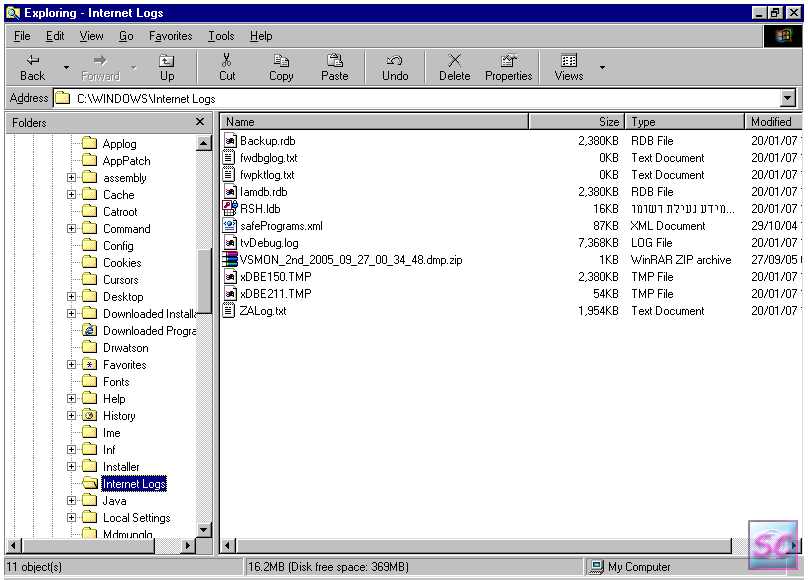
Attached jpgs example' but each time I restart the machine there are more and I keep deleting them again and agian but.....I want to get rid of this burden.

At the library c:\windows\

at the size about 0Mb and they look like:

fff8856f_{2CECBFCF-C4C9-4024-B881-C74DD7774BBC}.tmp
fff8856f_{311ED16D-524C-4BFC-B2D4-DF6C01C5B41D}.tmp

At the library c:\windows\internet logs\

at the size about 2Mb and they look like:

xDBE150.TMP
xDBE211.TMP
tvDebug.log
Iamdb.rdb

Dani AI

Generated

A concise diagnostic checklist and safe cleanup plan based on the examples posted by and the suggestions from and . Persistent small .tmp files and growing .log files on a Win98SE machine are usually produced by a running program or service (often a debug/logging feature), not by “random” filesystem corruption. Methodical identification of the creator is the fastest, safest fix.

Recommended troubleshooting steps

  • Reproduce then isolate: boot to Safe Mode. If the files stop appearing, they are started by a normal boot startup item or service.
  • Identify the creator process: watch processes at boot (Task Manager) and use a handle/process-inspection tool that supports Win9x to see which process opens the file. Note timestamps and the first process that touches the file.
  • Inspect startup locations: the Startup folder, plus RUN/RunServices keys in the registry and legacy entries in win.ini/system.ini. Temporarily disable nonessential startup entries and reboot to see which change prevents re-creation.
  • Stop the producing program before cleanup: exit the suspect program from the system tray or shut its service down, then delete or move the files. If a log (for example a tvDebug.log–style file) keeps growing, look for a debug/logging setting in that application and reduce or disable it.
  • If a file is locked, delete from Safe Mode or from DOS/boot media, or use a tool that releases handles. Keep a backup of any moved file for at least one reboot so any hidden dependency becomes obvious.

Malware/rootkit notes and safety

  • A clean AV scan lowers probability of infection but does not guarantee it. Complement online scans with an offline rescue scanner or specialized rootkit tools (use tools known to work on legacy systems). Do not delete files from C:\Windows blindly; move them first and keep a backup. If mystery persists, collect exact filenames, sizes, timestamps and the name of the process that created them before deeper analysis.

Long-term: consider moving off Win98 where possible; modern systems have better tooling and fewer unmanaged logging behaviors.

Recommended Answers

All 5 Replies

c:\windows\internet logs is a folder created by zone alarm. If the size of it bothers you then delete the contents of each .txt file in there. I bet you cannot delete the .log files while ZA is running.
I have only 20 ZAlog...txt files, so i assume they are deleted on a rolling basis automatically.
Those other windows\fff88... files? i have no idea... those clsid nos are not on the web so i would guess that something dodgy put them there. Try a f-secure blacklight beta scan, or kaspersky online scan, or rootkitdetector.

Some additional info for you.
The link below can explain it better than I ever could. ;)

See post #8 for the FFF entries....


PP :)

Thanks for your comments

No threats were found
and I disabled the MDM hope no problem comes out of it.

Tori


nb. About rootkillers, doesn't NAV find these parasites?

nb. About rootkillers, doesn't NAV find these parasites?

Rootkits?
Some Security Suite packages claim to detect them, but for the most part it is hit-or-miss. Generally, you are better off using a few of the specialized tools along in concert with an experienced forum advisor........


PP :)

thanks for the link, pp. And to you to, tori, for getting me to notice those logs put in by ZA. CCleaner in its current form will delete some of the txt files, but not the tvDebug.log one, which does grow.....
This link shows a few simple methods....

If you use CCleaner as a temp file cleaner, then the mod there is cool.

Be a part of the DaniWeb community

We're a friendly, industry-focused community of developers, IT pros, digital marketers, and technology enthusiasts meeting, networking, learning, and sharing knowledge.