I have been able to create a C# program from scratch.
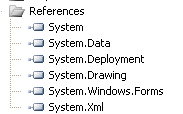
When I do so, I automatically get a list of References like this:
[IMG]http://i67.photobucket.com/albums/h292/Athono/csharp.png[/IMG]

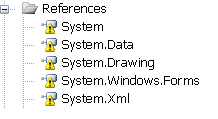
When I open a project developed by a co-worker, I get a list
of References that looks like this:
[IMG]http://i67.photobucket.com/albums/h292/Athono/01-1-1.png[/IMG]

This is very different and I suspect is the cause of some problems.
I am unable to double click on these items without getting an
error message.

Also, if I right click on these items and choose "Properties", I
am unable to edit a lot of key items such as path name.

Dani AI

Generated

: the different References view usually means the project files are not the same rather than a Visual Studio bug. As and suggested, a framework mismatch is a common cause, but other causes are equally likely: a different project type (Web Site vs Web Application), references resolved from the GAC (those paths are not editable), or <HintPath> entries in the .csproj that point to DLLs on a machine or network location that is missing.

A practical checklist to diagnose the exact cause:

  • Inspect the project's Target Framework and Visual Studio edition (Project -> Properties -> Application; Help -> About). Also unload the project and open the .csproj to see the <TargetFrameworkVersion> and <Reference> entries (look for <HintPath>).
  • Look for yellow warning icons on References. Missing/invalid references will fail to open and cannot be edited in Properties.
  • Check for NuGet/packages (packages.config or packages folder) or a local Bin/lib folder used by the co-worker. Web Site projects surface references differently and rely on the Bin folder instead of the .csproj.

Recommended fixes and prevention:

  • If frameworks differ, install the required .NET version or align the project's Target Framework (coordinate first; changing the target can break code).
  • For missing third-party DLLs, add the binaries into a project-local lib folder and reference them by relative HintPath, or convert those dependencies to NuGet packages so they restore automatically. To change a reference path, remove the broken reference and Add Reference -> Browse to the correct DLL (or add the project reference if available).
  • If an assembly is resolved from the GAC and a local copy is needed, install the appropriate runtime or use a local copy with Copy Local=true.

Further reading: Managing references in a project and .

Recommended Answers

All 2 Replies

Perhap try changing the target framework in the project properties to the max allowable?

Different framework versions is a possible cause. What did you and your co-worker each use to create the projects?

As to their properties, most of them should not be modifiable.

Be a part of the DaniWeb community

We're a friendly, industry-focused community of developers, IT pros, digital marketers, and technology enthusiasts meeting, networking, learning, and sharing knowledge.