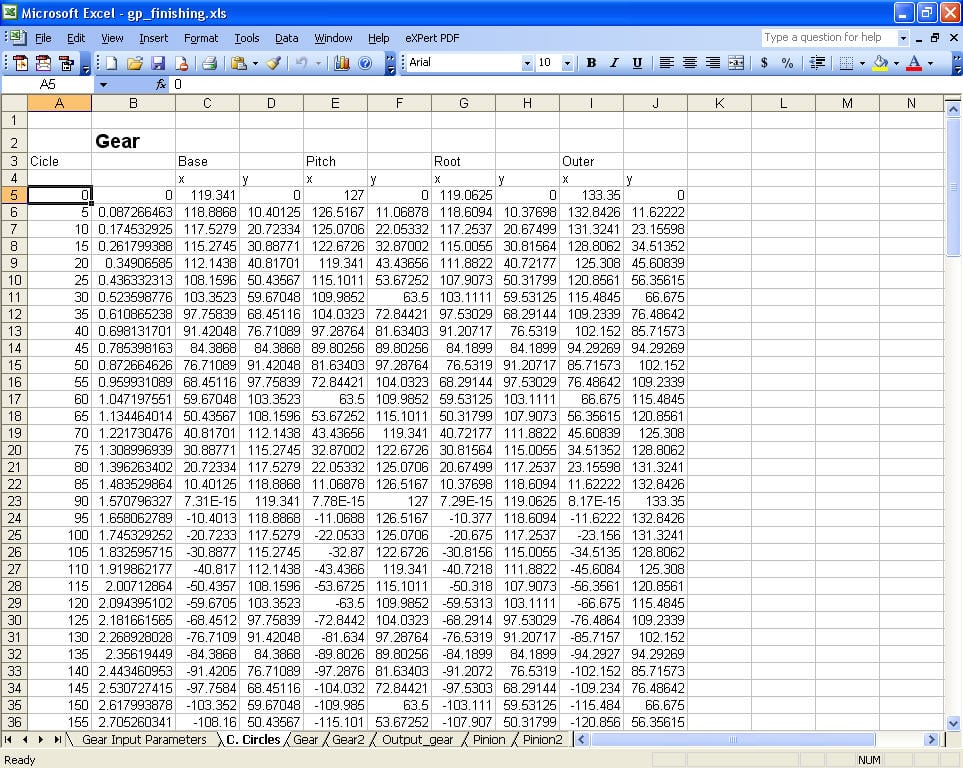
As in first Picture I'll have to generate a code
to make a fixed invisible colum

For i = 0 to 360
Step 5


[IMG][/IMG]

Then Each time it itterates the value gets multiplied by Pi and divided by 180

and stored in a similar way like excel.


[IMG][/IMG]

As for the third Picture weve got 4 circles
Pitch
base
Outer
Root
and each one has X, Y

Equations are the same for all 4 circles
the only thing that differs is that.
For example lets consider the Base Circle as shown in 3d picture.
X1 = Base Circle value ( same one used for Y) * Cos ( The stored value from the second picture)
X2 = ......
X360 = .....

Y1 = Base Circle Value * Sin ( The stored Value from the second Picture)
Y2=.....
Y360=......


The remaining three construction circles are built in the same concept but the same concept and same equation but the only one difference is the for pitch circle we use the value from the table of pitch
in Root we use the value assigned for root and so on.

Once weve got the code for all 4 circles. we can draw the circle as a representation of that table.

[IMG][/IMG]

Any help would be welcomed :-)

Dani AI

Generated

A concise plan for turning the Excel table into four drawn curves (pitch, base, outer, root) for , and a quick reply to ’s “what’s the point?”: this is a visualization of radial data (radii by angle). Best results come from separating the math (polar -> cartesian) from rendering, then using GDI+ transforms to place and scale the result on a control.

Compute step:

  • Keep a single data structure that holds the four radii for each angle (a small class/struct or parallel lists). Precompute the angle trig (radians, sin/cos) once and reuse it to avoid repeated Math.Sin/Math.Cos calls.
  • Convert mm -> pixels with a scale factor chosen to fit the largest radius into the drawing area (margin included).
  • Convert radii to PointF arrays (float pixel coordinates). If the dataset includes both 0 and 360 degrees, drop the final duplicate when building the polygon.

Rendering hints:

  • Do the drawing in Paint (or override OnPaint) and keep the computed PointF arrays as fields; recompute only when inputs change. Enable double buffering to avoid flicker and set SmoothingMode = AntiAlias for smoother circles.
  • Use Graphics.TranslateTransform to move the origin to the center of the control, and Graphics.ScaleTransform(1, -1) to make the Y axis point up; then DrawLines/DrawPolygon or GraphicsPath to draw/close each curve.
  • For constant-radius circles prefer DrawEllipse with the computed bounding rectangle; for variable radii connect the PointF array.

Example skeleton (VB) showing transforms and draw order:

Public Sub New()
    InitializeComponent()
    Me.DoubleBuffered = True
End Sub

Protected Overrides Sub OnPaint(e As PaintEventArgs)
    MyBase.OnPaint(e)
    Dim g = e.Graphics
    g.SmoothingMode = Drawing2D.SmoothingMode.AntiAlias
    g.TranslateTransform(ClientSize.Width/2, ClientSize.Height/2)
    g.ScaleTransform(1, -1)
    ' basePts, pitchPts, rootPts, outerPts are PointF() fields already converted to pixels
    g.DrawLines(Pens.Blue, basePts)
    g.DrawLines(Pens.Green, pitchPts)
    g.DrawLines(Pens.Red, rootPts)
    g.DrawLines(Pens.Black, outerPts)
End Sub

Troubleshooting notes: confirm array lengths match before drawing; clamp scale to avoid tiny or overflowing results; redraw with Invalidate after recompute; for export render to a Bitmap using the same transforms. This keeps computation separate, makes the UI responsive, and produces accurate, scalable visuals for the graduation project.

Recommended Answers

All 4 Replies

so what the point here?how far you do this?

Im a mechanical enginner im doing this for my graduation Project. I was asked to rebuilt my excel file all of it -> Visual Basic. i'll do this untill im done ofcourse. heres my excel file.

http://www.zshare.net/download/85156640d56348

So ill need a code like

Public Class Form1

    Private Sub Form1_Load(ByVal sender As System.Object, ByVal e As System.EventArgs) Handles MyBase.Load
        'Make your arrays
        Dim BaseX(72) As Double
        Dim BaseY(72) As Double
        Dim PitchX(72) As Double
        Dim PitchY(72) As Double
        Dim RootX(72) As Double
        Dim RootY(72) As Double
        Dim OuterX(72) As Double
        Dim OuterY(72) As Double

        'You're filling in these 4 from your other form.
        Dim Rbg_mm As Double
        Dim Rpg_mm As Double
        Dim Rrg_mm As Double
        Dim Rog_mm As Double

        'These are temporary variables to make the calculations easier.
        Dim dblSinTemp As Double
        Dim dblCosTemp As Double
        For i As Integer = 0 To 360 Step 5
            dblSinTemp = Math.Sin((i * Math.PI) / 180.0)
            dblCosTemp = Math.Cos((i * Math.PI) / 180.0)
            BaseX(i \ 5) = Rbg_mm * dblCosTemp
            BaseY(i \ 5) = Rbg_mm * dblSinTemp
            PitchX(i \ 5) = Rpg_mm * dblCosTemp
            PitchY(i \ 5) = Rpg_mm * dblSinTemp
            RootX(i \ 5) = Rrg_mm * dblCosTemp
            RootY(i \ 5) = Rrg_mm * dblSinTemp
            OuterX(i \ 5) = Rog_mm * dblCosTemp
            OuterY(i \ 5) = Rog_mm * dblSinTemp
        Next

        'That's it.  

    End Sub
End Class

i dont know wheather my code is ok or not. May you please look into it ?

If im to drawn 4 circles from this code What approch would i use ?


Public Class Form1

Private Sub Form1_Load(ByVal sender As System.Object, ByVal e As System.EventArgs) Handles MyBase.Load
        'Make your arrays
        Dim BaseX(72) As Double
        Dim BaseY(72) As Double
        Dim PitchX(72) As Double
        Dim PitchY(72) As Double
        Dim RootX(72) As Double
        Dim RootY(72) As Double
        Dim OuterX(72) As Double
        Dim OuterY(72) As Double

        'You're filling in these 4 from your other form.
        Dim Rbg_mm As Double
        Dim Rpg_mm As Double
        Dim Rrg_mm As Double
        Dim Rog_mm As Double

        'These are temporary variables to make the calculations easier.
        Dim dblSinTemp As Double
        Dim dblCosTemp As Double
        For i As Integer = 0 To 360 Step 5
            dblSinTemp = Math.Sin((i * Math.PI) / 180.0)
            dblCosTemp = Math.Cos((i * Math.PI) / 180.0)
            BaseX(i \ 5) = Rbg_mm * dblCosTemp
            BaseY(i \ 5) = Rbg_mm * dblSinTemp
            PitchX(i \ 5) = Rpg_mm * dblCosTemp
            PitchY(i \ 5) = Rpg_mm * dblSinTemp
            RootX(i \ 5) = Rrg_mm * dblCosTemp
            RootY(i \ 5) = Rrg_mm * dblSinTemp
            OuterX(i \ 5) = Rog_mm * dblCosTemp
            OuterY(i \ 5) = Rog_mm * dblSinTemp
        Next

        'That's it.  

    End Sub
End Class

Any one ? Any Help ?

Be a part of the DaniWeb community

We're a friendly, industry-focused community of developers, IT pros, digital marketers, and technology enthusiasts meeting, networking, learning, and sharing knowledge.