Hi Dear Friends...!!!

I am developing a Attendance System in C# using MS Access Database.

I want to Count the totall P and A in the Attendance Column...

now Dear Friends Please tell me any Query or logic to do the above work...!!!

***P for Present***
***A for Absent ***

Dani AI

Generated

Good catch by — the original symptom came from using a command method that does not return the scalar value produced by a SELECT aggregate. Below are safer, more robust options and a few practical tips you can apply now.

A single-query approach (counts in one row) is convenient and fast in Access; it also normalizes values so trailing spaces or case don’t hide matches:

SELECT
  SUM(IIf(Trim(UCase([Attandence]))='A',1,0)) AS AbsentCount,
  SUM(IIf(Trim(UCase([Attandence]))='P',1,0)) AS PresentCount
FROM emp_attandence;

Run that from C# with proper resource handling and null checks. This example uses a data reader so both aggregates are read without casting surprises:

using (var conn = new OleDbConnection(connString))
using (var cmd = new OleDbCommand(sql, conn))
{
  conn.Open();
  using (var rdr = cmd.ExecuteReader())
  {
    if (rdr.Read())
    {
      object a = rdr.GetValue(0);
      object p = rdr.GetValue(1);
      int absent = (a == DBNull.Value) ? 0 : Convert.ToInt32(a);
      int present = (p == DBNull.Value) ? 0 : Convert.ToInt32(p);
      // use absent / present
    }
  }
}

Troubleshooting & best practices:

  • Verify table/field names and spelling (the thread shows both Attendance and Attandence — typos break queries).
  • Normalize comparisons (Trim + UCase) or clean the column data if counts seem off.
  • For single-value results you can also fetch the aggregate with a scalar call; for multiple aggregates use a reader.
  • Use parameterized SQL when filtering (dates, employee IDs) to avoid injection and formatting issues.
  • Prefer server-side counting (SQL) over fetching all rows and counting in C# for performance.

This keeps counting reliable even if rows contain nulls, extra spaces, or mixed-case letters.

Recommended Answers

All 4 Replies

str="Select count(*) from TableName where Attendance='A'";
str1="Select count(*) from TableName where Attendance='P'";

Thanx Dear Friend for the Quick Reply...

But i have a Problem... :(

i use ur query like

string connectionString = "Provider=Microsoft.Jet.OLEDB.4.0;Data Source=..\\..\\employees.mdb";


            database = new OleDbConnection(connectionString);
            database.Open();

            string queryString = "select * from emp_attandence";

            loadDataGrid(queryString);

            string emp_commnd = "Select count(*) from emp_attandence where Attandence='A'";

            OleDbCommand commd = new OleDbCommand(emp_commnd, database);

            int count = commd.ExecuteNonQuery();

            MessageBox.Show("Total A are: "+count);

but im not receiving required output

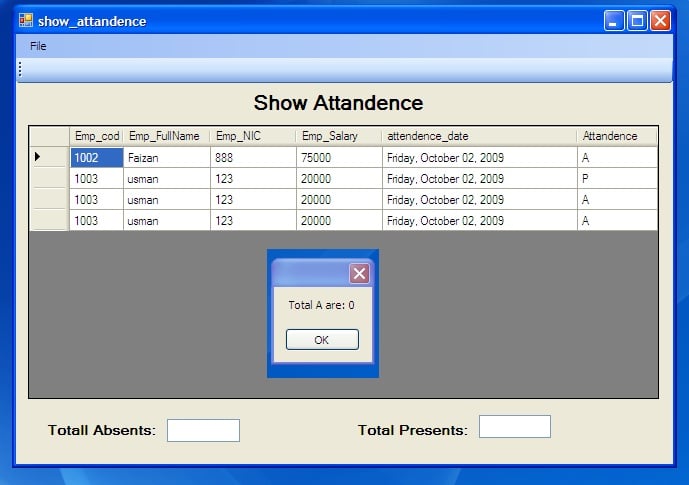
it gives me this out put

"Total A are: 0" :(

I have also attached the snapshot, in which i have three A's.

Use ExecuteScalar method.

string emp_commnd = "Select count(*) from emp_attandence where 
                          Attandence='A'";
 OleDbCommand commd = new OleDbCommand(emp_commnd, 
                                                              database);
  int count =  (int)commd.ExecuteScalar();

THANK YOU
my

DEAR DEAR DEAR Friend... u really Helped me alot... u r GENIUS. :)

PROBLEM SOLVED...!!!:cool:

Be a part of the DaniWeb community

We're a friendly, industry-focused community of developers, IT pros, digital marketers, and technology enthusiasts meeting, networking, learning, and sharing knowledge.