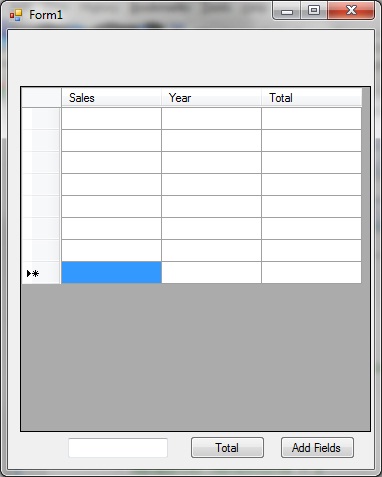
Guys, I really need your help !! I am using VB.Net & I have a Data Grid View in which I have 3 Columns and Dynamic Rows (user can insert rows based on their requirement). My problem is, I want to populate the value's in the rows that are being input by the User. For Example, user has input up to row 6. And I want to take the values from row 1-6 and calculate the MEAN, MEDIAN, VARIANCE, STANDARD DEVIATION, SIMPLE AVERAGE and so on and Display the result in Column 3 or may be in any text box. I Have attached the screen shot of my form. Plz help me out.

Dani AI

Generated

Short summary: was right — iterate the rows — but for reliable statistics you need to (1) treat values as Double (not Integer), (2) skip the DataGridView "new row", (3) ignore or report non‑numeric cells, and (4) compute median/variance properly (choose sample vs population). Below is a compact, production‑ready pattern you can drop into your button handler to get Mean, Median, Variance and Standard Deviation from column 1 and then show results (example shows putting the mean into column 3; use the same idea for other stats).

' gather numeric values from column 0
Dim numbers As New List(Of Double)
For Each row As DataGridViewRow In DataGridView1.Rows
    If Not row.IsNewRow Then
        Dim text = Convert.ToString(row.Cells(0).Value)
        Dim value As Double
        If Double.TryParse(text, value) Then
            numbers.Add(value)
        End If
    End If
Next

If numbers.Count = 0 Then
    MessageBox.Show("No numeric entries found in column 1.")
    Return
End If
' compute mean, median, variance and std dev
Dim n = numbers.Count
Dim sum As Double = 0
For Each v In numbers : sum += v : Next
Dim mean = sum / n

numbers.Sort()
Dim median = If(n Mod 2 = 1, numbers(n \ 2), (numbers(n \ 2 - 1) + numbers(n \ 2)) / 2)

Dim sumSq As Double = 0
For Each v In numbers : sumSq += (v - mean) * (v - mean) : Next
Dim popVar = sumSq / n
Dim sampleVar = If(n > 1, sumSq / (n - 1), 0)
Dim sampleStd = Math.Sqrt(sampleVar)

To show results in Column 3 for an unbound grid you can add a short summary row and write values into its cells. If the grid is data‑bound, update the underlying DataTable or display stats in separate TextBoxes/Labels (preferred). Troubleshooting notes: MessageBox.Show(var = something) prints True/False because it evaluates equality — to see numbers use ToString(). Avoid VB6 Val for production; prefer Double.TryParse (specify CultureInfo if needed). This approach handles dynamic row counts and non‑numeric cells cleanly.

Recommended Answers

All 11 Replies

You can read value at specific cell using,

var1=DataGridView1.Rows(0).Cells(0).Value
 ...

Thanks for your reply. I can retrieve the value from one specific cell. But I cant take all the values in column 1 and add them up together and show the result in column 3. I am confused. Plz help !

You can use loop.

For i=0 to 5
  var1=DataGridView1.Rows(i).Cells(0).Value
Next

Hi thnx Again. I used i in the for loop coz I want to make it dyanmic. When I m running the code and input the value and click total button, its showing "False" in the MessageBox that I have set for the output. Can u help me with the proper syntax to add the values in the column and display the total to Column 3 ? I will be greatful to u.

Dim i As Integer = 0
        Dim var1 As Integer
        For i = 0 To i
            MessageBox.Show(var1 = DataGrid1.Rows(i).Cells(i).Value)
        Next

>click total button, its showing "False" in the MessageBox

Because You are comparing these two values.

Dim i As Integer = 0
        Dim var1 As Integer=0
        For i = 0 To 5
           var1 =  var1 + val(DataGrid1.Rows(i).Cells(0).Value)
        Next
        Msgbox(var1)

Brooo, I don't know how to say thanks to you. But it really worked for me ! Thank you so much for your help. God Bless You !

Thanks. Please mark this thread as solved.

Ya sure, just one thing to ask. In the FOR Loop, u did i = 0 - 6 . But if I want to make it Dynamic then what to do. Like for example, User inputs until 4, it will automatically detect how many rows have been filled. Thats it, I believe u can help !

You can check the content of cell.

Dim i As Integer = 0
        Dim var1 As Integer=0
        Do while True
           if val(DataGrid1.Rows(i).Cells(0).Value)=0 Then
                Exit Do
           End If
           var1 =  var1 + val(DataGrid1.Rows(i).Cells(0).Value)
            i=i+1
        Loop
        Msgbox(var1)

Buddy, u r great. Thanks for all the help. God Bless

PEACE :)

Dude, thanks for all the help. U saved my life ! God Bless You !

PEACE :)

Be a part of the DaniWeb community

We're a friendly, industry-focused community of developers, IT pros, digital marketers, and technology enthusiasts meeting, networking, learning, and sharing knowledge.