The game will have the computer generate a secret random number in the range of 1 to 100. The user will then have six tries to guess the secret number. After each guess, the algorithm will tell the user if the guess was too high, too low or was correct.
If the user correctly guesses the secret number within six guesses, then the user has won the game. The game will stop looping when the secret number has been correctly guessed. If the user does not guess the secret number within six guesses, then the user has lost the game. Display an appropriate message to the user at the end of the game.

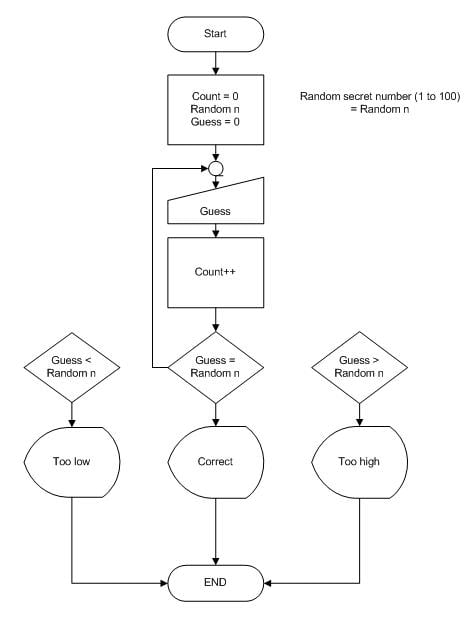
so far i have this. I don't know what to do after this.help me please.
Dani AI

Generated

You’re really asking how to turn the number-guessing rules into a loop in a flowchart. was right to clarify the goal; the heart of it is the loop condition and the yes/no decisions. ’s comment likely points to two common mistakes: unlabeled decision branches and a loop that doesn’t stop. As noted, every diamond should branch on a clear Yes/No.

A simple structure that matches ’s idea (counter + early exit) is:

[Start]
  |
[secret <- random(1..100)]
[attempts <- 0] [guessed <- False]
  |
+---------------- Loop ----------------+
| [Input guess]                        |
| [attempts <- attempts + 1]           |
| <guess == secret?> --Yes--> [guessed <- True]
|          | No
|    <guess < secret?> --Yes--> [Output "Too low"]
|          | No --> [Output "Too high"]
| <attempts < 6 AND NOT guessed?> --Yes--> back to Input
+--------------------------------------+
  |
<guessed?> --Yes--> [Output "You won"]
      | No --> [Output "You lost (show secret)"]
  |
[End]

If you prefer pseudocode first (then draw boxes/diamonds for each line):

secret = random 1..100
attempts = 0
guessed = False
while attempts < 6 and not guessed:
    guess = read integer
    attempts += 1
    if guess == secret:
        guessed = True
    elif guess < secret:
        print "Too low"
    else:
        print "Too high"
if guessed:
    print "You won"
else:
    print "You lost; the number was", secret

Tips:

  • Put input/output in parallelograms, assignments in rectangles, and comparisons in diamonds with Yes/No labels.
  • Guard the loop with both conditions: attempts < 6 AND not guessed. That prevents off-by-one errors and ensures the loop stops as soon as the user wins.

Recommended Answers

All 7 Replies

I don't know either.
What is the question?

And your flowchart is wrong.

The game will have the computer generate a secret random number in the range of 1 to 100. The user will then have six tries to guess the secret number. After each guess, the algorithm will tell the user if the guess was too high, too low or was correct. If the user correctly guesses the secret number within six guesses, then the user has won the game. The game will stop looping when the secret number has been correctly guessed. If the user does not guess the secret number within six guesses, then the user has lost the game. Display an appropriate message to the user at the end of the game.

so far i have this. I don't know what to do after this.help me please.

I don't this is right or not. I think this can give u an idea.Actually when at Condition you need to think Yes or Not only.

You should just use a while loop with a counter, and a break statement... Here's an example:

class Game
{
    public void Main()
    {
        int counter = 0;
        bool win = false;
        int number = 10;    //Set number...

        while (counter<=6)
        {
            input = 0;      //Input set to input...
            if (input == number)
            {
                win = true; //Victory!
                break;      //Exit loop...
            }
            //Otherwise, keep looping...
        }
        if (win)
        {
            //Player won....
        }
        else
        {
            //Player lost...
        }
    }
}

Hope I helped!

EDIT: Wait, were you looking for a correct flowchart, or code based on the flowchart you gave us? I just reread the question, and I'm not sure if I answered what you were asking.

Since this is obviously homework, you shouldn't give complete solutions. :)

Thank you for all your help...

i know to write it in a code...i just don't know how to do it correctly in the flowchart...

Be a part of the DaniWeb community

We're a friendly, industry-focused community of developers, IT pros, digital marketers, and technology enthusiasts meeting, networking, learning, and sharing knowledge.