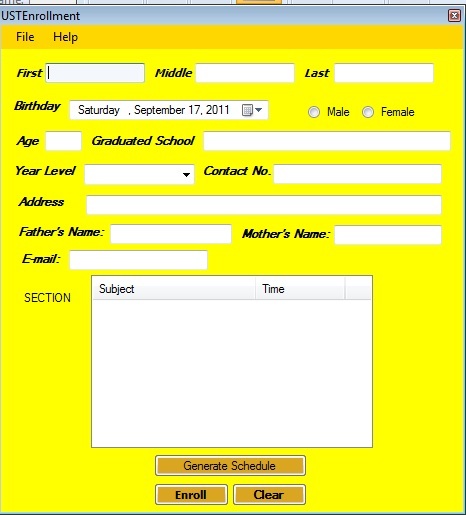
Hi there guys can anyone help me with my program. Because I have an enrollment form program for highschool students and what I want to happen is it will automatically save the information inputted to it in system, not in notepad like in file streaming. So when I open the program I can choose to load information from a certain user. For example the 3rd highschool enrollee entered his or her info in the program, I can load the details he/she entered in my program not through notepad but through the form itself. Any ideas how to do this? Any help would be greatly appreciated. By the way I've posted a screenshot of my program for your reference and if you guys need the code is I'll be posting it right away.

Dani AI

Generated

Two practical ways to stop using plain text and let the form load a chosen student record directly: keep one small data file per student (JSON/XML/serialized object) for simplicity, or use an embedded database (SQLite/LocalDB) when you need queries, relations and more records. is right about age — do not store a static age field; calculate it from the birthdate when you populate the form.

File-per-student (easy, fast to implement)

  1. Choose a format (JSON is readable and cross-language).
  2. Give each student a stable Id (GUID or numeric) and save as Id.json in an app data folder.
  3. On startup enumerate the folder to build the selection list, then deserialize the chosen file and fill the form controls.
    Example JSON:
    {
    "Id":"b2f9d3a0-7e4b-4c5a-9a2d-0f1e2b3c4d5f",
    "FirstName":"Anna",
    "LastName":"Santos",
    "BirthDate":"2006-09-12",
    "Grade":10,
    "Country":"PH"
    }

    Compute age at runtime:

    int ComputeAge(DateTime dob) {
    var today = DateTime.Today;
    var age = today.Year - dob.Year;
    if (dob > today.AddYears(-age)) age--;
    return age;
    }

Embedded DB (recommended if you need search, many records, or multi-user)
Create a Students table and use parameterized queries for insert/update/select. Example table:

CREATE TABLE Students (
  Id TEXT PRIMARY KEY,
  FirstName TEXT,
  LastName TEXT,
  BirthDate DATE,
  Grade INTEGER,
  Country TEXT
);

Index fields you search (LastName, Grade).

Practical cautions
Store data under the user AppData folder (not Program Files). Handle file/DB concurrency and transactions, validate input, and protect personal data (consider encryption or access controls). For country capture use a dropdown and save the ISO code. For a small single-user app: file-per-student is quickest; for anything beyond that, move to SQLite/LocalDB and use parameterized queries or a lightweight ORM.

Recommended Answers

All 2 Replies

Remove the Age field. You have their birthday, calculate it yourself.

You might want to read the pages here. Doing a full database system for you is a little much.

hey..what country are you from???

Be a part of the DaniWeb community

We're a friendly, industry-focused community of developers, IT pros, digital marketers, and technology enthusiasts meeting, networking, learning, and sharing knowledge.