im having problm with my date function.
i want to record date in database only one
but my code do not function.
this checks attendance once in a day. date must not double
plz help me.

Sub search()
'search if id registered
With ado
    .ConnectionString = connectdb
    .RecordSource = "Select * from info where id = '" & Text2 & "'"
    .Refresh


    If .Recordset.RecordCount > 0 Then
    Text3 = .Recordset!id
    Text4 = .Recordset!fname
    Text5 = .Recordset!lname
    Text6 = Date

'goto save record
    Call add


Public Sub add()
'save record
adoadd.Refresh

    If Text2.Text = adoadd.Recordset.Fields("date") Then
     MsgBox "duplicate date", vbInformation, "invalid"
     Text2 = ""
     Text3 = ""
     Text4 = ""
     Text5 = ""
     Text6 = ""
     Else
    With adoadd.Recordset
    .AddNew
    !id = Text3
    !First_Name = Text4
    !Last_Name = Text5
    !Date = Text6
    .Update
    MsgBox " save", vbInformation, "Done"

Text2 = ""
Text3 = ""
Text4 = ""
Text5 = ""
Text6 = ""
End With
End If
DataGrid1.Refresh

End Sub

Dani AI

Generated

The failures seen in this thread come from three separate issues: treating dates as text (format/time-part mismatches), not guarding against empty recordsets (BOF/EOF), and using the reserved name Date as a column. was right to say "cast to date"; was right to check for no-records — but RecordCount alone can be unreliable depending on cursor type. A more robust pattern is to let the database tell whether a record for that ID and today's date exists (server-side check) and store/compare true Date/Time values (or compare only the date part).

A simple, durable server-side check (VB6 + ADO + Access example) — use a date-only test and a parameter to avoid format issues:

' VB6 + ADO (example)
Dim cmd As ADODB.Command
Dim rs As ADODB.Recordset
Dim existsCnt As Long

Set cmd = New ADODB.Command
With cmd
  .ActiveConnection = conn  ' an open ADODB.Connection
  .CommandText = "SELECT COUNT(*) AS cnt FROM Attendance WHERE ID = ? AND DateValue([AttendanceDate]) = Date()"
  .CommandType = adCmdText
  .Parameters.Append .CreateParameter("p1", adVarChar, adParamInput, 50, txtID.Text)
  Set rs = .Execute
End With

If Not rs.EOF Then existsCnt = rs.Fields("cnt").Value
If existsCnt > 0 Then
  MsgBox "duplicate date"
Else
  ' proceed to insert (use parameters, store a Date/Time value)
End If

Practical notes and fixes tied back to the thread:

  • Rename the Date field to AttendanceDate (or always wrap it in brackets) because Date is a reserved identifier and causes subtle bugs.
  • Ensure the DB field is Date/Time (not text). If timestamps exist, compare only the date part (DateValue or cast to date).
  • Avoid relying on .Recordset.RecordCount alone; check If rs.EOF And rs.BOF Then for empty sets.
  • Watch for Null values before converting (IsNull check).
  • Add a DB-level unique index on (ID, AttendanceDate) so duplicates cannot be inserted even if application logic fails.
  • Replace ambiguous control names (Text2/Text6) with meaningful ones to avoid comparing the wrong fields (there are mismatches in the original code).

Debugging hints: use Debug.Print TypeName(...), Debug.Print CStr(...) or pop simple MsgBox lines to show raw values and types before comparison. These steps address the BOF/EOF errors saw and make the duplicate-check reliable.

Recommended Answers

All 12 Replies

Have you checked the format of the relevant date strings? If the formats don't agree the search function won't recognize the same date. You might be better off casting each one to a date type to compare them.

ok, then how am i supposed to do it?i dont have any idea.

One way, maybe the easiest, to check the format is to put a break on line 23 and examine the relative strings in the immediate window. Another way is to load those strings into a messagebox just before line 23 and display them that way. To use date type variables:

            Dim Date1, Date2 As Date
            Date1 = Date.Parse(Text2.Text)
            Date2 = Date.Parse(adoadd.Recordset.Fields("date"))
            If Date1 = Date2 then

i cant figure out.
can you just use my code above?

Try putting the code block I sibmitted above in to replace line 23 in your code and see if that clears it up.

do you mean like this?
cause it says compile error: end of statement.
thats what it says
where should i put it?

Public Sub add()
Dim Date1, Date2 As Date
'save to attendance record
adoadd.Refresh


    Date1 = Date.Parse(Text6.Text)
    Date2 = Date.Parse(adoadd.Recordset.Fields("date"))
    If Date1 = Date2 Then
     MsgBox "duplicate date", vbInformation, "invalid"
     Text2 = ""
     Text3 = ""
     Text4 = ""
     Text5 = ""
     Text6 = ""
     Else
     Exit Sub
    With adoadd.Recordset
    .AddNew
    !Barcode = Text3
    !First_Name = Text4
    !Last_Name = Text5
    !Date = Text6
    .update
    MsgBox "Attendance Checked", vbInformation, "Done"

Text2 = ""
Text3 = ""
Text4 = ""
Text5 = ""
Text6 = ""

    End With

DataGrid1.Refresh

You have it in the right place. But your code is missing a bunch of statements. There's no End Sub and no End If. If your code is incomplete it's not going to run.

i just forgot to copy the end statements.
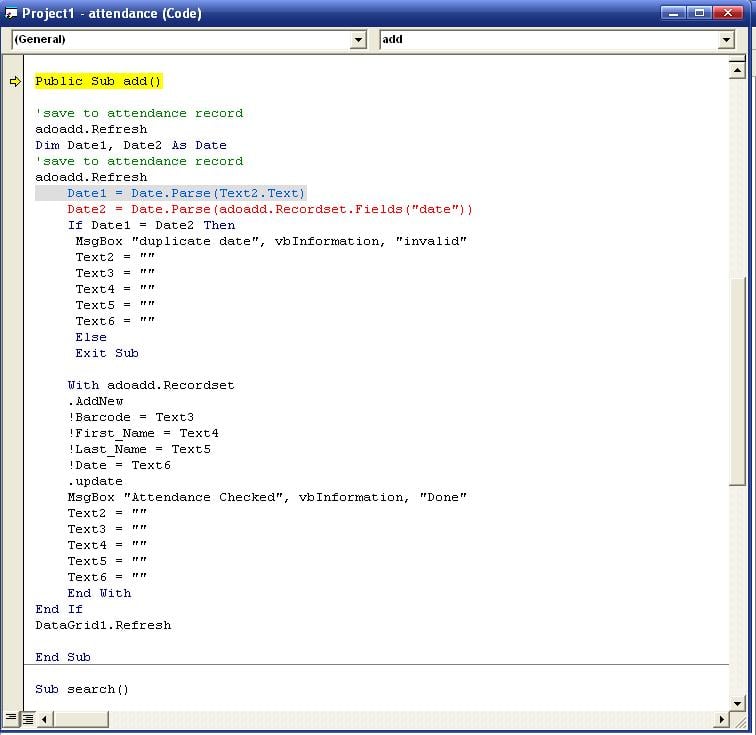
these two codes got color red, like its already error from the start.
this is what it looks. pls help with this.

cc

Date1 = Date.Parse(Text6.Text)
Date2 = Date.Parse(adoadd.Recordset.Fields("date"))

The picture you're showing is from the program running and entered a break. Did an error cause the break? If so the details from the error window at the bottom can help to narrow it down.

Use the format function to first add a date and check the date accordingly....

Sub search()
'search if id registered
With ado
    .ConnectionString = connectdb
    .RecordSource = "Select * from info where id = '" & Text2 & "'"
    .Refresh
    If .Recordset.RecordCount > 0 Then
    Text3 = .Recordset!id
    Text4 = .Recordset!fname
    Text5 = .Recordset!lname
    Text6 = Now ''Changed to now, this is normally in a proper date format...
'goto save record
    Call add
Public Sub add()
'save record
adoadd.Refresh
    Dim chkDate As Date
    chkDate = Format(Text2.Text, "yyyy/mm/dd")

    If chkDate = adoadd.Recordset.Fields("date") Then
     MsgBox "duplicate date", vbInformation, "invalid"
     Text2 = ""
     Text3 = ""
     Text4 = ""
     Text5 = ""
     Text6 = ""
     Else
    With adoadd.Recordset
    .AddNew
    !id = Text3
    !First_Name = Text4
    !Last_Name = Text5
    !Date = Format(Text6.Text, "yyyy/mm/dd")
    .Update
    MsgBox " save", vbInformation, "Done"
Text2 = ""
Text3 = ""
Text4 = ""
Text5 = ""
Text6 = ""
End With
End If
DataGrid1.Refresh
End Sub

it was almost on it, but if the database has no current record of date,
then it keeps on reading the BOF and EOF, the result is error.

Try the following...

Sub search()
'search if id registered
With ado
    .ConnectionString = connectdb
    .RecordSource = "Select * from info where id = '" & Text2 & "'"
    .Refresh
    If .Recordset.RecordCount > 0 Then
    Text3 = .Recordset!id
    Text4 = .Recordset!fname
    Text5 = .Recordset!lname
    Text6 = Now ''Changed to now, this is normally in a proper date format...
'goto save record
    Call add
Public Sub add()
'save record
adoadd.Refresh

If adoadd..Recordset.RecordCount > 0 Then
    Dim chkDate As Date
    chkDate = Format(Text2.Text, "yyyy/mm/dd")
    If chkDate = adoadd.Recordset.Fields("date") Then
     MsgBox "duplicate date", vbInformation, "invalid"
     Text2 = ""
     Text3 = ""
     Text4 = ""
     Text5 = ""
     Text6 = ""
     Else
    With adoadd.Recordset
    .AddNew
    !id = Text3
    !First_Name = Text4
    !Last_Name = Text5
    !Date = Format(Text6.Text, "yyyy/mm/dd")
    .Update
    MsgBox " save", vbInformation, "Done"
Text2 = ""
Text3 = ""
Text4 = ""
Text5 = ""
Text6 = ""
End With
End If
DataGrid1.Refresh
    Else
   Msgbox "No records found" 

   Exit sub
  End If
End Sub
Be a part of the DaniWeb community

We're a friendly, industry-focused community of developers, IT pros, digital marketers, and technology enthusiasts meeting, networking, learning, and sharing knowledge.